
 Sign in to Mod The Sims
 FIX: Adult Male Ear too dark (Maxis defaults)
 FIX: Adult Male Ear too dark (Maxis defaults)


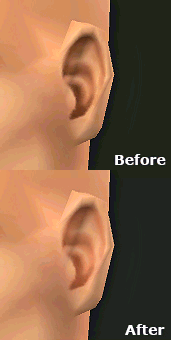
earcompare.png - width=165 height=128
ingamecompare.png - width=640 height=400
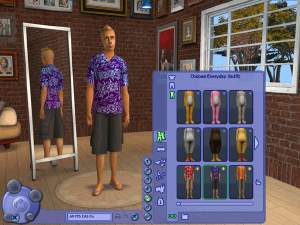
If anyone else has noticed, the Adult Male face has a darker ear than all the others, so this is simply a fix for that. All custom skintones that did not fix the ear themselves will also suffer from this problem and will need to be updated. There will be no quality loss if you make a custom skintone with this fix enabled (the textures are uncompressed, the same as how Maxis did it).
Skins fixed:
-Light
-Tan
-Medium
-Dark
-Alien
-Vampire (For EP2, AMEarfixVamp.package)
Do not use this if you have a default skin replacement package.
|
AMEarfix-defaults.rar
Download
Uploaded: 21st Jul 2006, 1.44 MB.
1,223 downloads.
|
||||||||
| For a detailed look at individual files, see the Information tab. | ||||||||
Install Instructions
1. Download: Click the download link to save the .rar or .zip file(s) to your computer.
2. Extract the zip, rar, or 7z file.
3. Place in Downloads Folder: Cut and paste the .package file(s) into your Downloads folder:
- Origin (Ultimate Collection): Users\(Current User Account)\Documents\EA Games\The Sims™ 2 Ultimate Collection\Downloads\
- Non-Origin, Windows Vista/7/8/10: Users\(Current User Account)\Documents\EA Games\The Sims 2\Downloads\
- Non-Origin, Windows XP: Documents and Settings\(Current User Account)\My Documents\EA Games\The Sims 2\Downloads\
- Mac: Users\(Current User Account)\Documents\EA Games\The Sims 2\Downloads
- Mac x64: /Library/Containers/com.aspyr.sims2.appstore/Data/Library/Application Support/Aspyr/The Sims 2/Downloads
- For a full, complete guide to downloading complete with pictures and more information, see: Game Help: Downloading for Fracking Idiots.
- Custom content not showing up in the game? See: Game Help: Getting Custom Content to Show Up.
- If you don't have a Downloads folder, just make one. See instructions at: Game Help: No Downloads Folder.
Loading comments, please wait...

Uploaded: 21st Jul 2006 at 10:54 PM
-
-
by Enayla 5th Feb 2006 at 3:10am
-
Skin collection #2 - non-defaults
by Enayla 18th Feb 2006 at 2:59pm
-
-
Defaults of "Complete Skintone Set by SSChan"
by SSChan 14th Oct 2006 at 7:00pm
-
-
Combo pjs for adult males (made with Pets Body Shop patched installed)
by ephemera_transient_msr 24th Jan 2007 at 12:34am
-
-
chakaru skins made into defaults
by dachshundsr4me 4th Feb 2008 at 4:22am
-
Adult Male Ear Fix + Custom Maxis-Match Skintone
by IntincrMars 28th Feb 2024 at 4:10pm
 +2 packs
3 2.2k 6
+2 packs
3 2.2k 6 Nightlife
 Seasons



-

No biting NPCs Except on Residential Lots
by PatchesSim2 22nd Oct 2005 at 4:53pm
I was disappointed with the DJS Sims options for their vampire biting control hack, they didn’t have the option that more...
+1 packs
5 18.5k 5 Nightlife
-
Custom Instruments by Proxy GUID *Updated 8-22-08
by PatchesSim2 19th Aug 2008 at 1:39pm
First off, before anyone accuses me of stealing, I have two usernames that I use frequently in The Sims 2 more...
+2 packs
11 71.6k 56 University
 Free Time
-
(Family Fun Stuff) CAS crashing when using new clothes fix - Update 4-15-06
by PatchesSim2 15th Apr 2006 at 1:59am
This *should* fix the crashes that occur in CAS when using the Family Fun Stuff outfits; I've used it for more...
29
39.6k
5
-
Vampire Replacement (with veins)
by PatchesSim2 28th Sep 2005 at 1:20am
**IMPORTANT!: This package will be packed with any houses you upload to the exchange that have Vampires on them, please more...


