
 Sign in to Mod The Sims
 Wall Cross
 Wall Cross


WallCrossSSF.jpg - width=631 height=440
WallCrossSS.jpg - width=357 height=387
WallCrossSSRec.jpg - width=357 height=387
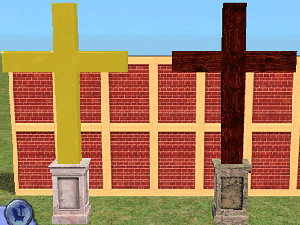
Here (by request) is a cross to hang on a wall.
 I know it isn't the only one the web, but a little variety is good! This also includes 1 recolor.
44 Faces
72 Vertices
It can be found in Decorative/Wall Hangings
Recolors are welcome, just link back!
Enjoy!
This is a new mesh, and means that it's a brand new self contained object that usually does not require a specific Pack (although this is possible depending on the type). It may have Recolours hosted on MTS - check below for more information.
|
W4ECrossWithRecolor.rar
Download
Uploaded: 25th Nov 2006, 194.9 KB.
4,186 downloads.
|
||||||||
| For a detailed look at individual files, see the Information tab. | ||||||||
Install Instructions
1. Download: Click the download link to save the .rar or .zip file(s) to your computer.
2. Extract the zip, rar, or 7z file.
3. Place in Downloads Folder: Cut and paste the .package file(s) into your Downloads folder:
- Origin (Ultimate Collection): Users\(Current User Account)\Documents\EA Games\The Sims™ 2 Ultimate Collection\Downloads\
- Non-Origin, Windows Vista/7/8/10: Users\(Current User Account)\Documents\EA Games\The Sims 2\Downloads\
- Non-Origin, Windows XP: Documents and Settings\(Current User Account)\My Documents\EA Games\The Sims 2\Downloads\
- Mac: Users\(Current User Account)\Documents\EA Games\The Sims 2\Downloads
- Mac x64: /Library/Containers/com.aspyr.sims2.appstore/Data/Library/Application Support/Aspyr/The Sims 2/Downloads
- For a full, complete guide to downloading complete with pictures and more information, see: Game Help: Downloading for Fracking Idiots.
- Custom content not showing up in the game? See: Game Help: Getting Custom Content to Show Up.
- If you don't have a Downloads folder, just make one. See instructions at: Game Help: No Downloads Folder.
Loading comments, please wait...


Uploaded: 25th Nov 2006 at 9:01 PM
Updated: 13th Feb 2007 at 4:17 PM by IgnorantBliss - moved to correct category
-
by shameless_wedgie 19th Apr 2005 at 5:29pm
 1
4.4k
1
1
4.4k
1
-
by momma"b" 5th May 2005 at 9:14am
41
30.7k
7
-
by jobtwo 28th Aug 2005 at 7:38am
10
17.1k
8
-

by maree464 3rd Oct 2005 at 6:41am
6
5.4k
1
-
by Elaxx 27th Feb 2006 at 5:11pm
3
7.1k
1
-
-
by worship4ever0227 28th Oct 2006 at 6:49pm
20
12.6k
8
-
For you Simmers of faith, a Crucifix for your home (new mesh)...
by KevinsHope 18th Dec 2006 at 11:15pm
39
40.5k
36
-
A cross for your Church and an updated wall crucifix (With new interactions)...
by KevinsHope 24th Jan 2007 at 4:49am
41
63.5k
71
-

-
-
by worship4ever0227 11th Sep 2006 at 3:27am
Hello all! more...
-
Hardwood Church Pew - Requested
by worship4ever0227 30th Aug 2006 at 4:46am
Hello all! more...
33
41k
31
-
by worship4ever0227 18th Sep 2007 at 8:52am
Hi there, Here is a Hotel that I have been working on since the release of Bon Voyage. more...
+6 packs
8 10.3k 11 University
 Nightlife
 Open for Business
 Pets
Pets
 Seasons
 Bon Voyage
-
by worship4ever0227 22nd Aug 2006 at 2:17am
Hello all! I give you my newest creation: An Animated (yes, animated) LAVA LAMP! more...
+1 packs
17 17.7k 10 Open for Business
-
-
Stainless Steel Table Sitting On A Ball w/Matching Chair
by worship4ever0227 31st Jul 2006 at 8:46am
Hello All, First off, I'd like to thank everyone who put out the tutorials, answered questions, and made more...
-
-
-


About Me
1. You may recolor any of my items - unless the thread specifically asks not to - provided that:
1) You include a link to the item's thread or my MTS2 profile page, and
2) You contact me, to bring such to my attention.
2. You may include any of my items on your lots uploaded to any other free site - unless the thread specifically asks not to - provided that:
1) You include a link to the item's thread or my MTS2 profile page, and
2) You contact me, to bring such to my attention.
3. You may NOT claim any of my items as your own.
4. You may NOT may not upload any alterations of my meshes unless you have my explicit permission.