Sign in to Mod The Sims
 We Love tasting gloss - 3in1 Lips!
SCREENSHOTS
.jpg?cb=1238676308)


lipstick&gloss3 (1).jpg - width=583 height=437
Darkpink & PinkCandy
gloss.jpg - width=824 height=329
Coralpink, Pinkgloss & Strawberry
Naturallipstick&gloss.jpg - width=640 height=270
Coral, tearose & Peach
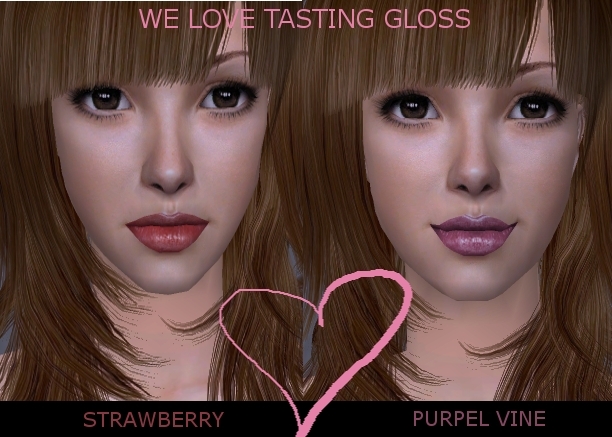
welove.jpg - width=612 height=437
3in1lips.jpg - width=492 height=493
Downloaded 3,592 times
259 Thanks
11 Favourited
17,609 Views
Say Thanks!
Thanked!
Lip liner, lipstick & gloss!
- Choose between 9 tasty colours.
- Choose between 9 tasty colours.
Step 1: A Lip liner in a slightly darker colour for fuller lips
Step 2:A coloured lipstick.
Step 3: Applied a seamless gloss for a tasty look (and actually tastes like candy ).
).
I wanted some lipstick where I got the coloured glossy lips, but still could see the lips fine lines. In my opinion it looks more realistic when you can see the contour of the lips, eventhough you applied some lipstick and gloss, so here you go:
9 3in1 lips in the colours strawberry, Coral, Coralpink, Pinkgloss, Purpelvine, Darkpink, Tearose, Peach and Pink candy.
You can download each separatly or you can download them all in 2 packages named Alldaylipstick&gloss and AllEveninglipstick&gloss.
Alldaylipstick&gloss includes: Coral, Coralpink, Peach and tearose.
AllEveninglipstick&gloss includes: Pinkgloss, strawberry, Purplevine, DarkPink, and Pink candy.

I've used the same model to show you the differences of the lipsticks colours. The beautiful hair are from xmsims and recoloured by Sango_91 and the eyes are from Stefan.
Hope you like them!
Step 2:A coloured lipstick.
Step 3: Applied a seamless gloss for a tasty look (and actually tastes like candy
 ).
).I wanted some lipstick where I got the coloured glossy lips, but still could see the lips fine lines. In my opinion it looks more realistic when you can see the contour of the lips, eventhough you applied some lipstick and gloss, so here you go:
9 3in1 lips in the colours strawberry, Coral, Coralpink, Pinkgloss, Purpelvine, Darkpink, Tearose, Peach and Pink candy.
You can download each separatly or you can download them all in 2 packages named Alldaylipstick&gloss and AllEveninglipstick&gloss.
Alldaylipstick&gloss includes: Coral, Coralpink, Peach and tearose.
AllEveninglipstick&gloss includes: Pinkgloss, strawberry, Purplevine, DarkPink, and Pink candy.
I've used the same model to show you the differences of the lipsticks colours. The beautiful hair are from xmsims and recoloured by Sango_91 and the eyes are from Stefan.
Hope you like them!

|
AllEveninglipstick&gloss.zip
| Pinkgloss, Strawberry, Purpelvine, Darkpink & Pinkcandy
Download
Uploaded: 3rd Apr 2009, 865.7 KB.
3,516 downloads.
|
||||||||
|
Alldaylipstick&gloss.zip
| Coral, Coralpink, Peach & Tearose
Download
Uploaded: 3rd Apr 2009, 222.4 KB.
2,964 downloads.
|
||||||||
|
95662a01_Tearose.zip
Download
Uploaded: 3rd Apr 2009, 80.7 KB.
489 downloads.
|
||||||||
|
3c152ff5_strawberry.zip
Download
Uploaded: 3rd Apr 2009, 29.7 KB.
604 downloads.
|
||||||||
|
f42b5494_purpelvine.zip
Download
Uploaded: 3rd Apr 2009, 21.5 KB.
428 downloads.
|
||||||||
|
6b22fdf2_pinkgloss.zip
Download
Uploaded: 3rd Apr 2009, 865.7 KB.
488 downloads.
|
||||||||
|
a1665bad_PinkCandy.zip
Download
Uploaded: 3rd Apr 2009, 250.1 KB.
536 downloads.
|
||||||||
|
24724a26_Peach.zip
Download
Uploaded: 3rd Apr 2009, 92.1 KB.
607 downloads.
|
||||||||
|
71496b92_Darkpink.zip
Download
Uploaded: 3rd Apr 2009, 274.6 KB.
490 downloads.
|
||||||||
|
7eb54991_Coralpink.zip
Download
Uploaded: 3rd Apr 2009, 25.1 KB.
572 downloads.
|
||||||||
|
845e64a2_Coral.zip
Download
Uploaded: 3rd Apr 2009, 24.6 KB.
776 downloads.
|
||||||||
| For a detailed look at individual files, see the Information tab. | ||||||||
Install Instructions
Basic Download and Install Instructions:
1. Download: Click the download link to save the .rar or .zip file(s) to your computer.
2. Extract the zip, rar, or 7z file.
3. Place in Downloads Folder: Cut and paste the .package file(s) into your Downloads folder:
1. Download: Click the download link to save the .rar or .zip file(s) to your computer.
2. Extract the zip, rar, or 7z file.
3. Place in Downloads Folder: Cut and paste the .package file(s) into your Downloads folder:
- Origin (Ultimate Collection): Users\(Current User Account)\Documents\EA Games\The Sims™ 2 Ultimate Collection\Downloads\
- Non-Origin, Windows Vista/7/8/10: Users\(Current User Account)\Documents\EA Games\The Sims 2\Downloads\
- Non-Origin, Windows XP: Documents and Settings\(Current User Account)\My Documents\EA Games\The Sims 2\Downloads\
- Mac: Users\(Current User Account)\Documents\EA Games\The Sims 2\Downloads
- Mac x64: /Library/Containers/com.aspyr.sims2.appstore/Data/Library/Application Support/Aspyr/The Sims 2/Downloads
- For a full, complete guide to downloading complete with pictures and more information, see: Game Help: Downloading for Fracking Idiots.
- Custom content not showing up in the game? See: Game Help: Getting Custom Content to Show Up.
- If you don't have a Downloads folder, just make one. See instructions at: Game Help: No Downloads Folder.
Loading comments, please wait...
Other Download Recommendations:
-
-
-
-
-

-
-

-
by ShojoAngel 26th Feb 2009 at 6:54pm
-
by x_HaZeL_EyEz_x 5th Mar 2009 at 12:58am
-
by dragonmandy 25th Jun 2009 at 8:04pm


More downloads by Cosia:
See more