Sign in to Mod The Sims
 Boots for Teens - 2 Styles!
 Boots for Teens - 2 Styles!


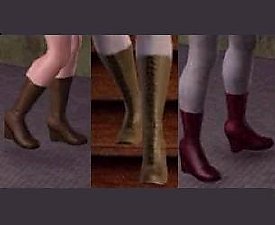
TeenBoot_Style1_Dip_Cas.jpg - width=215 height=216
Style 1 - Dip - In CAS
TeenBoot_Style1_Dip.jpg - width=265 height=635
Style 1 - Dip - In game with customized pattern
TeenBoot_Style2_Rise_Cas.jpg - width=215 height=216
Style 2 - Rise - in CAS
TeenBoot_Style2_Rise.jpg - width=223 height=561
Style 2 - Rise - In game with customized pattern
The default colors are the white/blue combo you see in the CAS shots. You, being the clever person you are, will certainly have no trouble at all finding colors and patterns to suit your own tastes, whether you're making superheroes, magical girls, hippies, or whatever.

There are two styles:
Style 1: Dip - the middle front of the boot dips.
Style 2: Rise - the middle front of the boot rises to a point.
|
bsi_syera_ts3_shoes_KneeBoots_Rise.zip
Download
Uploaded: 19th Jul 2009, 148.1 KB.
32,500 downloads.
|
||||||||
|
bsi_syera_ts3_shoes_FT_KneeBootDip.zip
Download
Uploaded: 19th Jul 2009, 150.6 KB.
38,684 downloads.
|
||||||||
| For a detailed look at individual files, see the Information tab. | ||||||||
Install Instructions
1. Click the download button, or the filename, to download the file to your computer.
2. Extract the zip, rar, or 7z file. Now you will have either a .package or a .sims3pack file.
For Package files:
1. Cut and paste the file into your Documents\Electronic Arts\The Sims 3\Mods\Packages folder. If you do not already have this folder, you should read the full guide to Package files first: Sims 3:Installing Package Fileswiki, so you can make sure your game is fully patched and you have the correct Resource.cfg file.
2. Run the game, and find your content where the creator said it would be (build mode, buy mode, Create-a-Sim, etc.).
For Sims3Pack files:
1. Cut and paste it into your Documents\Electronic Arts\The Sims 3\Downloads folder. If you do not have this folder yet, it is recommended that you open the game and then close it again so that this folder will be automatically created. Then you can place the .sims3pack into your Downloads folder.
2. Load the game's Launcher, and click on the Downloads tab. Find the item in the list and tick the box beside it. Then press the Install button below the list.
3. Wait for the installer to load, and it will install the content to the game. You will get a message letting you know when it's done.
4. Run the game, and find your content where the creator said it would be (build mode, buy mode, Create-a-Sim, etc.).
Extracting from RAR, ZIP, or 7z: You will need a special program for this. For Windows, we recommend 7-Zip and for Mac OSX, we recommend Keka. Both are free and safe to use.
Need more help?
If you need more info, see:
- For package files: Sims 3:Installing Package Fileswiki
- For Sims3pack files: Game Help:Installing TS3 Packswiki
Loading comments, please wait...
Uploaded: 19th Jul 2009 at 11:22 PM
-
-
-
Sailor Moon Graphic Tees for Teen Girls (3 Sets)
by Ashleigh825 20th Aug 2009 at 2:01am
 20
29.8k
43
20
29.8k
43
Female » Mixed Sets » Teen
-
-
-
-
-
-
-

-
-
-
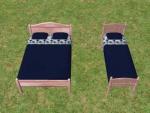
Testers Wanted - Three New Beddings!
by Syera 24th Jan 2005 at 3:34am
My first three bedsets. :) Please let me know what you think of them. more...
 5
9.2k
2
5
9.2k
2
-
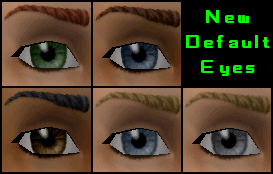
Syera's Default Replacement Eyes!
by Syera 21st May 2005 at 5:23am
Awhile back, I downloaded sugarandcaffiene's replacement eyes. more...
-
-
Replacement Templates For Far East Locals
by Syera 6th Jan 2008 at 10:44pm
Replacement templates for Far East vacation locals. more...
+1 packs
25 49.9k 104 Bon Voyage