
 Sign in to Mod The Sims
 Shimmer Eye Set
 Shimmer Eye Set
SCREENSHOTS


snapshot_b8439f94_58439f95.jpg - width=400 height=300
snapshot_b8439f94_3843a023.jpg - width=400 height=300
snapshot_b8439f94_7843a050.jpg - width=400 height=300
snapshot_b8439f94_58439ffc.jpg - width=400 height=300
snapshot_b8439f94_f843a085.jpg - width=400 height=300
snapshot_b8439f94_1843a508.jpg - width=400 height=300
Downloaded 383 times
96 Thanks
3 Favourited
12,866 Views
Say Thanks!
Thanked!
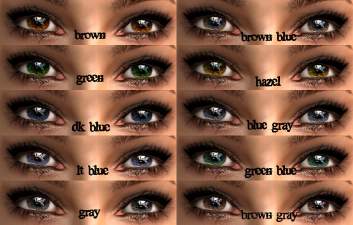
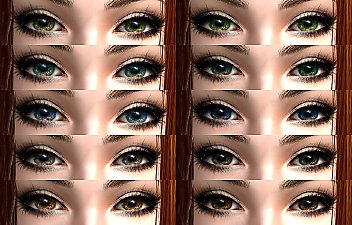
Hi, I decided to upload my first set of eyes. They are beautiful, quite realistic, and in gorgeous colours. I haven't ever uploaded here before, but hopefully this will attract attention. I used a picture of a sclera, then edited it a bit, if you're suspicious about a newbie creating a perfect sclera. If there are ANY problems with the eyes, tell me. I like to learn new things. Please have a nice day, and enjoy!
Additional Credits:
Vampire Aninyosaloh for her Advanced Eye Creating tutorial. I got lots of my tips from there!
Shady for telling me where to put my zip files!
Additional Credits:
Vampire Aninyosaloh for her Advanced Eye Creating tutorial. I got lots of my tips from there!
Shady for telling me where to put my zip files!
Advertisement:
|
ShimmerSet.zip
Download
Uploaded: 5th Jan 2010, 42.5 KB.
1,508 downloads.
|
||||||||
| For a detailed look at individual files, see the Information tab. | ||||||||
Install Instructions
Basic Download and Install Instructions:
1. Download: Click the download link to save the .rar or .zip file(s) to your computer.
2. Extract the zip, rar, or 7z file.
3. Place in Downloads Folder: Cut and paste the .package file(s) into your Downloads folder:
1. Download: Click the download link to save the .rar or .zip file(s) to your computer.
2. Extract the zip, rar, or 7z file.
3. Place in Downloads Folder: Cut and paste the .package file(s) into your Downloads folder:
- Origin (Ultimate Collection): Users\(Current User Account)\Documents\EA Games\The Sims™ 2 Ultimate Collection\Downloads\
- Non-Origin, Windows Vista/7/8/10: Users\(Current User Account)\Documents\EA Games\The Sims 2\Downloads\
- Non-Origin, Windows XP: Documents and Settings\(Current User Account)\My Documents\EA Games\The Sims 2\Downloads\
- Mac: Users\(Current User Account)\Documents\EA Games\The Sims 2\Downloads
- Mac x64: /Library/Containers/com.aspyr.sims2.appstore/Data/Library/Application Support/Aspyr/The Sims 2/Downloads
- For a full, complete guide to downloading complete with pictures and more information, see: Game Help: Downloading for Fracking Idiots.
- Custom content not showing up in the game? See: Game Help: Getting Custom Content to Show Up.
- If you don't have a Downloads folder, just make one. See instructions at: Game Help: No Downloads Folder.
Advertisement:
Loading comments, please wait...
Author

Download Details
Packs:
None, this is Sims 2 base game compatible!
Uploaded: 5th Jan 2010 at 4:29 AM
Uploaded: 5th Jan 2010 at 4:29 AM
Eye Type:
– Custom
Eye Style:
– Human
– Realistic
Tags
Other Download Recommendations:
-
-
-

-
-

-

-
-
-
by dragonmandy updated 14th Jul 2008 at 9:52pm
-


About Me
Yes, I do create!
Rules:
You MAY NOT upload ANY of my creations to a pay site.
You MAY upload them to other sites, as long as you give me credit.
Rules:
You MAY NOT upload ANY of my creations to a pay site.
You MAY upload them to other sites, as long as you give me credit.