
 Sign in to Mod The Sims
 Minimaal Gate
 Minimaal Gate


minimaalGate01.jpg - width=1024 height=621
minimaalGate02.jpg - width=1024 height=621

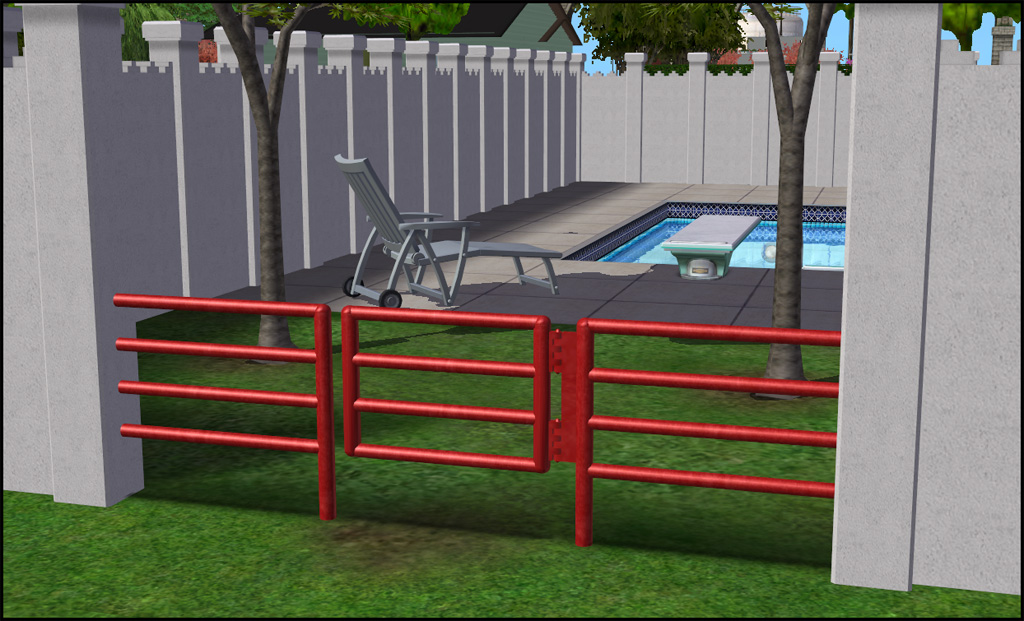
This gate matches the fences that came with OFB, the small red and black ones. It's a nice, modern fence suitable for many places; but of course it was missing a matching gate. So now the fence is more useful! The gate is recolorable, in fact it comes in both red and black colors (in one package) like the fence. Handy, yes? You'll find it in Build/Gates for §140.
Notes:
There are two files: Please only download one!
- Choose the one labeled BASE if your latest EP is Pre-OFB,
- Choose the one labeled OFB if your latest EP is OFB or later and you have the function to lock gates.
Credits:
This is for joandsarah. No, they didn't request it. And no I don't take requests. They only posted in WCIF. But it was a lonely WCIF...with no responses. =)
Polygon Counts:
1100
This is a new mesh, and means that it's a brand new self contained object that usually does not require a specific Pack (although this is possible depending on the type). It may have Recolours hosted on MTS - check below for more information.
|
HL_MinimaalGateBASE.rar
Download
Uploaded: 23rd Sep 2012, 33.1 KB.
3,684 downloads.
|
||||||||
|
HL_MinimaalGateOFB.rar
Download
Uploaded: 23rd Sep 2012, 33.1 KB.
9,112 downloads.
|
||||||||
| For a detailed look at individual files, see the Information tab. | ||||||||
Install Instructions
1. Download: Click the download link to save the .rar or .zip file(s) to your computer.
2. Extract the zip, rar, or 7z file.
3. Place in Downloads Folder: Cut and paste the .package file(s) into your Downloads folder:
- Origin (Ultimate Collection): Users\(Current User Account)\Documents\EA Games\The Sims™ 2 Ultimate Collection\Downloads\
- Non-Origin, Windows Vista/7/8/10: Users\(Current User Account)\Documents\EA Games\The Sims 2\Downloads\
- Non-Origin, Windows XP: Documents and Settings\(Current User Account)\My Documents\EA Games\The Sims 2\Downloads\
- Mac: Users\(Current User Account)\Documents\EA Games\The Sims 2\Downloads
- Mac x64: /Library/Containers/com.aspyr.sims2.appstore/Data/Library/Application Support/Aspyr/The Sims 2/Downloads
- For a full, complete guide to downloading complete with pictures and more information, see: Game Help: Downloading for Fracking Idiots.
- Custom content not showing up in the game? See: Game Help: Getting Custom Content to Show Up.
- If you don't have a Downloads folder, just make one. See instructions at: Game Help: No Downloads Folder.
Loading comments, please wait...


Uploaded: 23rd Sep 2012 at 9:20 PM
-
by Supertramp 12th Sep 2005 at 11:31pm
 13
14.6k
11
13
14.6k
11
-
-
Wrought Iron Picket Fence/Gate
by Moon_Ez 26th Sep 2005 at 2:41pm
+2 packs
26 32.1k 20 University
 Nightlife
-
by stepehnguy 15th Feb 2006 at 6:51am
14
22.6k
15
-
by stepehnguy 17th Feb 2006 at 3:06am
9
28.6k
20
-
by stepehnguy 9th Apr 2006 at 4:34am
3
11k
1
-
by JohnBrehaut1 19th Apr 2006 at 4:54pm
+1 packs
10 17.1k 2 Nightlife
-
by stepehnguy 17th May 2006 at 12:57pm
18
22.4k
2
-
by crocobaura 17th Jul 2007 at 9:58am
24
77k
117
-
by Psychosim 3rd Aug 2009 at 9:51pm
10
30.5k
80


-
by HugeLunatic 19th May 2010 at 5:48pm
Eagle Ridge is a reasonably priced home designed for beach and cliff lots. more...
 +1 packs
6 9.5k 6
+1 packs
6 9.5k 6 World Adventures
-
Hexa tiles from Future Waffles
by HugeLunatic 20th May 2021 at 1:54pm
The stone hex tiles from Apartment Life in a more reasonable scale. These are simple texture defaults in half the more...
+1 packs
15 4.8k 25 Apartment Life
-
by HugeLunatic 10th Mar 2018 at 2:42pm
A collection of EA bookcases emptied, slots added, and repo'd to their original counterparts. more...
13
15.6k
49
-
by HugeLunatic 1st Oct 2012 at 10:04pm
Just something a little different and fun, "Caon's Stuffed Freezer Bunny" from M&G turned into a pet pillow! more...
+1 packs
21 32.6k 86 Pets
Pets
-
by HugeLunatic 25th Sep 2016 at 10:21pm
The Uni "Out of the Dark Ages Window" resized to encompass the entire wall height and two tiles wide. more...
+1 packs
17 16.6k 56 University
-
by HugeLunatic updated 30th Oct 2022 at 7:59pm
Thanks to MrsM'Quve for pointing out this blue recolor was just hanging out in the game files and nowhere more...
+1 packs
7 10.7k 27 Nightlife
-
M&G Second Empire Architecture Roof - Halved
by HugeLunatic 4th Aug 2025 at 12:30am
+1 packs
4 2.1k 12 Mansion and Garden
-
by HugeLunatic 20th Apr 2013 at 11:01pm
Description This small, compact fridge is good for more than just snacking! more...
+1 packs
18 29.5k 75 University
-

by HugeLunatic 4th Oct 2019 at 4:53pm
The electronics from The Sim 3 Store Atomic set. more...
+1 packs
12 8.3k 32 Apartment Life
-
by HugeLunatic 24th Feb 2018 at 6:49pm
Sometimes you need something a little bit less formal for your sims dining out experience. more...
+1 packs
14 9.6k 37 Nightlife


About Me
Pet Stories || Dog Agility Items? || Castaway Stories || Holy Simoly Extras
4esf Archive || Holy Simoly Archive || CEP-Extras List || Buyable Game Objects
lunie content from GoS/s2a
 Installation of CEP Extras
-the package with pfiles appended to the name will go into your cep extras folder where your game is installed (typically c drive, you do you)
-the other goes in CEP extra folder in documents.
The following locations are what I am aware of, beyond that you'll have to do some searching.
Downloads Folder:
C:\Users\<user>\Documents\EA Games\The Sims 2 Legacy
C:\Users\<user>\Documents\EA Games\The Sims 2 Ultimate Collection
With multiple launchers, the location for your game install will vary.
C:\Program Files\EA GAMES\The Sims 2 Legacy\TSData\Res\Catalog\zCEP-EXTRA
C:\Program Files\EA GAMES\The Sims 2\TSData\Res\Catalog\zCEP-EXTRA
C:\Program Files (x86)\EA GAMES\The Sims 2\TSData\Res\Catalog\zCEP-EXTRA