
 Sign in to Mod The Sims
 Shiny Blue Bigfoot Default Replacement
 Shiny Blue Bigfoot Default Replacement


1.JPG - width=833 height=717
6.jpg - width=599 height=1010
23.JPG - width=392 height=540
68.jpg - width=890 height=733
77.jpg - width=906 height=678
0982.JPG - width=1237 height=729
678.JPG - width=600 height=731
1234.JPG - width=1084 height=729

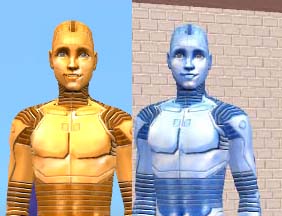
I love to make my game a little unique and funny so I changed the Bigfoot a 'little'.
He is Shiny Blue now! This will replace the old Brown boring looking Bigfoot.
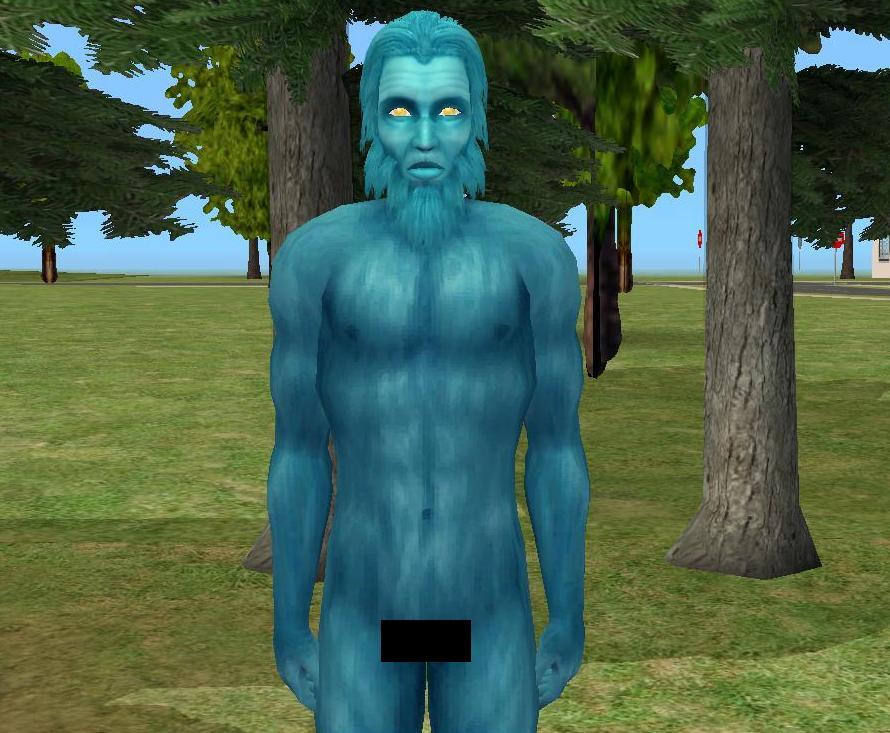
 WARNING:
 -You NEED Bon Voyage Expansion pack. If you don't have it, There will be no Bigfoot in the game!
-This is a Replacement! You can bring it back to normal by just deleting the file!
To find a Bigfoot you need to go to the "Hidden Burrow'' in Three Lakes. To make "Hidden Burrow'' show up you need to find the secret map while digging around.

Draga
|
Shiny Blue Bigfoot.rar
Download
Uploaded: 13th Apr 2013, 836.4 KB.
962 downloads.
|
||||||||
| For a detailed look at individual files, see the Information tab. | ||||||||
Install Instructions
1. Download: Click the download link to save the .rar or .zip file(s) to your computer.
2. Extract the zip, rar, or 7z file.
3. Place in Downloads Folder: Cut and paste the .package file(s) into your Downloads folder:
- Origin (Ultimate Collection): Users\(Current User Account)\Documents\EA Games\The Sims™ 2 Ultimate Collection\Downloads\
- Non-Origin, Windows Vista/7/8/10: Users\(Current User Account)\Documents\EA Games\The Sims 2\Downloads\
- Non-Origin, Windows XP: Documents and Settings\(Current User Account)\My Documents\EA Games\The Sims 2\Downloads\
- Mac: Users\(Current User Account)\Documents\EA Games\The Sims 2\Downloads
- Mac x64: /Library/Containers/com.aspyr.sims2.appstore/Data/Library/Application Support/Aspyr/The Sims 2/Downloads
- For a full, complete guide to downloading complete with pictures and more information, see: Game Help: Downloading for Fracking Idiots.
- Custom content not showing up in the game? See: Game Help: Getting Custom Content to Show Up.
- If you don't have a Downloads folder, just make one. See instructions at: Game Help: No Downloads Folder.
Loading comments, please wait...


 View with Names
Uploaded: 13th Apr 2013 at 6:04 PM
Updated: 13th Apr 2013 at 8:47 PM
-
-
Purple Louis Alien Default Replacement
by Tamha 11th Jun 2007 at 8:16am
-

-
Default Replacement for Bon Voyage's Bigfoot
by NekoSurge™ 8th Jan 2009 at 8:31pm
-
Do I Dazzle You? [Sparkly Vampire Default Replacement]
by HectorRashbaum 9th Mar 2009 at 12:51am
-
Orange/Blue Coloured Robot Skins - Normal, Shiny & Very Shiny
by madmosh 24th Aug 2009 at 9:26pm
-
Gold Servos and Black Bigfoot Default Replacements
by joninmobile 3rd Sep 2009 at 10:16pm
 +2 packs
5 29.9k 11
+2 packs
5 29.9k 11 Open for Business
 Bon Voyage
-
F-IN evo 5 Default Skin Replacement
by Navetsea 6th Mar 2011 at 6:35am
-
Tooth Paste Replacement (In 2 Flavors)
by Draga Devia 2nd Apr 2013 at 9:31pm
+1 packs
15 13.1k 43 Apartment Life
-
5 More Tooth Paste Replacement
by Draga Devia 8th Apr 2013 at 4:13pm
+1 packs
9 18.4k 51 Apartment Life




-
5 More Tooth Paste Replacement
by Draga Devia 8th Apr 2013 at 4:13pm
Hello Everybody! more...
+1 packs
9 18.4k 51 Apartment Life
-
Tooth Paste Replacement (In 2 Flavors)
by Draga Devia 2nd Apr 2013 at 9:31pm
Hello Everybody! more...
+1 packs
15 13.1k 43 Apartment Life
-
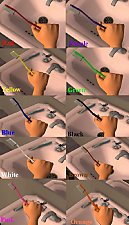
Tooth Brush Replacement (In 10 Colors!)
by Draga Devia 7th Nov 2011 at 9:45pm
Hello everybody! :bunny: I never liked the original Maxis Tooth Brush. So I decided to recolor them! more...
+1 packs
10 28.2k 41 Apartment Life
Packs Needed
| Base Game | |
|---|---|
| Sims 2 |
| Expansion Pack | |
|---|---|
| Bon Voyage |