
 Sign in to Mod The Sims
 TS2>TS3 "Anti-Quaint-Ed" Ltd. Ed. Armoire Conversion
 TS2>TS3 "Anti-Quaint-Ed" Ltd. Ed. Armoire Conversion


InUse.jpg - width=528 height=759
Mapping.jpg - width=524 height=734
3 channels- body; door panels; handles.
Thumb.jpg - width=172 height=172
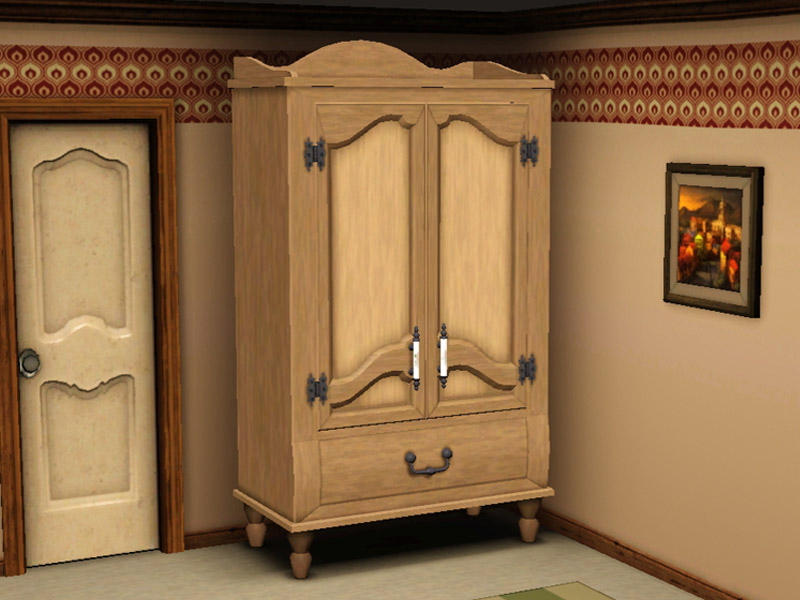
Wardrobe.jpg - width=800 height=600
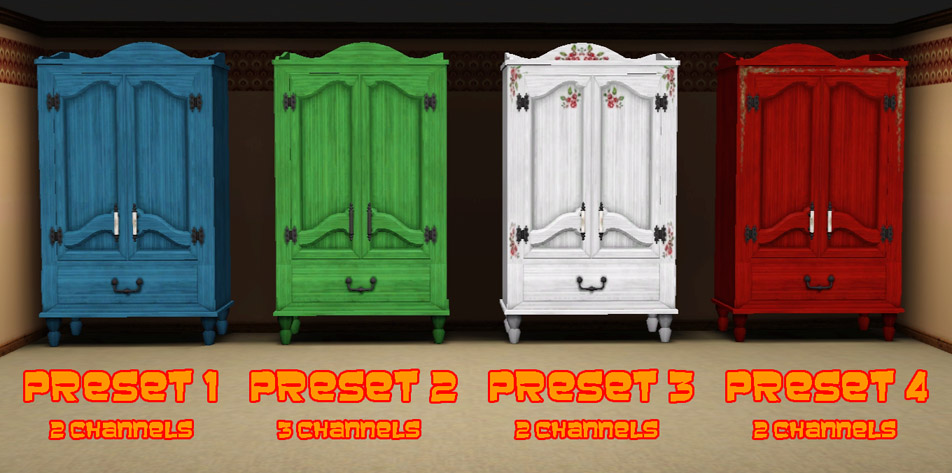
WardrobePresets.jpg - width=952 height=473
Presets, each with a different stencil.
WooHooClipping.jpg - width=524 height=654
Foot/leg clipping when a Sim enters to WooHoo.
Any players of TS2 will note that the mesh is not an exact replica. This is because I have had to lower the handles and decorative wood section in order for Sims to actually look as though they are using them.
Object Details
Price || 250
Room Sort || Bedroom > Dressers
Function Sort || Storage > Dressers
Presets || 4
Channels || 2*
*The Second preset actually has 3 channels as it is the only one where the handles can be recoloured. The other presets use a stencil. See below.
The wardrobe even features the original TS2 catalogue description and has been translated into all languages provided with the original.
|
The writing's off the wall and onto the armoire, and it says, "Anti-Quaint-Ed!" Yes, the makers of this limited edition armoire are making 'quaint' antiquated by making quaint cool. Quaint is the new black. (Hurry while supplies last; actual production number will vary; 'cool' is in no way a promise of performance or ambient temperature; all rights reserved.) |
 As with my previous wardrobe conversion, there are a few things to note.
- The mapping is not perfect and I have done my best to fix it. Horizontal patterns become quite distorted across the door frames but the issue is not visible when vertical patterns are used. Any pattern works well on the door panels.
- The clothing inside the wardrobe is not animated. When all of the clothing was rigged it had an annoying tendency to stick out of the wardrobe sides at odd angles and gave the coathangers the appearance of them being broken.
- Sims' feet sink into the wardrobe base when entering and exiting from woohoo. This is because the doors are not as low as either of the Supernatural originals from which it was cloned. There is a picture in the attachements to illustrate.
Built with game version 1.50
With all that being said I hope that you and your Sims find this conversion useful and pleasing to look at.
If you do like it then please give the Thanks button a press.
Polygon Counts:
High = 3154
Medium = 2089
Additional Credits:
simPE,
s3pe,
TSRW,
Milkshape,
Photoshop.
This is a new mesh, and means that it's a brand new self contained object that usually does not require a specific Pack (although this is possible depending on the type). It may have Recolours hosted on MTS - check below for more information.
|
MM_TS2_AntiQauintEdArmoire.zip
Download
Uploaded: 18th Apr 2013, 2.58 MB.
5,554 downloads.
|
||||||||
| For a detailed look at individual files, see the Information tab. | ||||||||
Install Instructions
1. Click the file listed on the Files tab to download the file to your computer.
2. Extract the zip, rar, or 7z file. Now you will have either a .package or a .sims3pack file.
For Package files:
1. Cut and paste the file into your Documents\Electronic Arts\The Sims 3\Mods\Packages folder. If you do not already have this folder, you should read the full guide to Package files first: Sims 3:Installing Package Fileswiki, so you can make sure your game is fully patched and you have the correct Resource.cfg file.
2. Run the game, and find your content where the creator said it would be (build mode, buy mode, Create-a-Sim, etc.).
For Sims3Pack files:
1. Cut and paste it into your Documents\Electronic Arts\The Sims 3\Downloads folder. If you do not have this folder yet, it is recommended that you open the game and then close it again so that this folder will be automatically created. Then you can place the .sims3pack into your Downloads folder.
2. Load the game's Launcher, and click on the Downloads tab. Find the item in the list and tick the box beside it. Then press the Install button below the list.
3. Wait for the installer to load, and it will install the content to the game. You will get a message letting you know when it's done.
4. Run the game, and find your content where the creator said it would be (build mode, buy mode, Create-a-Sim, etc.).
Extracting from RAR, ZIP, or 7z: You will need a special program for this. For Windows, we recommend 7-Zip and for Mac OSX, we recommend Keka. Both are free and safe to use.
Need more help?
If you need more info, see:
- For package files: Sims 3:Installing Package Fileswiki
- For Sims3pack files: Game Help:Installing TS3 Packswiki
Loading comments, please wait...



 View with Names
Uploaded: 18th Apr 2013 at 10:03 PM
Updated: 18th Apr 2013 at 11:02 PM
#wardrobe, #armoire, #conversion, #TS2, #TS3
-
"Custard" Anti-Puddingface Texture Replacer
by HystericalParoxysm 22nd Jun 2009 at 4:15am
-
-
TS2>TS3 SimCity SynapseSnapper Industrial Sign Conversion
by Menaceman44 18th Dec 2012 at 4:21pm
 8
18.9k
61
8
18.9k
61
-
-
-
TS2>TS3 Touch of Teak Plymouth Armoire Conversion
by Menaceman44 27th Mar 2013 at 7:04pm
+1 packs
7 12.8k 31 Supernatural
-
TS2>TS3 Rackmaster 850 Bowling Ball Rack Conversion
by Menaceman44 22nd May 2013 at 4:14pm
13
25.1k
86
-
TS2>TS3 Tall and Terrible Armoire By Darkness Conversion
by Menaceman44 28th Jun 2013 at 3:53pm
+1 packs
3 13.1k 46 Supernatural
-
by TheJim07 27th Mar 2015 at 3:33pm
10
18.7k
99
-
by DarkCrystal1997 updated 12th Apr 2025 at 11:55am
18
16.7k
81


-
General Practioner? Job Title Fix
by Menaceman44 24th Sep 2008 at 8:49pm
How many General Practioners do you know? I certainly don't know any seeing as the correct title should be 'General more...
 22
38.9k
58
22
38.9k
58
-


Freezer Bunny Award Texture Fix
by Menaceman44 15th Nov 2014 at 10:21pm
A file to replace the award statue texture with a better looking Freezer Bunny face. more...
-
Simlish "It Gets Better" T-shirt Texture Defaults
by Menaceman44 19th Jun 2019 at 7:37pm
A file to replace the It Gets Better t-shirt textures with a Simlish version. more...
-
Unlocked and Recoloured Male Leather Gloves
by Menaceman44 updated 5th Jul 2025 at 7:44pm
EA leather gloves unlocked and recoloured for everyday use. more...
 16
29.3k
105
16
29.3k
105
-

by Menaceman44 30th Jul 2023 at 8:46pm
-
by Menaceman44 16th Apr 2011 at 10:40am
Updated for the 1.26 patch and Pets EP I've had this sat on my computer for quite some time more...
32
59.4k
133
-
Iron Cabinet to match Realm of Magic Iron Counter
by Menaceman44 updated 2nd May 2020 at 10:13pm
A matching kitchen cabinet for the Realm of Magic Iron Counter. more...
+1 packs
30 42.2k 164 Realm of Magic
-
by Menaceman44 30th Oct 2022 at 9:40pm
Description I decided that I wanted some content in my game better suited for creating small garden greenhouses and so I more...
5
28.3k
91
-
Simlish It's On Us T-shirt Texture Defaults
by Menaceman44 updated 24th Jun 2022 at 11:13pm
Simlish texture replacements for the It's On Us male and female tees. more...
-
TS2>TS3 "Peace of Garbage" Can Conversion
by Menaceman44 30th Dec 2012 at 6:31am
A TS2 to TS3 conversion of the basic garbage can. more...
26
25.7k
99


Packs Needed
| Base Game | |
|---|---|
| Sims 3 |
| Expansion Pack | |
|---|---|
| Supernatural |