Sign in to Mod The Sims
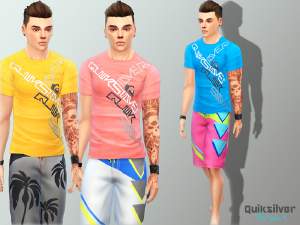
 Adult Male Tops Selection
 Adult Male Tops Selection


Capture1.JPG - width=614 height=649
Capture2.JPG - width=784 height=597
Capture3.JPG - width=755 height=594
Capture4.JPG - width=658 height=594
Capture5.JPG - width=749 height=591
Capture6.JPG - width=852 height=610
Capture7.JPG - width=740 height=622
Capture8.JPG - width=875 height=597
Capture9.JPG - width=692 height=596
Capture10.JPG - width=706 height=553
Capture11.JPG - width=764 height=593
Capture12.JPG - width=943 height=547
Capture13.JPG - width=787 height=592
Capture14.JPG - width=797 height=601
Capture15.JPG - width=760 height=598
Capture16.JPG - width=810 height=607
Capture17.JPG - width=784 height=604
Capture18.JPG - width=887 height=609
Capture19.JPG - width=692 height=567
Capture20.JPG - width=755 height=565
Capture21.JPG - width=697 height=575
Capture22.JPG - width=696 height=562


|
sims upload.rar
Download
Uploaded: 25th Nov 2014, 1.98 MB.
6,828 downloads.
|
||||||||
| For a detailed look at individual files, see the Information tab. | ||||||||
Install Instructions
1. Download: Click the File tab to see the download link. Click the link to save the .rar or .zip file(s) to your computer.
2. Extract: Use 7zip (Windows) to extract the file(s) from the .rar or .zip file(s).
3. Cut and paste the file(s) into your Mods folder
Need more information?
- My Documents\Electronic Arts\The Sims 4\Mods\
- Anyone can use both .rar and .zip files easily! On Windows, use 7zip!
- If you don't have a Mods folder, just make one.
Loading comments, please wait...
Uploaded: 25th Nov 2014 at 1:07 PM
-
by MrSoundwave 22nd Sep 2014 at 11:49pm
-
-
-
-
-
-
-
-
-