
 Sign in to Mod The Sims
 Shopping
 Shopping


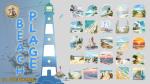
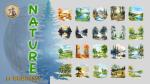
presentation.jpg - width=1920 height=1080
image1.jpg - width=1920 height=1080
image2.jpg - width=1920 height=1080
image3.jpg - width=1920 height=1080
image4.jpg - width=1920 height=1080
image5.jpg - width=1920 height=1080
image6.jpg - width=1920 height=1080
image1.jpg - width=1920 height=1080
image2.jpg - width=1920 height=1080
image3.jpg - width=1920 height=1080
image4.jpg - width=1920 height=1080
image5.jpg - width=1920 height=1080
image6.jpg - width=1920 height=1080


en bois gris et l'autre sur toile. Idéal pour décorer votre magasin ou boutique de vêtements.
A set of two prints depicting a woman returning from shopping, one on a gray wooden frame
and the other on canvas. Ideal for decorating your store or clothing boutique.
| Filename | Type | Size |
|---|---|---|
| shopping2.rar | rar | |
| README.txt | txt | 3087 |
| shopping2.package | package | 8964458 |
| Filename | Type | Size |
|---|---|---|
| shopping1.zip | zip | |
| Shopping1.package | package | 26495976 |
| README.txt | txt | 3087 |
Custom installation instructions! READ ME!
In addition to the normal installation instructions, this download also has a custom instruction, as follows:
1. Download: Click the download link to save the .rar or .zip file(s) to your computer.
2. Extract: Use 7zip (recommended), WinRAR (Windows) or The Unarchiver (MacOS) to extract the file(s) from the .rar or .zip file(s). OS X also has a built-in utility for that (just rightclick).
3. --------------------------------------------------------------------------------------------------------------------------------------------------------------------
INSTALLATION
1. Téléchargement : cliquez sur le lien de téléchargement pour enregistrer le(s) fichier(s) .rar ou .zip sur votre ordinateur.
1. Download: Click the download link to save the .rar or .zip file(s) to your computer.
2. Extraire : utilisez 7zip (recommandé), WinRAR (Windows) ou Stuffit (OS X) pour extraire le(s) fichier(s) des fichiers .rar ou .zip. OS X dispose également d'un utilitaire intégré (clic droit).
2. Extract: Use 7zip (recommended), WinRAR (Windows), or Stuffit (OS X) to extract the file(s) from .rar or .zip files. OS X also has a built-in (right-click) utility.
3. Déposez-le dans le dossier MOD de votre jeu ou dans votre sous-dossier préféré (Ex : \mods\dossier préféré\fichier.package)
3. Drop it into your game's MOD folder or your preferred subfolder (Ex: \mods\preferred folder\file.package)
Vous devez le trouver dans le mode construction du jeu dans "Toiles et affiches "
You need to find it in the game's build mode under "Painting"
--------------------------------------------------------------------------------------------------------------------------------------------------------------------
Need more information?
- For a full guide to downloading complete with pictures and more information, see: Game Help: Downloading for Fracking Idiots.
|
shopping1.zip
Download
Uploaded: 7th Aug 2025, 25.02 MB.
192 downloads.
|
||||||||
|
shopping2.rar
| Shopping on canvas
Download
Uploaded: 7th Aug 2025, 8.24 MB.
154 downloads.
|
||||||||
| For a detailed look at individual files, see the Information tab. | ||||||||
Install Instructions
1. Download: Click the download link to save the .rar or .zip file(s) to your computer.
2. Extract: Use 7zip (recommended), WinRAR (Windows) or The Unarchiver (MacOS) to extract the file(s) from the .rar or .zip file(s). OS X also has a built-in utility for that (just rightclick).
3. --------------------------------------------------------------------------------------------------------------------------------------------------------------------
INSTALLATION
1. Téléchargement : cliquez sur le lien de téléchargement pour enregistrer le(s) fichier(s) .rar ou .zip sur votre ordinateur.
1. Download: Click the download link to save the .rar or .zip file(s) to your computer.
2. Extraire : utilisez 7zip (recommandé), WinRAR (Windows) ou Stuffit (OS X) pour extraire le(s) fichier(s) des fichiers .rar ou .zip. OS X dispose également d'un utilitaire intégré (clic droit).
2. Extract: Use 7zip (recommended), WinRAR (Windows), or Stuffit (OS X) to extract the file(s) from .rar or .zip files. OS X also has a built-in (right-click) utility.
3. Déposez-le dans le dossier MOD de votre jeu ou dans votre sous-dossier préféré (Ex : \mods\dossier préféré\fichier.package)
3. Drop it into your game's MOD folder or your preferred subfolder (Ex: \mods\preferred folder\file.package)
Vous devez le trouver dans le mode construction du jeu dans "Toiles et affiches "
You need to find it in the game's build mode under "Painting"
--------------------------------------------------------------------------------------------------------------------------------------------------------------------
Need more information?
- For a full guide to downloading complete with pictures and more information, see: Game Help: Downloading for Fracking Idiots.
Loading comments, please wait...

 + 1 GPs
Uploaded: 7th Aug 2025 at 12:50 AM
Updated: 8th Aug 2025 at 6:55 AM
-
-
by Magnum Patrol 13th Sep 2020 at 2:36am
 14
7.4k
27
14
7.4k
27
-
by Magnum Patrol 20th Sep 2020 at 8:16am
1
2.6k
7
-
by Rainerine 20th Oct 2021 at 10:58pm
2
19.1k
48
-
by lovethesims68 21st Nov 2024 at 12:17am
1
1.1k
1
-
-
by zeroth 27th Aug 2025 at 1:53pm
2k
2
-
-
-


-

-


-


-


Paris, the city of lights (Paris la ville lumière)
by roro9261 updated 1st Jul 2025 at 2:52pm
Je vous présente la capitale de la France, vue à travers des aquarelles et des peintures trouvées sur le web. Nombreux more...
+1 packs
2 4.6k 2 Dine Out
-


by roro9261 23rd Apr 2026 at 5:35pm
Les Jonquilles Cette maison a été créée à partir d'une partie complète (mars 2025). Sur un terrain vacant à Willow Creek, j'ai more...
+23 packs
2.7k 4 Get to Work
 Outdoor Retreat
 Get Together
 City Living
 Perfect Patio Stuff
 Spa Day
 Seasons
 Get Famous
 Island Living
 Movie Hangout Stuff
 Discover University
Dine Out
Discover University
Dine Out
 Eco Lifestyle
 Romantic Garden Stuff
 Snowy Escape
 Backyard Stuff
 High School Years
 Vintage Glamour Stuff
 Fitness Stuff
 Laundry Day Stuff
 Jungle Adventure
 Realm of Magic
 Dream Home Decorator
-


-


-
-
-


Packs Needed
| Base Game | |
|---|---|
| Sims 4 |
| Game Pack | |
|---|---|
| Dine Out |
About Me
Actuellement dans le jeu j'ai dix familles qui démarre des parents avec les enfants qui se sont installés dans Willow creek, il est pas facile de garder le lien entre chaque famille avec les plantages du jeu a chaque ou presque nouvelle extension, l'arbre généalogique est difficile d’être réel et il faut constamment le modifier, surtout si on réinstalle les sims ils perdent leurs appartenances aux parents d'origine et des frères et sœurs.
Google translat:
I've been passionate about the Sims since version 2, with my daughter who introduced me to this game. I played up to Sims 3, because I didn't want to be EA's bank and start all over again from the beginning of Sims 4. I just installed Sims 4 a year ago, which I find average because it lacks a lot compared to Sims 3, but I love building beautiful houses.
Currently in the game, I have ten families starting with parents and children who have settled in Willow Creek. It's not easy to keep the link between each family, with the game crashing with almost every new expansion. The family tree is difficult to be realistic and must be constantly modified, especially if you reinstall the Sims; they lose their affiliations with the original parents and siblings.