
 Sign in to Mod The Sims
 Height Diversity 0.2.0 — Automatic heights by age and gender
 Height Diversity 0.2.0 — Automatic heights by age and gender

Lzv Heigth Diversity.jpg - width=1152 height=918
Version: 0.2.0
Tested with game version: 1.128.90.1030
Gives your Sims different body heights by age and gender, so a household stops looking like a line of identical clones.
What it does
- Automatic heights. When a Sim changes age, it receives the height for its age and gender, teens get the teen height, and young adults, adults and elders get the male or female height for their gender. An elder keeps the height of its gender.
- Children, toddlers and infants are not affected.
- The same three heights are also available in CAS under the Forehead category, so a Sim can also get its height while you edit it. A preset belongs to one age and gender (teen, female, male) the game offers the one that matches the Sim you are editing, so CAS is not a free height choice.
- Each height changes the Sim's overall height without deforming the body, and the Sim keeps it through save and reload.
Requirements
- DLC required: None (base game only).
- Script mods allowed in Game Options: Yes.
Installation
- Copy "LyzerVice_HeightDiversity.package" and "LyzerVice_HeightDiversity.ts4script" into your "Mods/" folder.
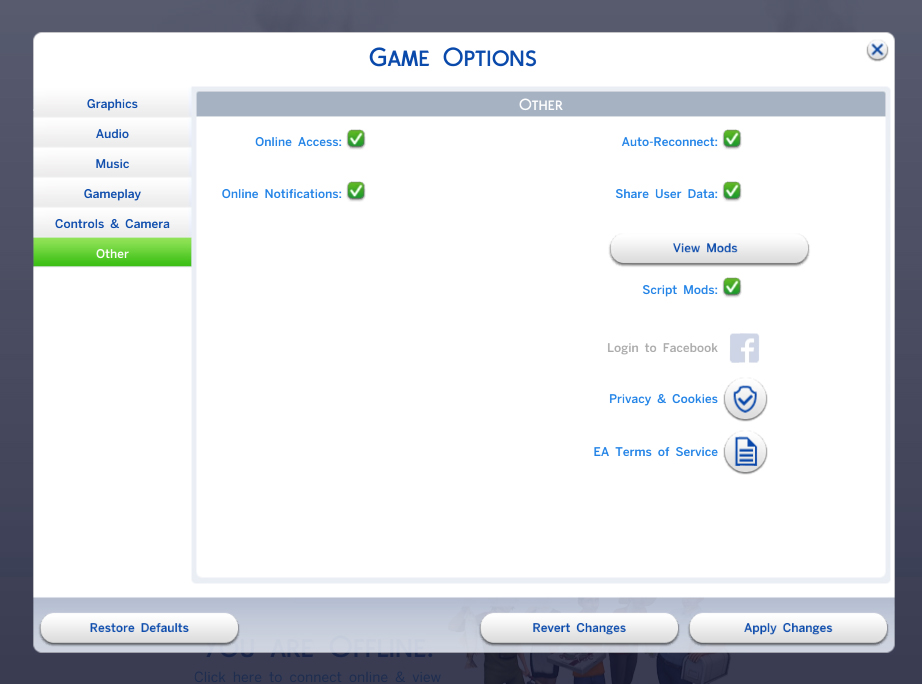
- Enable "Custom Content and Mods" and "Script Mods" in Game Options (they are two separate options).
- Restart the game. Heights are applied automatically as your Sims change age, in CAS the preset for the Sim's own age and gender is available under the Forehead category.
Compatibility
- Conflicts: other mods that change how tall Sims are (other height mods) do not combine.
- Patch sensitivity: the heights rely on game internals that can change with a patch.
Known issues
- The height is applied when a Sim changes age. A Sim that never changes age keeps its current height, applying the height to every Sim on load is planned for a later release.
- Changing the previewed age inside CAS does not change the height there. The Sim gets the correct height as soon as it is in the world and changes age.
- The body presets have no custom icon in CAS, so they are easy to miss there. The automatic height your Sims get when they change age does not depend on them.
- All Sims share one set of animations, so Sims of very different heights can look slightly off together in some interactions, adapted animations are planned.
Uninstallation
- Delete "LyzerVice_HeightDiversity.package" and "LyzerVice_HeightDiversity.ts4script" from your "Mods/" folder. The game starts without errors and the Sims return to their default height, the presets disappear from CAS.
| Filename | Type | Size |
|---|---|---|
| LyzerVice_HeightDiversity_v0.2.0.zip | zip | |
| LyzerVice_HeightDiversity.ts4script | ts4script | 5024 |
| LyzerVice_HeightDiversity.package | package | 1414 |
|
LyzerVice_HeightDiversity_v0.2.0.zip
| Automatic body heights for Sims by age and gender.
Download
Uploaded: 3rd Nov 2026, 6.1 KB.
112 downloads.
|
||||||||
| For a detailed look at individual files, see the Information tab. | ||||||||
Install Instructions
1. Download: Click the File tab to see the download link. Click the link to save the .rar or .zip file(s) to your computer.
Read the upload description for installation instructions. If nothing else is specified, do the following:
2. Extract: Use WinRAR (Windows) to extract the .package file(s) (if included, ts4script as well) from the .rar or .zip file(s).
3. Cut and paste the .package file(s) (if included, ts4script as well) into your Mods folder
- Windows XP: Documents and Settings\(Current User Account)\My Documents\Electronic Arts\The Sims 4\Mods\
- Windows Vista/7/8/8.1: Users\(Current User Account)\Documents\Electronic Arts\The Sims 4\Mods\
Need more information?
- Anyone can use both .rar and .zip files easily! On Windows, use WinRAR.
- If you don't have a Mods folder, just make one.
- Mod still not working? Make sure you have script mods enabled
Loading comments, please wait...
Uploaded: 3rd Nov 2026 at 11:19 PM
-
by DrAnimaniac updated 26th Feb 2021 at 5:35pm
 154
96.6k
300
-

-
by siriussimmer updated 30th Aug 2021 at 1:10am
+1 packs
66 141.7k 226 Cottage Living
-

by Simsonian Library 3rd Sep 2021 at 1:08am
+1 packs
52 213.7k 326 Realm of Magic
-

by Simsonian Library updated 12th Dec 2021 at 7:24pm
+7 packs
49 76.1k 192 Outdoor Retreat
 Cats and Dogs
 Seasons
Cottage Living
 Horse Ranch
 Jungle Adventure
Realm of Magic
-

by Meep62 updated 26th Jun 2025 at 11:56pm
49
152.3k
158
-
by SimmingWithP&J updated 30th Jun 2023 at 3:27am
12
18.1k
21
-

by TURBODRIVER updated 23rd Nov 2024 at 11:43am
9
24.1k
28
-
by tank updated 11th Jul 2025 at 11:49pm
5
16.3k
9
-

by baciaangi updated 14th Sep 2026 at 5:56pm
4
2.5k
5


