Sign in to Mod The Sims
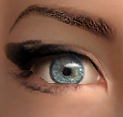
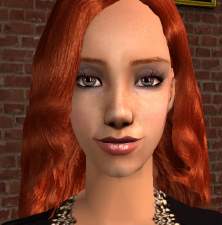
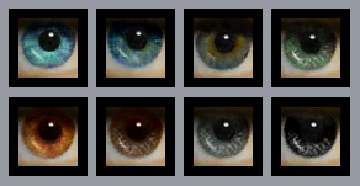
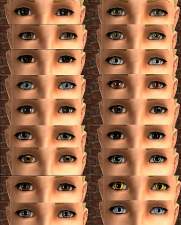
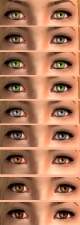
 My "New realistic eyes" and my "Reflective eyes" as default replacements (requested)
 My "New realistic eyes" and my "Reflective eyes" as default replacements (requested)


NewRealisticDefault.jpg - width=609 height=397
ReflectiveDefault.jpg - width=609 height=402
Install: Put the extracted packages into My documents/Ea Games/The Sims 2/Downloads
Uninstall: Delete/Remove them
Note: You may use only one of these sets. You have to chose - or "New realistic eyes" or "Reflective eyes". They'll not work together
You can find the whole "Realistic" set here - http://modthesims2.com/showthread.php?t=112500
And the "Reflective" set - http://modthesims2.com/showthread.php?t=121980
Credits
To SimPE people
To Morague for the tutorial found in this thread - http://www.modthesims2.com/showthread.php?t=52707
I'm new in this, so let me know if there is something wrong
Have a nice day

|
DefaultReflectiveEyes.rar
Download
Uploaded: 19th Jan 2006, 71.7 KB.
2,967 downloads.
|
||||||||
|
DefaultNewRealisticEyes.rar
Download
Uploaded: 19th Jan 2006, 72.8 KB.
6,668 downloads.
|
||||||||
| For a detailed look at individual files, see the Information tab. | ||||||||
Install Instructions
1. Download: Click the download link to save the .rar or .zip file(s) to your computer.
2. Extract the zip, rar, or 7z file.
3. Place in Downloads Folder: Cut and paste the .package file(s) into your Downloads folder:
- Origin (Ultimate Collection): Users\(Current User Account)\Documents\EA Games\The Sims™ 2 Ultimate Collection\Downloads\
- Non-Origin, Windows Vista/7/8/10: Users\(Current User Account)\Documents\EA Games\The Sims 2\Downloads\
- Non-Origin, Windows XP: Documents and Settings\(Current User Account)\My Documents\EA Games\The Sims 2\Downloads\
- Mac: Users\(Current User Account)\Documents\EA Games\The Sims 2\Downloads
- Mac x64: /Library/Containers/com.aspyr.sims2.appstore/Data/Library/Application Support/Aspyr/The Sims 2/Downloads
- For a full, complete guide to downloading complete with pictures and more information, see: Game Help: Downloading for Fracking Idiots.
- Custom content not showing up in the game? See: Game Help: Getting Custom Content to Show Up.
- If you don't have a Downloads folder, just make one. See instructions at: Game Help: No Downloads Folder.
Loading comments, please wait...


Uploaded: 19th Jan 2006 at 1:12 AM
Updated: 19th Jan 2006 at 2:44 PM
-
-
-

-
-
by Barcelonista 18th Dec 2005 at 9:09pm
-
-
My "No Freckles - eyes" as default replacement [requested]
by vidde 19th Oct 2006 at 2:29pm
-
by Hardy boyz 22nd Dec 2006 at 10:05am
-
"Tired eyes" - my first set of realistic eyes
by Strange_girl 24th Dec 2006 at 5:12pm
-


-
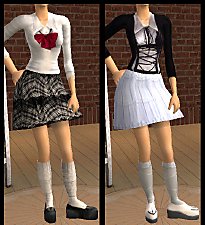
Requested - teen Harajuku outfits
by Barcelonista 13th Dec 2005 at 7:30pm
This set was requested by latribegirl. It includes 5 skirts, 5 tops and 3 whole outfits. more...
 26
21.5k
19
26
21.5k
19
Female » Mixed Sets » Teen
-
-
Realistic eyes V8 - Update - Added Default Replacements
by Barcelonista 14th Jan 2007 at 8:13pm
Hello, This is my new eyecolor set. more...
-
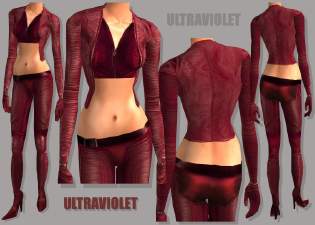
Movie costumes – Ultraviolet, Aeon Flux, Van Helsing, Resident Evil: Apocalypse
by Barcelonista 30th Mar 2006 at 7:06pm
Hi guys, This is set of movie outfits. Most of them I made as per requests. more...
-
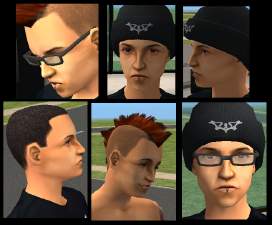
Chester Bennington (Linkin Park)
by Barcelonista 18th Nov 2005 at 6:50pm
This is my attempt at Chester. He is the vocalist of LP, one of my favourite bands. more...
28
37.2k
22
-
by Barcelonista 12th Dec 2005 at 5:16pm
I've made some combinations with the tear which I created for my crying girl. more...
66
161.3k
108
-
by Barcelonista 11th Dec 2005 at 6:55pm
This is my winter collection, which includes 5 outfits. The set don't requires meshes or EPs. more...
-
by Barcelonista 20th Jan 2006 at 4:43am
It's a set of 3 formal gowns. more...
-
Recolors of Besen's "Cinderella"
by Barcelonista 17th Dec 2005 at 7:41pm
This is my first serious try to recolor a hair. more...
-
by Barcelonista 22nd Mar 2006 at 8:33pm
Hi, This outfit was requested by Omri645. more...