
 Sign in to Mod The Sims
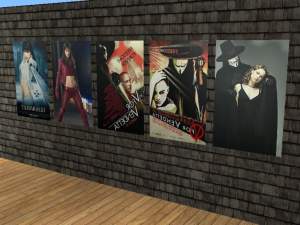
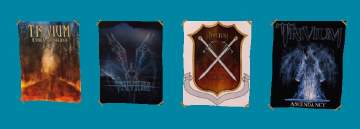
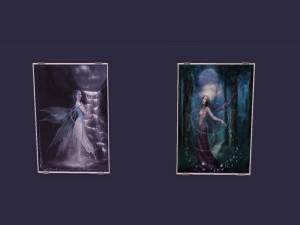
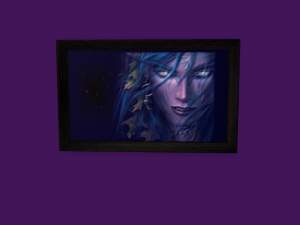
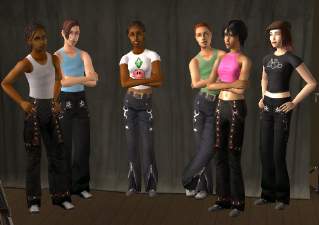
 8 In Flames posters! (By request)
 8 In Flames posters! (By request)


sa-inflamesposters.jpg - width=1004 height=426
sa-inflamesposters1.jpg - width=832 height=316
sa-inflamesposters2.jpg - width=791 height=262
Requsted by stratos.
This custom content if it is not clothing, may require a seperate download to work properly. This is available at Colour Enable Package (CEP) by Numenor.
|
sa-InFlamesPosters.zip
Download
Uploaded: 2nd Mar 2006, 1.75 MB.
586 downloads.
|
||||||||
| For a detailed look at individual files, see the Information tab. | ||||||||
Install Instructions
1. Download: Click the download link to save the .rar or .zip file(s) to your computer.
2. Extract the zip, rar, or 7z file
3. Place in Downloads Folder: Cut and paste the .package file(s) into your Downloads folder:
- Origin (Ultimate Collection): Users\(Current User Account)\Documents\EA Games\The Sims™ 2 Ultimate Collection\Downloads\
- Non-Origin, Windows Vista/7/8/10: Users\(Current User Account)\Documents\EA Games\The Sims 2\Downloads\
- Non-Origin, Windows XP: Documents and Settings\(Current User Account)\My Documents\EA Games\The Sims 2\Downloads\
- Mac: Users\(Current User Account)\Documents\EA Games\The Sims 2\Downloads
- Mac x64:
/Library/Containers/com.aspyr.sims2.appstore/Data/Library/Application Support/Aspyr/The Sims 2/Downloads
Need more information?
- For a full, complete guide to downloading complete with pictures and more information, see: Game Help: Downloading for Fracking Idiots.
- Custom content not showing up in the game? See: Game Help: Getting Custom Content to Show Up.
- If you don't have a Downloads folder, just make one. See instructions at: Game Help: No Downloads Folder.
Loading comments, please wait...
Uploaded: 2nd Mar 2006 at 6:53 PM
Updated: 3rd Mar 2006 at 9:27 PM
-
-

by dtb 17th Jul 2005 at 4:41pm
 5
3.6k
1
5
3.6k
1
-
by musicjunkie98 6th Sep 2005 at 3:21pm
+1 packs
5 7.5k University
-
by sleepless_angel 3rd Jan 2006 at 7:48pm
10
6.2k
4
-
by alex195 9th Feb 2006 at 6:55am
66
-
by alex195 9th Feb 2006 at 6:56am
72
-
by OpenHouseJack 28th Feb 2006 at 5:24am
6
5.8k
3
-
-
-


-
Another pair of Black & blue Tripp pants with chains for men
by sleepless_angel 23rd Dec 2006 at 6:11pm
Yet another pair of Tripp pants for men, teen and YA/adult! more...
-
by sleepless_angel 20th Dec 2005 at 6:35pm
:new: Please look here for newer male versions! more...
16
15.4k
18
-

by sleepless_angel 15th Dec 2006 at 12:40am
This has got to be the most disgusting game content I've created, yet. Rotten teeth! more...
26
30.6k
32
-
6 Complete outfits - Rockpants with different tops
by sleepless_angel 17th May 2006 at 10:01pm
This is 6 complete outfits for adult women, "rockpants" with diffrent tops. more...
-
Jeans'n'Heels - 7 Outfits for AF (Updated Oct 08!)
by sleepless_angel updated 10th May 2008 at 3:18pm
:new: UPDATE 2008 Oct 7: Now with CORRECT shoe noise! more...
-
Black & white corset now for YA!
by sleepless_angel 9th Aug 2006 at 12:46am
This is a new version of the black & white corset I made. more...
+1 packs
9 20.9k 21 University
-
Black rockskirt with high heels & "fairy" top!
by sleepless_angel 9th Mar 2006 at 6:29pm
Here's a nice black outfit. A skirt with a fairy/manga top and high heels. I hope you like it. more...
-
53 sets of music CDs! (Updated May 07 2011)
by sleepless_angel updated 7th May 2011 at 12:17pm
:new: UPDATE May 7 2011: Added 13 previously Wicked Sims exclusive sets. more...
54
60.8k
89
-
Mesh - Bottom only: alpha editable skirt with heels + recolors (MESH UPDATED 8 july 2007!)
by sleepless_angel 30th Nov 2006 at 7:00pm
:new: The mesh have been updated with better "feet/walk animation". Please re-download the mesh. more...
-
by sleepless_angel 12th Dec 2005 at 7:38pm
Here's my second upload for men. Black pants with red details. The mesh is included in the original game. more...
About Me
Terms of Use
+ Feel free to do whatever you like with my creations as long as they stay free.
+ Don't claim my work as your own. Please, give credit and/or link back.
+ Please don't upload my creations or parts of my creations to paysites.
I have retired from Sims modding.