
 Sign in to Mod The Sims
 Butterfly Wings
 Butterfly Wings


Milkshape_2.jpg - width=1008 height=756
Milkshape_1.jpg - width=1008 height=756
Ingame_2.jpg - width=1024 height=473
Ingame_1.jpg - width=1024 height=483

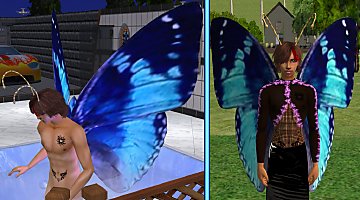
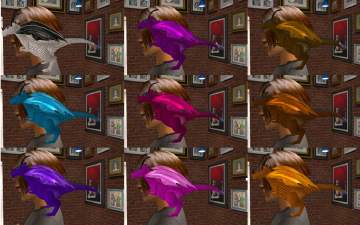
They're for Adult Males (I forgot to mention...) and can be found in Game under "glasses" and will stay on your sims back whatever he's doing
 No EP needed. The Downloadfile includes both Meshes and Recolors.
Recolors from these files are "Stay-ons", too.
Wings: Vertices 1564, Faces 2652
Feelers (?): Vertices 506, Faces 792
They are recolorable...
I hope you like it.
Feel free to recolor, but:
- please do not offer your recolors on any other sites, except for MTS2.
- do not link to my mesh on any other sites, except for MTS2.
- do not alter or copy my mesh in any way.
- And never offer my mesh with your MTS2-recolors, please. Just link back here for the meshfile.
- If you plan uploading your Recolors anywhere else than modthesims2.com, please PM me first for permission.
have fun
This is a new mesh, and means that it's a brand new self contained object that usually does not require a specific Pack (although this is possible depending on the type). It may have Recolours hosted on MTS - check below for more information.
|
ButterflyWings_Schwerelos2006.rar
Download
Uploaded: 5th Apr 2006, 361.9 KB.
15,040 downloads.
|
||||||||
| For a detailed look at individual files, see the Information tab. | ||||||||
Install Instructions
1. Download: Click the download link to save the .rar or .zip file(s) to your computer.
2. Extract the zip, rar, or 7z file.
3. Place in Downloads Folder: Cut and paste the .package file(s) into your Downloads folder:
- Origin (Ultimate Collection): Users\(Current User Account)\Documents\EA Games\The Sims™ 2 Ultimate Collection\Downloads\
- Non-Origin, Windows Vista/7/8/10: Users\(Current User Account)\Documents\EA Games\The Sims 2\Downloads\
- Non-Origin, Windows XP: Documents and Settings\(Current User Account)\My Documents\EA Games\The Sims 2\Downloads\
- Mac: Users\(Current User Account)\Documents\EA Games\The Sims 2\Downloads
- Mac x64: /Library/Containers/com.aspyr.sims2.appstore/Data/Library/Application Support/Aspyr/The Sims 2/Downloads
- For a full, complete guide to downloading complete with pictures and more information, see: Game Help: Downloading for Fracking Idiots.
- Custom content not showing up in the game? See: Game Help: Getting Custom Content to Show Up.
- If you don't have a Downloads folder, just make one. See instructions at: Game Help: No Downloads Folder.
Loading comments, please wait...



Uploaded: 5th Apr 2006 at 1:31 AM
Updated: 5th Apr 2006 at 7:49 AM
-
by saracentner 12th May 2005 at 1:30am
 83
93k
33
83
93k
33
-
-
by q3tbo 6th Apr 2006 at 10:17pm
18
36.5k
26
-
by temptress 12th Apr 2006 at 12:29am
59
163.1k
90
-
by Dea 13th Apr 2006 at 9:14am
10
12.1k
3
-
by q3tbo 26th Jun 2006 at 5:54pm
13
21.3k
10
-
by q3tbo 21st Aug 2006 at 9:26pm
13
15.3k
6
-
by lilsweetiecori 10th Oct 2006 at 9:28pm
38
102.6k
77
-
by Silus 9th Nov 2007 at 2:12am
12
34.4k
29
-
by Silus 12th Dec 2007 at 12:05pm
10
32.7k
20

-
The Giorgio Armani Line Part I
by q3tbo 27th Jun 2006 at 10:51am
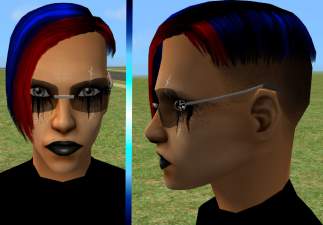
:wtf: It's for male Adults and young Adults, can be found in Game under "glasses" and needs no more...
5
8.5k
4
-

-
-
-
-
-
-
-
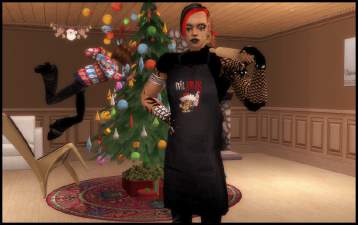
Preparing for Christmas - Earrings and Apron for males
by q3tbo 10th Dec 2013 at 9:40pm
Just a small Accessory-Pack for guys, including 4 Xmas alpha earring recolors and aprons for accessory, so more...
8
12.5k
12
-
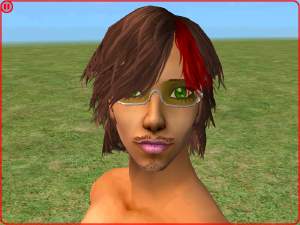
Gucci Sunglasses for Males... -.-
by q3tbo 26th Jun 2006 at 8:17pm
:wtf: It's for male Adults and young Adults, can be found in Game under "glasses" and needs no EP... more...
4
11.1k
3
