
 Sign in to Mod The Sims
 Fan recolors for all ages and genders
 Fan recolors for all ages and genders


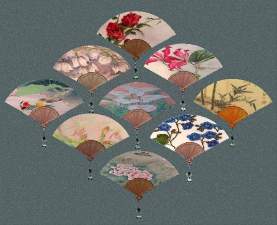
0 fans 1-4.jpg - width=600 height=450
0 fans 5-8.jpg - width=600 height=450
0 fans 9-12.jpg - width=600 height=450
0 fans 13-15.jpg - width=600 height=450
0 fans all 3.jpg - width=600 height=450
0 toddler.JPG - width=375 height=322
0 they love them.JPG - width=600 height=450
http://www.modthesims2.com/showthread.php?t=162817
I didn't change the mesh, I just changed settings in the recolor files. These recolors are available for male and female, toddler through elder.
I hope you enjoy these!
Technical notes for those who are curious:
1. To Change gender of “glasses” - open the RECOLOR file in SimPe.
Click on “all resources”
Sort by type
Scroll down list to find “Mesh overlay XML” - there will be several - change all of them.
Click on one, on the bottom left is a long list.
Click on “gender” - now you can change this in the box on the right labeled “value”
The values are:
1 - female only
2 - male only
3 - female and male
Change the value, then click “commit”
Repeat as needed
2. To change age - open the RECOLOR file in SimPe.
Click on “all resources”
Sort by type
Scroll down list to find “Mesh overlay XML” - there will be several
Click on one, on the bottom left is a long list.
Click on “age” - you can now change this in the box on the right labeled “value”
The settings are:
01 - toddler
02 - child
04 - teenager
08 - adult
40 - young adult
10 - elder
You can add these values together. For example:
40 + 8 = 48: use recolor for both young adult and adult
2 + 4 = 6 : use for both child and teen
Click on each Mesh overlay to see all the ages included
Now go back and make desired changes, clicking “commit” with each change.
|
white lace.zip
Download
Uploaded: 29th Jun 2006, 27.3 KB.
866 downloads.
|
||||||||
|
tree.zip
Download
Uploaded: 29th Jun 2006, 27.6 KB.
701 downloads.
|
||||||||
|
tan floral.zip
Download
Uploaded: 29th Jun 2006, 27.0 KB.
669 downloads.
|
||||||||
|
red floral.zip
Download
Uploaded: 29th Jun 2006, 27.5 KB.
746 downloads.
|
||||||||
|
red dragon.zip
Download
Uploaded: 29th Jun 2006, 27.7 KB.
771 downloads.
|
||||||||
|
pink floral.zip
Download
Uploaded: 29th Jun 2006, 28.6 KB.
878 downloads.
|
||||||||
|
phoenix.zip
Download
Uploaded: 29th Jun 2006, 27.5 KB.
747 downloads.
|
||||||||
|
peacock.zip
Download
Uploaded: 29th Jun 2006, 26.2 KB.
746 downloads.
|
||||||||
|
pagoda.zip
Download
Uploaded: 29th Jun 2006, 28.9 KB.
694 downloads.
|
||||||||
|
gold floral.zip
Download
Uploaded: 29th Jun 2006, 28.7 KB.
760 downloads.
|
||||||||
|
gold.zip
Download
Uploaded: 29th Jun 2006, 28.7 KB.
751 downloads.
|
||||||||
|
blue mountains.zip
Download
Uploaded: 29th Jun 2006, 26.9 KB.
720 downloads.
|
||||||||
|
black lace.zip
Download
Uploaded: 29th Jun 2006, 30.7 KB.
798 downloads.
|
||||||||
|
black floral.zip
Download
Uploaded: 29th Jun 2006, 28.0 KB.
811 downloads.
|
||||||||
|
black dragon.zip
Download
Uploaded: 29th Jun 2006, 27.9 KB.
883 downloads.
|
||||||||
|
all fan recolors.zip
Download
Uploaded: 29th Jun 2006, 418.9 KB.
3,144 downloads.
|
||||||||
| For a detailed look at individual files, see the Information tab. | ||||||||
Install Instructions
1. Download: Click the download link to save the .rar or .zip file(s) to your computer.
2. Extract the zip, rar, or 7z file.
3. Place in Downloads Folder: Cut and paste the .package file(s) into your Downloads folder:
- Origin (Ultimate Collection): Users\(Current User Account)\Documents\EA Games\The Sims™ 2 Ultimate Collection\Downloads\
- Non-Origin, Windows Vista/7/8/10: Users\(Current User Account)\Documents\EA Games\The Sims 2\Downloads\
- Non-Origin, Windows XP: Documents and Settings\(Current User Account)\My Documents\EA Games\The Sims 2\Downloads\
- Mac: Users\(Current User Account)\Documents\EA Games\The Sims 2\Downloads
- Mac x64: /Library/Containers/com.aspyr.sims2.appstore/Data/Library/Application Support/Aspyr/The Sims 2/Downloads
- For a full, complete guide to downloading complete with pictures and more information, see: Game Help: Downloading for Fracking Idiots.
- Custom content not showing up in the game? See: Game Help: Getting Custom Content to Show Up.
- If you don't have a Downloads folder, just make one. See instructions at: Game Help: No Downloads Folder.
Meshes needed
This download requires one or more meshes to work properly. Please check the Description tab for information about the meshes needed, then download them below:| MTS cannot guarantee any off-site links will be available |
| 3 fans as accessories by Bipsouille |
Loading comments, please wait...
Uploaded: 29th Jun 2006 at 11:07 AM
#fan, #fans, #Bipsouille
-
Testers Wanted: Lavender Skin for all ages and sizes!
by similicious20 19th Feb 2005 at 2:23am
-
by temptress 12th Apr 2006 at 12:29am
 59
163k
90
59
163k
90
-
-
by Bipsouille 4th Jun 2006 at 8:20pm
30
27k
17
-
by q3tbo 26th Jun 2006 at 5:54pm
13
21.3k
10
-
by Kizzmon 15th Oct 2006 at 12:46am
12
25k
24
-
SimCribbling~ Turban Accessories (for all ages/genders)
by Ren 26th Jan 2007 at 4:12am
118
249.6k
252
-
Maxis Match skin - all ages and genders - 4 tones
by oepu 20th Aug 2007 at 7:00pm
-
-
by khakidoo 5th Oct 2007 at 1:39pm
22
29k
64

-
-
Two "rugs" - red and blue persian
by Nocomment 22nd Dec 2004 at 8:50am
Each "rug" is made up of 6 floor tiles. more...
7
12.5k
5
-
Shorter Jeanette hair for males
by Nocomment 18th Jul 2005 at 7:55am
As requested, this is the Jeanette hair for males, trimmed so it's about shoulder length. more...
-
Small adobe house - Furnished - $19,962
by Nocomment 10th Aug 2006 at 10:01am
Here is a small adobe house on a 2 x 2 lot. more...
+3 packs
4 9.8k 4 University
 Nightlife
 Open for Business


