
 Sign in to Mod The Sims
 Gemstone Eyeshadows
 Gemstone Eyeshadows
SCREENSHOTS


GemsShadows.jpg - width=500 height=500
GemsAme.jpg - width=800 height=600
GemsChry.jpg - width=800 height=600
GemsEm.jpg - width=800 height=600
GemsAll.jpg - width=478 height=235
Downloaded 766 times
292 Thanks
18 Favourited
23,999 Views
Say Thanks!
Thanked!

Hi!
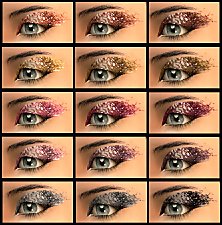
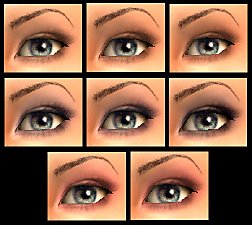
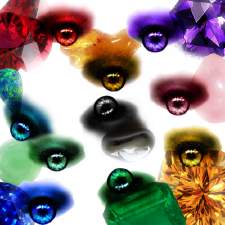
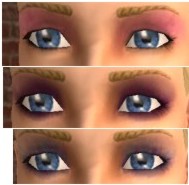
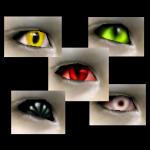
These are the eyeshadows that go with my Gemstone Eyes. One shade for every eye, ten in total.
If you like the eyes, they should be available though my profile.
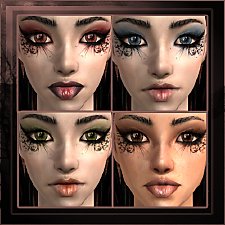
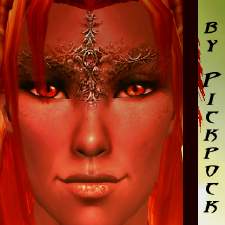
As you can see in the pictures, the eyeshadows are perfect for everyday make-up, for a party or just because it's very pretty
Ruby, Sapphire, Emerald, Amber, Amethyst
&
Rose Quartz, Opal, Chrysopras, Hematite, Citrine,
Enjoy!
Custom Content by Me:
- Rose Quartz Eyeshadow, by Pickpock
- Citrine Eyeshadow, by Pickpock
- Chrysopras Eyeshadow, by Pickpock
- Opal Eyeshadow, by Pickpock
- Hematite Eyeshadow, by Pickpock
- Amber Eyeshadow, by Pickpock
- Amethyst Eyeshadow, by Pickpock
- Sapphire Eyeshadow, by Pickpock
- Ruby Eyeshadow, by Pickpock
- Emerald Eyeshadow, by Pickpock
These are the eyeshadows that go with my Gemstone Eyes. One shade for every eye, ten in total.
If you like the eyes, they should be available though my profile.
As you can see in the pictures, the eyeshadows are perfect for everyday make-up, for a party or just because it's very pretty

Ruby, Sapphire, Emerald, Amber, Amethyst
&
Rose Quartz, Opal, Chrysopras, Hematite, Citrine,
Enjoy!
Custom Content by Me:
- Rose Quartz Eyeshadow, by Pickpock
- Citrine Eyeshadow, by Pickpock
- Chrysopras Eyeshadow, by Pickpock
- Opal Eyeshadow, by Pickpock
- Hematite Eyeshadow, by Pickpock
- Amber Eyeshadow, by Pickpock
- Amethyst Eyeshadow, by Pickpock
- Sapphire Eyeshadow, by Pickpock
- Ruby Eyeshadow, by Pickpock
- Emerald Eyeshadow, by Pickpock
Advertisement:
|
GemsEyeshadow.zip
Download
Uploaded: 7th Mar 2007, 691.1 KB.
5,424 downloads.
|
||||||||
| For a detailed look at individual files, see the Information tab. | ||||||||
Install Instructions
Basic Download and Install Instructions:
1. Download: Click the download link to save the .rar or .zip file(s) to your computer.
2. Extract the zip, rar, or 7z file.
3. Place in Downloads Folder: Cut and paste the .package file(s) into your Downloads folder:
1. Download: Click the download link to save the .rar or .zip file(s) to your computer.
2. Extract the zip, rar, or 7z file.
3. Place in Downloads Folder: Cut and paste the .package file(s) into your Downloads folder:
- Origin (Ultimate Collection): Users\(Current User Account)\Documents\EA Games\The Sims™ 2 Ultimate Collection\Downloads\
- Non-Origin, Windows Vista/7/8/10: Users\(Current User Account)\Documents\EA Games\The Sims 2\Downloads\
- Non-Origin, Windows XP: Documents and Settings\(Current User Account)\My Documents\EA Games\The Sims 2\Downloads\
- Mac: Users\(Current User Account)\Documents\EA Games\The Sims 2\Downloads
- Mac x64: /Library/Containers/com.aspyr.sims2.appstore/Data/Library/Application Support/Aspyr/The Sims 2/Downloads
- For a full, complete guide to downloading complete with pictures and more information, see: Game Help: Downloading for Fracking Idiots.
- Custom content not showing up in the game? See: Game Help: Getting Custom Content to Show Up.
- If you don't have a Downloads folder, just make one. See instructions at: Game Help: No Downloads Folder.
Advertisement:
Loading comments, please wait...
Author


Download Details
Packs:
None, this is Sims 2 base game compatible!
Uploaded: 7th Mar 2007 at 7:49 AM
Uploaded: 7th Mar 2007 at 7:49 AM
Tags
Other Download Recommendations:
-
by LadyGrainne 30th Sep 2005 at 7:20am
-
-

by Barcelonista 30th Nov 2005 at 10:20pm
-
-
by Barcelonista 20th Dec 2005 at 11:20pm
-
-
by Barcelonista 8th Feb 2006 at 8:26am
-
by Barcelonista 23rd Mar 2006 at 12:26pm
-
-


More downloads by pickpock:
See more






About Me
http://i170.photobucket.com/albums/...ck1/Welcome.jpg
This is the profile of the slightly mad creator who thinks she's a penguin *honk*
Give me fish or comments if you want me to love you ^^
New Policy as of July :)
Feel free to do anything with my eyes and other CC as long as you credit. A link to my profile here or on Insim is fine.
The only exceptions are: NO PAYSITES!
and don't upload my CC by it's own on your site. Using my altered textures is fine. But if I want all my stuff available somewhere, I'll be the one to post it.
If you want to PM me and tell me what you use it for it would be great, but it's not something you have to do.
I sometimes (okay, pretty often) change backgrounds and details with photoshop (like hair for example) on my pics, but I never mess with the stuff that I'm uploading.
Sometimes I'm at the site quite a lot, and sometimes it'll go weeks inbetween, all depending on RL.
This is the profile of the slightly mad creator who thinks she's a penguin *honk*
Give me fish or comments if you want me to love you ^^
New Policy as of July :)
Feel free to do anything with my eyes and other CC as long as you credit. A link to my profile here or on Insim is fine.
The only exceptions are: NO PAYSITES!
and don't upload my CC by it's own on your site. Using my altered textures is fine. But if I want all my stuff available somewhere, I'll be the one to post it.
If you want to PM me and tell me what you use it for it would be great, but it's not something you have to do.
I sometimes (okay, pretty often) change backgrounds and details with photoshop (like hair for example) on my pics, but I never mess with the stuff that I'm uploading.
Sometimes I'm at the site quite a lot, and sometimes it'll go weeks inbetween, all depending on RL.