Sign in to Mod The Sims
 .·´¯`·.·• Breakaway Eyeliners •·.·´¯`·.
 .·´¯`·.·• Breakaway Eyeliners •·.·´¯`·.
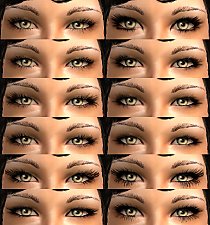
SCREENSHOTS


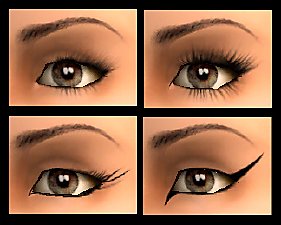
BreakawayLiners.jpg - width=602 height=354
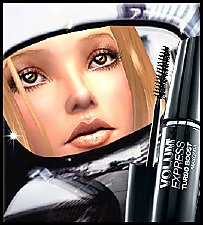
BreakawayLinerPandora.jpg - width=638 height=642
Downloaded 1,431 times
537 Thanks
34 Favourited
40,321 Views
Say Thanks!
Thanked!
My latest creations, a set of 5 eyeliners, called Breakaway.
Don't upload those ANYWHERE, especially not the *cough* lovely *cough* exchange.
Feel free to use them for your pictures, stories and stuff. You may also package them with your sims when you put them up for download (but please give credit then)
Additional credits for my model Pandora:
Eyes: Rensim
Skintone: Edited Louis/Enayla skins with additional Rensim makeup
Lipstick: Bruno
Hair: Rosesims (pay)
Don't upload those ANYWHERE, especially not the *cough* lovely *cough* exchange.
Feel free to use them for your pictures, stories and stuff. You may also package them with your sims when you put them up for download (but please give credit then)
Additional credits for my model Pandora:
Eyes: Rensim
Skintone: Edited Louis/Enayla skins with additional Rensim makeup
Lipstick: Bruno
Hair: Rosesims (pay)
Advertisement:
|
Aleesha_BreakawayEyeliners.zip
Download
Uploaded: 1st May 2007, 197.8 KB.
9,054 downloads.
|
||||||||
| For a detailed look at individual files, see the Information tab. | ||||||||
Install Instructions
Basic Download and Install Instructions:
1. Download: Click the download link to save the .rar or .zip file(s) to your computer.
2. Extract the zip, rar, or 7z file.
3. Place in Downloads Folder: Cut and paste the .package file(s) into your Downloads folder:
1. Download: Click the download link to save the .rar or .zip file(s) to your computer.
2. Extract the zip, rar, or 7z file.
3. Place in Downloads Folder: Cut and paste the .package file(s) into your Downloads folder:
- Origin (Ultimate Collection): Users\(Current User Account)\Documents\EA Games\The Sims™ 2 Ultimate Collection\Downloads\
- Non-Origin, Windows Vista/7/8/10: Users\(Current User Account)\Documents\EA Games\The Sims 2\Downloads\
- Non-Origin, Windows XP: Documents and Settings\(Current User Account)\My Documents\EA Games\The Sims 2\Downloads\
- Mac: Users\(Current User Account)\Documents\EA Games\The Sims 2\Downloads
- Mac x64: /Library/Containers/com.aspyr.sims2.appstore/Data/Library/Application Support/Aspyr/The Sims 2/Downloads
- For a full, complete guide to downloading complete with pictures and more information, see: Game Help: Downloading for Fracking Idiots.
- Custom content not showing up in the game? See: Game Help: Getting Custom Content to Show Up.
- If you don't have a Downloads folder, just make one. See instructions at: Game Help: No Downloads Folder.
Advertisement:
Loading comments, please wait...

Other Download Recommendations:
-

-

by pinksalamander 29th Dec 2005 at 2:24pm
-
-
by Barcelonista 20th Jan 2006 at 6:46pm
-
by redbutterfly 30th Jan 2006 at 1:50am
-
-
by SussisSoGoodSims 11th Jan 2007 at 11:32am
-
-
-


More downloads by Aleesha:
See more
-
-
-


-


-


-
-


-


~* * * Fever Eyes - You are infected! * * *~
by Aleesha 6th Sep 2007 at 12:45pm
Hey folks. I'm back. Kinda... more...
-


-