
 Sign in to Mod The Sims
 More Natural Blonde
 More Natural Blonde
SCREENSHOTS


1-back.jpg - width=293 height=503
1-front.jpg - width=337 height=511
1-side.jpg - width=365 height=479
2-back.jpg - width=204 height=429
2-front.jpg - width=319 height=505
2-side.jpg - width=236 height=389
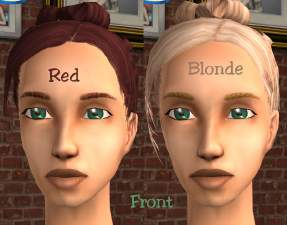
both-front.jpg - width=656 height=505
Downloaded 204 times
46 Thanks
3 Favourited
5,454 Views
Say Thanks!
Thanked!
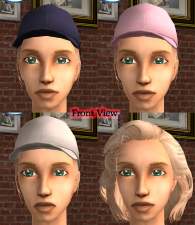
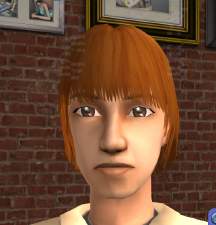
Thanks to the positive comments on my first 'Natural Blonde' hair, i recolored 2 more for you all.
All images are at the bottom in this order 1 (back, front, side) the 2 (back, front, side), the an image of both from the front.
Same as last time these hair will not replace the existing ones, this hair will appear in your custom hair bin.
All images are at the bottom in this order 1 (back, front, side) the 2 (back, front, side), the an image of both from the front.
Same as last time these hair will not replace the existing ones, this hair will appear in your custom hair bin.
Advertisement:
This is a Maxis Recolour which means that it is a recolour of an item that already exists in your game. Please check the Pack requirements to see which game pack it recolours.
|
more_natural_blonde_hair.rar
Download
Uploaded: 4th Oct 2007, 814.9 KB.
483 downloads.
|
||||||||
| For a detailed look at individual files, see the Information tab. | ||||||||
Install Instructions
Basic Download and Install Instructions:
1. Download: Click the download link to save the .rar or .zip file(s) to your computer.
2. Extract the zip, rar, or 7z file.
3. Place in Downloads Folder: Cut and paste the .package file(s) into your Downloads folder:
1. Download: Click the download link to save the .rar or .zip file(s) to your computer.
2. Extract the zip, rar, or 7z file.
3. Place in Downloads Folder: Cut and paste the .package file(s) into your Downloads folder:
- Origin (Ultimate Collection): Users\(Current User Account)\Documents\EA Games\The Sims™ 2 Ultimate Collection\Downloads\
- Non-Origin, Windows Vista/7/8/10: Users\(Current User Account)\Documents\EA Games\The Sims 2\Downloads\
- Non-Origin, Windows XP: Documents and Settings\(Current User Account)\My Documents\EA Games\The Sims 2\Downloads\
- Mac: Users\(Current User Account)\Documents\EA Games\The Sims 2\Downloads
- Mac x64: /Library/Containers/com.aspyr.sims2.appstore/Data/Library/Application Support/Aspyr/The Sims 2/Downloads
- For a full, complete guide to downloading complete with pictures and more information, see: Game Help: Downloading for Fracking Idiots.
- Custom content not showing up in the game? See: Game Help: Getting Custom Content to Show Up.
- If you don't have a Downloads folder, just make one. See instructions at: Game Help: No Downloads Folder.
Advertisement:
Loading comments, please wait...
Author
Download Details
Packs:
None, this is Sims 2 base game compatible!
Uploaded: 4th Oct 2007 at 8:56 PM
Updated: 5th Oct 2007 at 12:04 AM
Uploaded: 4th Oct 2007 at 8:56 PM
Updated: 5th Oct 2007 at 12:04 AM
Tags
Other Download Recommendations:
-
-
-
-
-
-
Natural Blonde Streaks (Requested) - XMSims72 Recolour - Female All Ages
by punkprincess92 10th Jul 2007 at 4:39am
-
-
-
-


More downloads by simster:
See more




About Me
My Creation Policy
-------------------
You can use the items i upload if you credit me for that item.
-------------------
You can use the items i upload if you credit me for that item.