
 Sign in to Mod The Sims
 Custom Pet Coat for Dogs - "Poochasso"
 Custom Pet Coat for Dogs - "Poochasso"
SCREENSHOTS


img.jpg - width=600 height=600
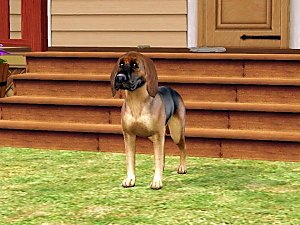
screenshot1.jpg - width=548 height=500
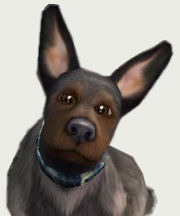
screenshot2.jpg - width=725 height=622
Downloaded 1,320 times
227 Thanks
26 Favourited
25,683 Views
Say Thanks!
Thanked!
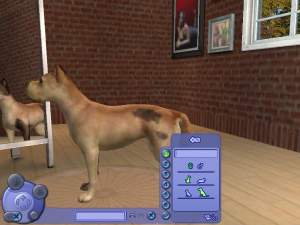
[It looks like someone got a little to close to his master's canvas! ^ ^]
 NOTE: This is a DEFAULT REPLACEMENT COAT! I have set it to override the GOOFY, SMOOTH coat for dogs, thus leaving your aesthetically pleasing coat colors as they are. [and if you -are- using that color, your dogs will be fine as long as their fur consistancy isn't set to "smooth".]
Needless to say, before this is actually usable, you'll need to import the following Code into your game to unlock that specific Color:
 Goofy Coat for Dogs
ZZZ11ZZZHZAAQ91ZB1A or EEGJ2YRZZZARQ9QHA64
[When your desired Neighborhood has finished loading, simply click the "Game Options", then the little Key in the righthand corner, and enter either of the codes above.]
[If you don't do so, it -will not- work. The images are designed to override that specific coat and fur consistancy only.]
This custom coat does not have a custom eye color - I just used grey, as that's what I'd imagine it being [it's pads are grey as well]. The color on the texture is simply yellow, so it will not visibly override any of your in game pets' irises.
Simply stick the .package into your downloads file and it should work perfectly - Again, replacing the goofy, smooth fur dog coat.
I am very open to suggestions as well! If you'd like me to have a go at a specific custom coat, I'll be more than happy to try it, if it sounds like an entertaining idea ^ ^
Please do -not- upload any of the custom coats to pay sites. Everyone should be able to get them for free, and I'd hate for them to think otherwise. Thank you kindly.
If you're interested in learning how to create your own custom Pet coats, here is a link to the Tutorial I have made on doing so ^ ^
 NOTE: This is a DEFAULT REPLACEMENT COAT! I have set it to override the GOOFY, SMOOTH coat for dogs, thus leaving your aesthetically pleasing coat colors as they are. [and if you -are- using that color, your dogs will be fine as long as their fur consistancy isn't set to "smooth".]
Needless to say, before this is actually usable, you'll need to import the following Code into your game to unlock that specific Color:
 Goofy Coat for Dogs
ZZZ11ZZZHZAAQ91ZB1A or EEGJ2YRZZZARQ9QHA64
[When your desired Neighborhood has finished loading, simply click the "Game Options", then the little Key in the righthand corner, and enter either of the codes above.]
[If you don't do so, it -will not- work. The images are designed to override that specific coat and fur consistancy only.]
This custom coat does not have a custom eye color - I just used grey, as that's what I'd imagine it being [it's pads are grey as well]. The color on the texture is simply yellow, so it will not visibly override any of your in game pets' irises.
Simply stick the .package into your downloads file and it should work perfectly - Again, replacing the goofy, smooth fur dog coat.
I am very open to suggestions as well! If you'd like me to have a go at a specific custom coat, I'll be more than happy to try it, if it sounds like an entertaining idea ^ ^
Please do -not- upload any of the custom coats to pay sites. Everyone should be able to get them for free, and I'd hate for them to think otherwise. Thank you kindly.
If you're interested in learning how to create your own custom Pet coats, here is a link to the Tutorial I have made on doing so ^ ^
Advertisement:
|
Poochasso.zip
Download
Uploaded: 19th Jan 2008, 246.7 KB.
5,479 downloads.
|
||||||||
| For a detailed look at individual files, see the Information tab. | ||||||||
Install Instructions
Basic Download and Install Instructions:
1. Download: Click the download link to save the .rar or .zip file(s) to your computer.
2. Extract the zip, rar, or 7z file.
3. Install: Double-click on the .sims2pack file to install its contents to your game. The files will automatically be installed to the proper location(s).
1. Download: Click the download link to save the .rar or .zip file(s) to your computer.
2. Extract the zip, rar, or 7z file.
3. Install: Double-click on the .sims2pack file to install its contents to your game. The files will automatically be installed to the proper location(s).
- You may want to use the Sims2Pack Clean Installer instead of the game's installer, which will let you install sims and pets which may otherwise give errors about needing expansion packs. It also lets you choose what included content to install. Do NOT use Clean Installer to get around this error with lots and houses as that can cause your game to crash when attempting to use that lot. Get S2PCI here: Clean Installer Official Site.
- For a full, complete guide to downloading complete with pictures and more information, see: Game Help: Downloading for Fracking Idiots.
- Custom content not showing up in the game? See: Game Help: Getting Custom Content to Show Up.
Advertisement:
Loading comments, please wait...
Author

Download Details
Tags
Other Download Recommendations:
-
-
-
-
-
by fecoloradoxD 27th Dec 2006 at 1:43am
-
-
-
Custom Pet Coat for Cats - Halloween Sky
by Ticks-Tocks 17th Jan 2008 at 9:32am
-
-


More downloads by Ticks-Tocks:
See more
-
Custom Pet Coat for Cats - Halloween Sky
by Ticks-Tocks 17th Jan 2008 at 9:32am
:!!:NOTE: This is a DEFAULT REPLACEMENT COAT! more...
Packs Needed
| Expansion Pack | |
|---|---|
 | Pets |
About Me
http://216.32.95.41/images/smilies/icon4.gif Wondering how to create your own custom pet coats? Do-It-Yourself Pet Coat Customization Tutorial with Template .packages.
[ Link UPDATED ]