
 Sign in to Mod The Sims
 Beach Paradise House - 2 floors, 2 bedrooms and fully furnished
 Beach Paradise House - 2 floors, 2 bedrooms and fully furnished


FINAL1.jpg - width=800 height=600
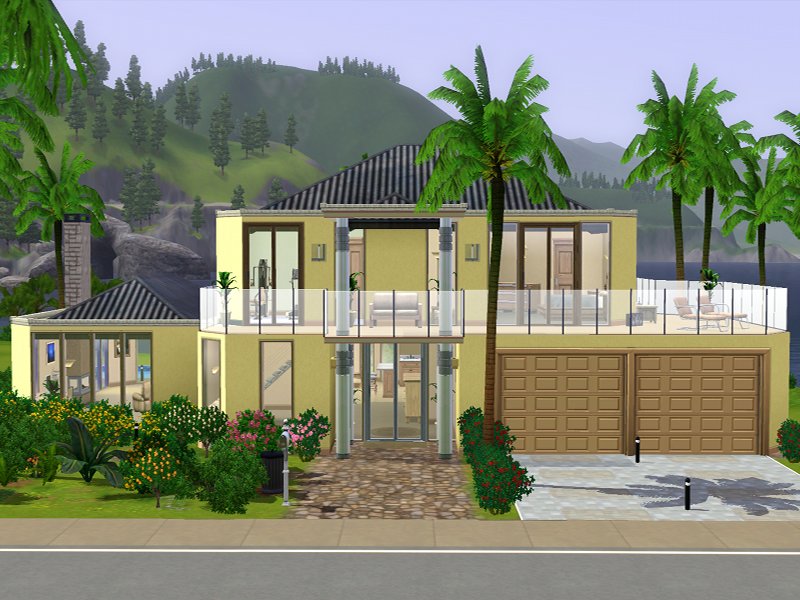
Front
FINAL2.jpg - width=800 height=600
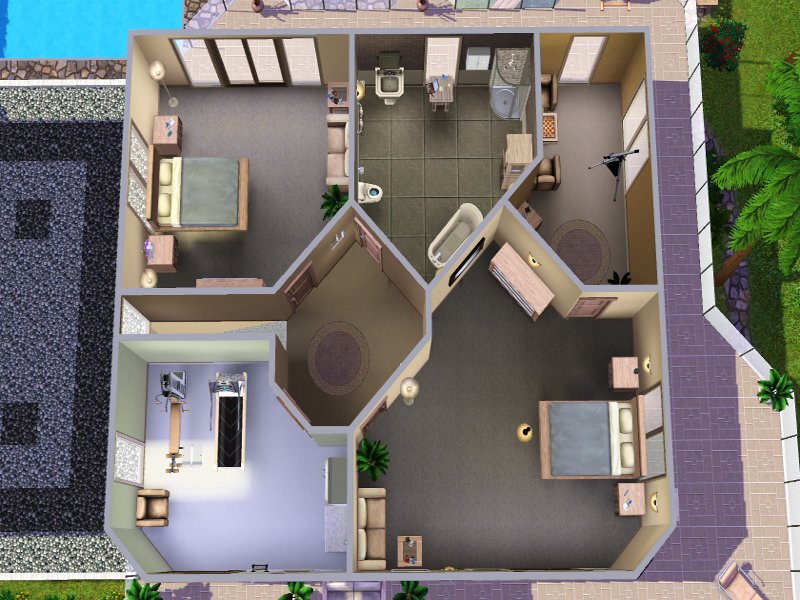
2nd floor
FINAL3.jpg - width=800 height=600
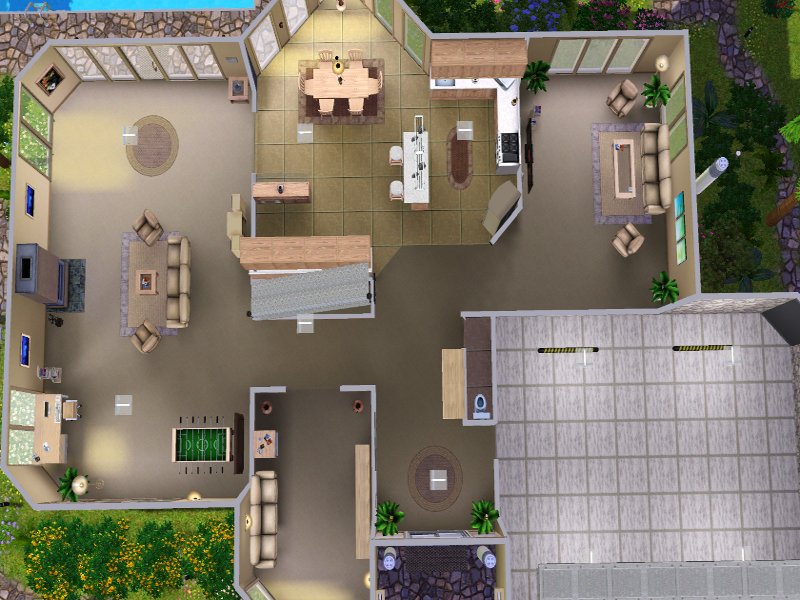
1st floor
FINAL4 - kitchen.jpg - width=1280 height=1024
kitchen
FINAL5 - fireplace.jpg - width=1280 height=1024
living room - fireplace
FINAL6 - bedroom.jpg - width=1280 height=1024
bedroom
FINAL7 - Rear.jpg - width=980 height=653
Rear
FINAL main.jpg - width=800 height=600
Front
2 bedrooms, garage for 2 cars, large living room with fireplace, trainingroom, bookroom, chessroom, TV room and a nice garden with a few details. Fully furnished with weight on light colors.
1st floor:
2nd floor:
Lot Size: 3x3
Lot Price: 41.413 / 118.029
|
Beach Paradise House updated.rar
| Beach Paradise House
Download
Uploaded: 16th Jun 2009, 1.54 MB.
2,356 downloads.
|
||||||||
| For a detailed look at individual files, see the Information tab. | ||||||||
Install Instructions
1. Click the filename or the download button to download the file to your computer.
2. Extract the zip, rar, or 7z file.
2. Select the .sims3pack file you got from extracting.
3. Cut and paste it into your Documents\Electronic Arts\The Sims 3\Downloads folder. If you do not have this folder yet, it is recommended that you open the game and then close it again so that this folder will be automatically created. Then you can place the .sims3pack into your Downloads folder.
5. Load the game's Launcher, and click on the Downloads tab. Select the house icon, find the lot in the list, and tick the box next to it. Then press the Install button below the list.
6. Wait for the installer to load, and it will install the lot to the game. You will get a message letting you know when it's done.
7. Run the game, and find your lot in Edit Town, in the premade lots bin.
Extracting from RAR, ZIP, or 7z: You will need a special program for this. For Windows, we recommend 7-Zip and for Mac OSX, we recommend Keka. Both are free and safe to use.
Need more help?
If you need more info, see Game Help:Installing TS3 Packswiki for a full, detailed step-by-step guide!
Loading comments, please wait...

Uploaded: 16th Jun 2009 at 7:25 AM
-
by Jcasjr updated 11th Jun 2009 at 3:36pm
 24
22.9k
10
24
22.9k
10
-
by swetcaramel7983 30th Jun 2009 at 10:21pm
2
9.1k
3
-
Sunflower Breeze - Modern House (1-4 sims)
by AllHeartAnne updated 4th Jul 2009 at 12:40pm
30
65.2k
63
-
by lotra91 15th Jul 2009 at 11:36pm
9
15.7k
15
-
Beach Paradise - Five Bedroom, Five Bathroom (3 EnSuite)
by weirscotland2k 1st Aug 2009 at 11:39pm
3
42.9k
5
-
by gomme 1st Nov 2009 at 9:28pm
2
14.6k
6
-
-
-
by SaronaSims 15th Feb 2010 at 8:13pm
+1 packs
2 4.7k 1 World Adventures
-


-
Venus - Vampire the Masquerade: Bloodlines
by Slipslop 9th Sep 2009 at 6:29pm
--> BACKGROUND: Venus is the seductive owner of "Confession", a downtown nightclub based more...
13
66.1k
44
-
-
Gary Golden - Vampire the Masquerade: Bloodlines
by Slipslop 9th Feb 2010 at 10:44am
-> What the hell is THIS? This is Gary Golden, primogen of the Nosferatu clan, scary! Read more...
26
43.3k
43
-
-
-
Yukie - Vampire the Masquerade: Bloodlines
by Slipslop 29th Jan 2010 at 10:42pm
-> The cute little demonhunter girl from the game, a new asian sim! With comparison video. Read more...
24
56.5k
54
-
-

-
Beckett - Vampire the Masquerade: Bloodlines (UPDATE 3.Jan)
by Slipslop 17th Aug 2009 at 10:12pm
:!: UPDATE 3.Jan: EsmeraldaF had a little New year gift for me and the VtMB fans, she created the more...
9
27.5k
21
-
About Me
I have quit creating for Sims 3 and moved on to other games. I enjoyed creating for MTS and i am happy that so many people liked my sims. I'm still lurking, but i am not active anymore. Hope you still find my sims here and enjoy playing them.
Farewell! But i will probably be back for Sims 4, let's hope they get it right with the editor ;)
!! Must have mods !!
Alternative UI mod for Non-default Skintones by Anach (Anach_CASSkins6x4_1.17.package)
Mastercontroller mod by twallan (Install it and experiment with this baby, you will be surprised!)
Alternative sliderhacks by [B]aWT and CmarNYC (If you don't like awesomemod for some reason)
HQ Modification by aWT (used for HQ textured uploads, you'll see them more often now i guess)
__________________________________________
[B]Q/A
- I create for the BASEGAME ONLY, no Addons! For maximum compatibility.
- All my sims are tested in the basegame without CC (to test , if they crash) and with all used CC before uploading, to make sure they look like in the pictures, if you installed all the needed CC correctly. So if my sims don't work in an addon it might be, because some mods or CC doesn't work there, or a new patch screws with mods.
- If you ask why i add musiclinks to my uploads. It's my way to share my musictaste with the community and i try to make the tracks fit the character.
- ''Why do you have such nice graphics?'' I have every graphic setting ingame and in my card's driversettings absolute max (x16 Ansitropefiltering, Antialiasing max ingame) and i use the max allowed filesize for jpg(250kb) and png(150kb), so i get the best picture quality possible. For the thumbnails i use png format, to avoid pixelation and the slight blurriness the jpg format gives these small pictures.
I use XP-Paint and GIMP to edit the raw bmp-screenshots, which i take with FRAPS.
- ''Do you take requests?'' Nope, sorry. I have too