
 Sign in to Mod The Sims
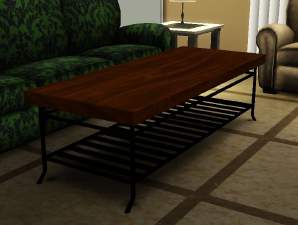
 Elation Coffee Table (NEW MESH/RECOLORABLE)
 Elation Coffee Table (NEW MESH/RECOLORABLE)


elationdefault.jpg - width=400 height=400
elation_1.jpg - width=700 height=525
elation_2.jpg - width=700 height=525
elation_3.jpg - width=700 height=525
elation_4.jpg - width=700 height=525
elation_5.jpg - width=700 height=525

 I hope you enjoy it!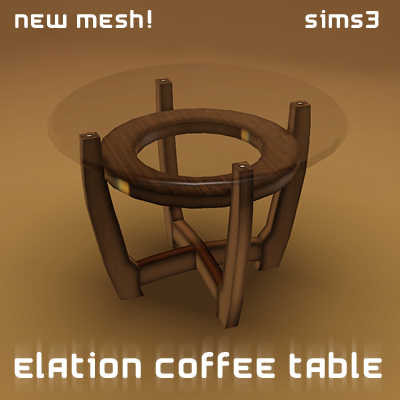
It's a coffee table (which can also be used as an end table) that is FULLY recolorable. The only thing you can't change is the glass, but otherwise you can change it to whatever color, pattern, etc. that you'd like
Just install it (with the InstallHelper) and you'll be able to find it in Surfaces > Coffee Tables for §166.
[NOTE: Thumbnail may look like a repeat of another end table, just click on it and you'll be able to tell which one is which]
[NOTE: Also note that this object is VERY reflective, so the colors of its surroundings may change how the object's true color looks in the game.]
Polygon Counts:
Poly/Faces: 950 ; Vertices: 516
Additional Credits:
Special thanks to Deluxe Designs for the tutorial (couldn't have done it without you!), WesHowe for all the support, the creators of all the tools made (I appreciate all your time!), and of course Mod The Sims
This is a new mesh, and means that it's a brand new self contained object that usually does not require a specific Pack (although this is possible depending on the type). It may have Recolours hosted on MTS - check below for more information.
|
simfantastic2_elationcoffee.zip
Download
Uploaded: 19th Aug 2009, 849.5 KB.
32,642 downloads.
|
||||||||
| For a detailed look at individual files, see the Information tab. | ||||||||
Install Instructions
1. Click the download button, or the filename, to download the file to your computer.
2. Extract the zip, rar, or 7z file. Now you will have either a .package or a .sims3pack file.
For Package files:
1. Cut and paste the file into your Documents\Electronic Arts\The Sims 3\Mods\Packages folder. If you do not already have this folder, you should read the full guide to Package files first: Sims 3:Installing Package Fileswiki, so you can make sure your game is fully patched and you have the correct Resource.cfg file.
2. Run the game, and find your content where the creator said it would be (build mode, buy mode, Create-a-Sim, etc.).
For Sims3Pack files:
1. Cut and paste it into your Documents\Electronic Arts\The Sims 3\Downloads folder. If you do not have this folder yet, it is recommended that you open the game and then close it again so that this folder will be automatically created. Then you can place the .sims3pack into your Downloads folder.
2. Load the game's Launcher, and click on the Downloads tab. Find the item in the list and tick the box beside it. Then press the Install button below the list.
3. Wait for the installer to load, and it will install the content to the game. You will get a message letting you know when it's done.
4. Run the game, and find your content where the creator said it would be (build mode, buy mode, Create-a-Sim, etc.).
Extracting from RAR, ZIP, or 7z: You will need a special program for this. For Windows, we recommend 7-Zip and for Mac OSX, we recommend Keka. Both are free and safe to use.
Need more help?
If you need more info, see:
- For package files: Sims 3:Installing Package Fileswiki
- For Sims3pack files: Game Help:Installing TS3 Packswiki
Loading comments, please wait...


Uploaded: 19th Aug 2009 at 10:16 PM
-
by orangemittens 2nd Nov 2009 at 6:16pm
 16
32.5k
36
16
32.5k
36
-
by Odysseus1960 30th Nov 2009 at 8:26pm
34
50.2k
54
-
Socialite dining set from the Sims 2 - Work with PETS
by TheJim07 11th Mar 2010 at 5:40pm
30
50.7k
135
-
by stouffers3 28th Apr 2010 at 8:34pm
7
27.1k
72
-
by leefish 20th Jun 2010 at 5:33pm
9
17.9k
28
-
by Lisen801 updated 25th May 2012 at 2:01pm
28
57.5k
127
-
-
by sailfindragon 28th Jun 2012 at 5:50am
-
-
by zoe22 2nd Jan 2020 at 8:05pm
13
14.8k
85

-
New Simfantastic 2 Television Entertainment!
by simfantastic2 11th Aug 2005 at 12:52am
I know i said i wouldn't be making objects until after nightlife, but i just couldn't resist making another one. more...
 22
25k
20
22
25k
20
-
UPDATED! New Christmas Outside Decorations! 3 Meshes!
by simfantastic2 30th Oct 2005 at 12:16am
Ever since i got my own website that i paid for with so much space i haven't been posting here more...
32
41.7k
13
-
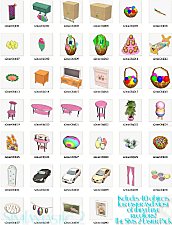
The Sims 2 Easter Pack by Simfantastic 2 over 40 easter objects!
by simfantastic2 2nd Apr 2006 at 9:34pm
Well i have been working on this for a long time and I hope everyone enjoys it. more...
94
100k
43
-
New Simfantastic 2 Ground Bay Window (Includes all roof recolors including uni!)
by simfantastic2 10th Dec 2005 at 11:35pm
Here is my latest creation! more...
70
83.9k
81
-
Garland For Railing With Lights
by simfantastic2 7th Dec 2005 at 1:32am
Here you go. A new christmas decoration for your fences. more...
29
27.6k
18
-
New Canon 2005 Printer And Scanner!
by simfantastic2 25th Mar 2005 at 11:40pm
:beer: After hours and hours, weeks and weeks, i have finally made my First new Mesh object! more...
81
55.3k
28
-

New Beauty Hair Mesh (All Colors!)
by simfantastic2 27th Nov 2005 at 5:04pm
Hi everyone, this is the first hair mesh i ever made, i hope you like it! Enjoy! more...
-
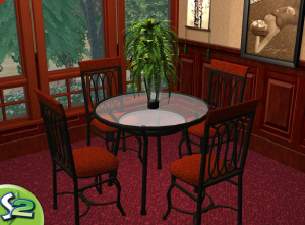
by simfantastic2 30th Jan 2006 at 11:31pm
Here are some of my objects for the sims 2 that i got out of the Home Decorators Collection Magazine, more...
53
36.8k
29
-
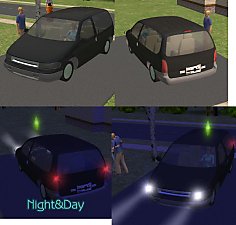
by simfantastic2 27th Nov 2005 at 2:43am
This is my first car ever. more...
+1 packs
28 29.4k 10 Nightlife
-
The Sims 2 Summer Life Pack (40 new objs, over 200 new walls and floors, and more!)
by simfantastic2 27th Aug 2006 at 2:39pm
This is my second pack after creating the succesfully easter pack, i hope you like this as much or even more...
116
239.8k
152


About Me
Most of all, enjoy. It is an honor and pleasure to see anyone that has used items from me or made recolors. I enjoy looking at them and it is a lot of fun.