Sign in to Mod The Sims
 Modern Home on a Cliff
 Modern Home on a Cliff
SCREENSHOTS


Screenshot-13.jpg - width=840 height=524
Living Area
Screenshot-7.jpg - width=840 height=524
Lower Level
Screenshot-8.jpg - width=840 height=524
Main Level
Screenshot-9.jpg - width=840 height=524
Observatory
Screenshot-14.jpg - width=840 height=524
Master Bedroom
Screenshot-17.jpg - width=840 height=524
View from Observatory
Screenshot.jpg - width=840 height=524
Screenshot-2.jpg - width=840 height=524
Downloaded 428 times
76 Thanks
6 Favourited
8,630 Views
Say Thanks!
Thanked!
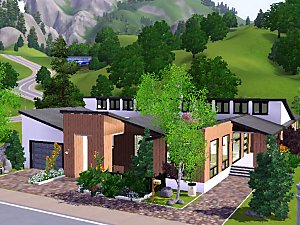
This is my first attempt at a house in the sims 3 and I think it turned out pretty well. Worked pretty hard on this and put well over 8 hours into it.
The house has 3 bedrooms and 4 bathrooms. Master bedroom suite with fireplace. Guest bedroom on main level with full bath. All glass rooftop observatory with exit to sun deck. Large living room. Large kitchen/dining room/den area.
Lot Size: 40x30
Furnished: 325,284
Unfurnished: 135,235
Guess this slipped past me I thought i deleted any custom content i had in the house but this is all I'm aware of.
Backless Shower by petallotus
http://www.modthesims.info/download.php?t=361082
The rest is all EA store content
Living area is the Ultra Lounge set (couches and coffee table)
Guest Bedroom also uses Ultra Lounge set (bed, end tables, dresser)
Plasma Tron TV
Nightly Light
Brassworks Chandelier
Ceiling Torchiere
The Longest Table
Variegated Ceramic Vase
Mostly Square Table Lamp
Lot Size: 4x3
Lot Price: 325284
The house has 3 bedrooms and 4 bathrooms. Master bedroom suite with fireplace. Guest bedroom on main level with full bath. All glass rooftop observatory with exit to sun deck. Large living room. Large kitchen/dining room/den area.
Lot Size: 40x30
Furnished: 325,284
Unfurnished: 135,235
Guess this slipped past me I thought i deleted any custom content i had in the house but this is all I'm aware of.
Backless Shower by petallotus
http://www.modthesims.info/download.php?t=361082
The rest is all EA store content
Living area is the Ultra Lounge set (couches and coffee table)
Guest Bedroom also uses Ultra Lounge set (bed, end tables, dresser)
Plasma Tron TV
Nightly Light
Brassworks Chandelier
Ceiling Torchiere
The Longest Table
Variegated Ceramic Vase
Mostly Square Table Lamp
Lot Size: 4x3
Lot Price: 325284
Advertisement:
|
Modern Cliffside Home.rar
Download
Uploaded: 22nd Sep 2009, 2.95 MB.
1,024 downloads.
|
||||||||
| For a detailed look at individual files, see the Information tab. | ||||||||
Install Instructions
Quick Guide:
1. Click the filename or the download button to download the file to your computer.
2. Extract the zip, rar, or 7z file.
2. Select the .sims3pack file you got from extracting.
3. Cut and paste it into your Documents\Electronic Arts\The Sims 3\Downloads folder. If you do not have this folder yet, it is recommended that you open the game and then close it again so that this folder will be automatically created. Then you can place the .sims3pack into your Downloads folder.
5. Load the game's Launcher, and click on the Downloads tab. Select the house icon, find the lot in the list, and tick the box next to it. Then press the Install button below the list.
6. Wait for the installer to load, and it will install the lot to the game. You will get a message letting you know when it's done.
7. Run the game, and find your lot in Edit Town, in the premade lots bin.
Extracting from RAR, ZIP, or 7z: You will need a special program for this. For Windows, we recommend 7-Zip and for Mac OSX, we recommend Keka. Both are free and safe to use.
Need more help?
If you need more info, see Game Help:Installing TS3 Packswiki for a full, detailed step-by-step guide!
1. Click the filename or the download button to download the file to your computer.
2. Extract the zip, rar, or 7z file.
2. Select the .sims3pack file you got from extracting.
3. Cut and paste it into your Documents\Electronic Arts\The Sims 3\Downloads folder. If you do not have this folder yet, it is recommended that you open the game and then close it again so that this folder will be automatically created. Then you can place the .sims3pack into your Downloads folder.
5. Load the game's Launcher, and click on the Downloads tab. Select the house icon, find the lot in the list, and tick the box next to it. Then press the Install button below the list.
6. Wait for the installer to load, and it will install the lot to the game. You will get a message letting you know when it's done.
7. Run the game, and find your lot in Edit Town, in the premade lots bin.
Extracting from RAR, ZIP, or 7z: You will need a special program for this. For Windows, we recommend 7-Zip and for Mac OSX, we recommend Keka. Both are free and safe to use.
Need more help?
If you need more info, see Game Help:Installing TS3 Packswiki for a full, detailed step-by-step guide!
Advertisement:
Loading comments, please wait...
Author
Download Details
Packs:
None, this is Sims 3 base game compatible!
Uploaded: 19th Sep 2009 at 6:28 PM
Updated: 22nd Sep 2009 at 1:55 AM
Uploaded: 19th Sep 2009 at 6:28 PM
Updated: 22nd Sep 2009 at 1:55 AM
Number of bedrooms:
– 3 Bedrooms
Custom Content Included:
– None
: No Custom Content included
Furnishings:
– Unfurnished
: Lot is a basic shell with walls, floors, windows, doors, stairs, and landscaping, but does not contain basic fixtures, plumbing, or furniture.
– Fully Furnished
: Lot is completely decked out in furnishings
Special Flags:
– Not Applicable
Other Download Recommendations:
-
-
-
by Lavandula 10th Jul 2009 at 9:52pm
 4
11.9k
10
4
11.9k
10
-
-
-
by Townieforsims 14th Aug 2009 at 7:28pm
5
14.3k
3
-
-
-

-