
 Sign in to Mod The Sims
 Braces!
 Braces!


braces_colorthumb.png - width=256 height=256
braces_nocolorthumb.png - width=256 height=256
braceslogo.jpg - width=180 height=123
childnocolor.jpg - width=645 height=577
nocolor2.jpg - width=605 height=555
teencolor.jpg - width=484 height=550
color.jpg - width=590 height=552


For some strange reason I had an itch to make some braces for my sims, so I thought I'd share!
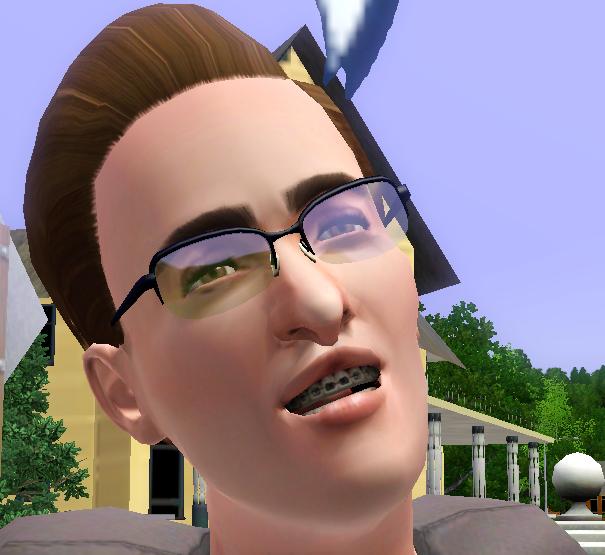
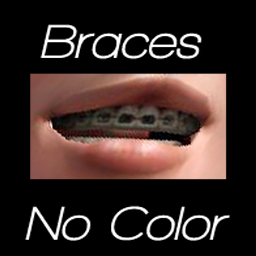
The braces are non-default overlays that go over your sims teeth and they come in two styles.
There's a non-recolorable version, that's all metal.
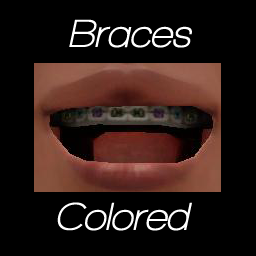
And a second version that allows for recolorable brackets. The brackets have three recolorable sections, allowing for multicolored magic in your sims mouth

These are categorized as costume makeup, and are available for both genders child-adult.
Both types for all ages/genders are in one package, for your convenience. And they both have custom thumbnails to help distinguish them in CAS.
As always you can use these for sims and such, just link back to here for the download please. And no exchange/paysites.
Additional Credits:
Child Hair: Wojtek0 (MTS)
Teen Female Hair: Peggy Sims (Free)
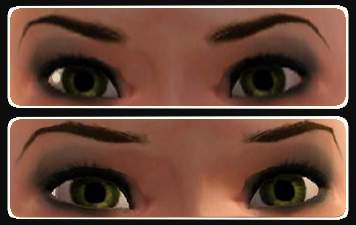
Eyes: daluved1 (MTS)
Child Brows: daluved1 (MTS)
Teen Female Brows: Nanondalt (MTS)
|
daluved1_braces_nondefault.rar
Download
Uploaded: 21st Sep 2009, 398.1 KB.
78,620 downloads.
|
||||||||
| For a detailed look at individual files, see the Information tab. | ||||||||
Install Instructions
1. Click the download button, or the filename, to download the file to your computer.
2. Extract the zip, rar, or 7z file. Now you will have either a .package or a .sims3pack file.
For Package files:
1. Cut and paste the file into your Documents\Electronic Arts\The Sims 3\Mods\Packages folder. If you do not already have this folder, you should read the full guide to Package files first: Sims 3:Installing Package Fileswiki, so you can make sure your game is fully patched and you have the correct Resource.cfg file.
2. Run the game, and find your content where the creator said it would be (build mode, buy mode, Create-a-Sim, etc.).
For Sims3Pack files:
1. Cut and paste it into your Documents\Electronic Arts\The Sims 3\Downloads folder. If you do not have this folder yet, it is recommended that you open the game and then close it again so that this folder will be automatically created. Then you can place the .sims3pack into your Downloads folder.
2. Load the game's Launcher, and click on the Downloads tab. Find the item in the list and tick the box beside it. Then press the Install button below the list.
3. Wait for the installer to load, and it will install the content to the game. You will get a message letting you know when it's done.
4. Run the game, and find your content where the creator said it would be (build mode, buy mode, Create-a-Sim, etc.).
Extracting from RAR, ZIP, or 7z: You will need a special program for this. For Windows, we recommend 7-Zip and for Mac OSX, we recommend Keka. Both are free and safe to use.
Need more help?
If you need more info, see:
- For package files: Sims 3:Installing Package Fileswiki
- For Sims3pack files: Game Help:Installing TS3 Packswiki
Loading comments, please wait...


Uploaded: 21st Sep 2009 at 2:18 AM
-
by Shep 29th Jun 2009 at 6:41pm
 44
134.1k
185
44
134.1k
185
-
by Papercat 23rd Jul 2009 at 2:03am
48
67.7k
120
-
by ailivina 10th Sep 2009 at 2:33pm
19
48.4k
73
-
by sammann89 29th Sep 2009 at 12:51pm
61
63.4k
60
-
by newone08 3rd Nov 2009 at 12:31am
33
104.5k
233
-
by newone08 5th Nov 2009 at 5:27pm
23
72.2k
120
-
-
by Chicken0895 14th Mar 2011 at 5:09am
14
28.6k
32
-
-
by san3sawayaka3kumi 21st Aug 2014 at 3:53pm
11
14.7k
35


-
-
I Wanna See Some Cash: Platform Heels
by Puss 'N Heels 9th Aug 2012 at 12:06am
Skrippin' aint easy. more...
-
-
The Medieval Kitchen Part 2 - Ye Olde Kingdom of Pudding
by The Merrye Makers 9th Jan 2012 at 6:02pm
Medieval Hot Beverage Barrel, Shelves, and two Cupboards (one tall and one short) made for The Merrye Makers by Hekate999. more...
13
72k
169
-
Madame Dal's House of Dance: Part 2 of 2 (UPDATED)
by daluved1 24th Oct 2010 at 11:49pm
Still dancing..... more...
25
96.7k
236
Female » Mixed Sets » Child
-
Medieval Blacksmith - Deco Objects - Ye Olde Kingdom of Pudding
by The Merrye Makers 20th Dec 2011 at 11:27am
Medieval blacksmith decorative objects made by Hekate999 for The Merrye Makers. more...
8
56.5k
116
-


-
Unisex Medieval Child's Tunic - Ye Olde Kingdom of Pudding
by The Merrye Makers 7th Jul 2013 at 1:24pm
Unisex Medieval child's tunic for boys and girls - Everyday, Formal, Athletic - by The Merrye Makers. Three channels. more...
19
49.8k
152
-
-
About Me
Because my policy is really inconsistent on my uploads, I've decided to make an official policy! So whatever you see here on my profile is my current policy. You may disregard any ''policy'' information you see on the actual upload itself.
-You may use my creations with sims
-You may use my objects with lots.
-You may retexture my meshes.
-You may include my meshes with retextures.
-You may NOT upload my creations with sims
-You may NOT upload my objects with lots.
-You may NOT upload my creations to paysites.
-You may NOT upload my creations to the exchange.
-Always credit me with a link
-I do NOT take requests!