
 Sign in to Mod The Sims
 Pacifíca Cottage
 Pacifíca Cottage


Pacifíca Cottage2.jpg - width=800 height=600
Pacifíca Cottage1.jpg - width=800 height=600
Pacifíca Cottage5.jpg - width=800 height=600
Pacifíca Cottage4.jpg - width=800 height=600
Pacifíca Cottage3.jpg - width=800 height=600
 . This is not my first house in TS3 but the first one I upload in MTS (Y) xD. This cottage is small, peaceful has 2 bedroom with 2.5 bathrooms and it is fully tested(at lease as much as I am aware of). So yeah, if you find any problem, just give me a PM and things will be solved .
The house does not have any CC and so would be quite easy to install(or so I believe).
The inspiration of this house came from works of Cloudburst and I believe to some extent, this house resemble his work.
So yeah, have a great time using this
Jesse
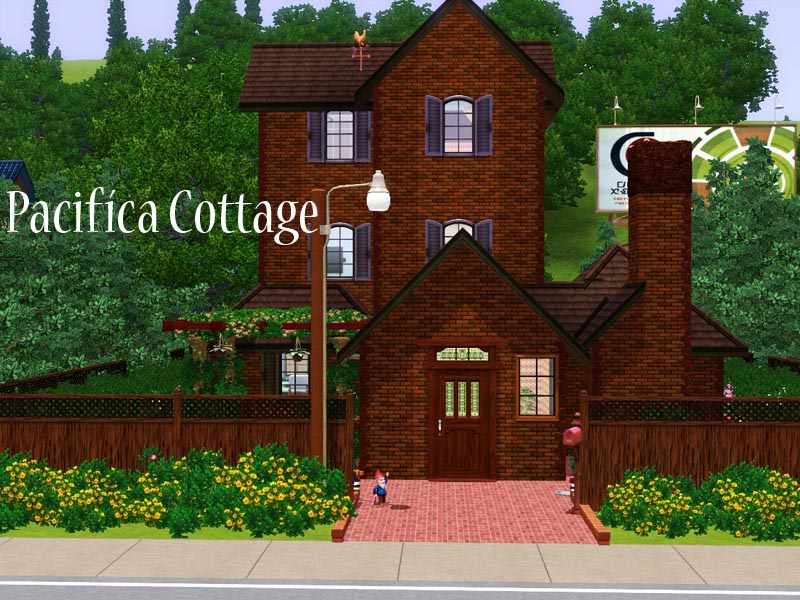
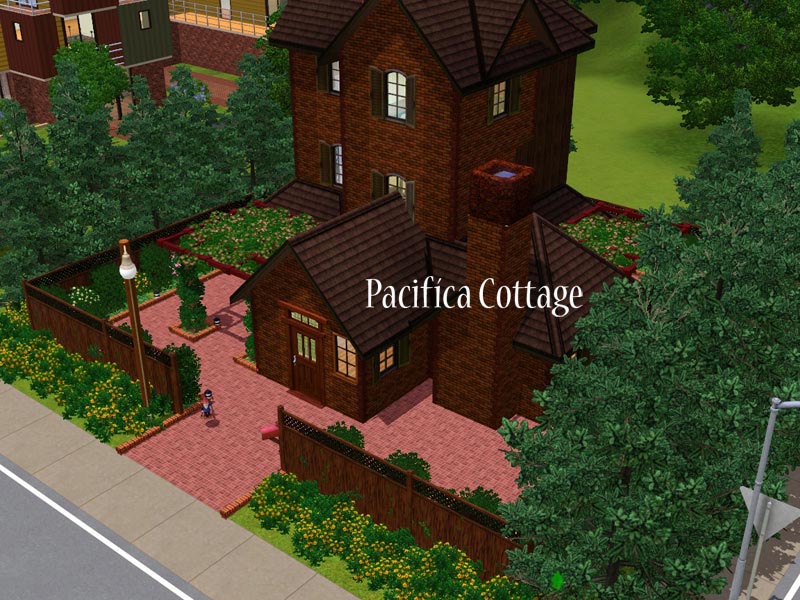
P.S. You can see floor plans in the below thumbnails. Click on it and it'll expand
. Pacifíca=Peaceful in Spanish xDLot Size: 21*22 (Will be fine putted in larger lots)
Lot Price:
Unfurnished:44.225
Furnished:57.750
Additional Credits:
Cloudburst for inspirations
|
MTS - Randhill - Pacifíca Cottage.rar
Download
Uploaded: 1st Feb 2010, 2.39 MB.
274 downloads.
|
||||||||
| For a detailed look at individual files, see the Information tab. | ||||||||
Install Instructions
1. Click the filename or the download button to download the file to your computer.
2. Extract the zip, rar, or 7z file.
2. Select the .sims3pack file you got from extracting.
3. Cut and paste it into your Documents\Electronic Arts\The Sims 3\Downloads folder. If you do not have this folder yet, it is recommended that you open the game and then close it again so that this folder will be automatically created. Then you can place the .sims3pack into your Downloads folder.
5. Load the game's Launcher, and click on the Downloads tab. Select the house icon, find the lot in the list, and tick the box next to it. Then press the Install button below the list.
6. Wait for the installer to load, and it will install the lot to the game. You will get a message letting you know when it's done.
7. Run the game, and find your lot in Edit Town, in the premade lots bin.
Extracting from RAR, ZIP, or 7z: You will need a special program for this. For Windows, we recommend 7-Zip and for Mac OSX, we recommend Keka. Both are free and safe to use.
Need more help?
If you need more info, see Game Help:Installing TS3 Packswiki for a full, detailed step-by-step guide!
Loading comments, please wait...

 View with Names
Uploaded: 1st Feb 2010 at 5:16 AM
-
by Amaranth1990 16th Jun 2009 at 5:44pm
 11
26.9k
33
11
26.9k
33
-
by lotra91 22nd Jun 2009 at 1:27am
3
5.8k
3
-
-
-
-
-
by iiNs0mNiiA 31st Oct 2012 at 5:51am
+5 packs
2 10.1k 15 Ambitions
 Late Night
 Generations
 Showtime
 Supernatural
-
by ohthatsimschick 14th Aug 2014 at 11:35am
3
6.6k
23
-
by Vermilionz 20th Feb 2017 at 10:19am
+2 packs
3 7.5k 18 Pets
Pets
 Seasons
-
by Mspigglypooh 28th Jan 2022 at 9:12am
+12 packs
3.2k 8 World Adventures
 High-End Loft Stuff
Ambitions
Late Night
Generations
Pets
Showtime
Supernatural
Seasons
High-End Loft Stuff
Ambitions
Late Night
Generations
Pets
Showtime
Supernatural
Seasons
 University Life
 Island Paradise
 Into the Future


Packs Needed
| Expansion Pack | |
|---|---|
| World Adventures |
About Me
Jesse