
 Sign in to Mod The Sims
 "Dicke Berta" Stove
 "Dicke Berta" Stove


berta-01.jpg - width=921 height=691
berta_colours01.jpg - width=1020 height=834
berta_colours02.jpg - width=1020 height=834
berta_playtest01.jpg - width=880 height=660
berta_playtest02.jpg - width=880 height=660
berta_presets.jpg - width=1020 height=720
berta_tiling.jpg - width=1020 height=700
brokenchimney.jpg - width=350 height=736
It costs 480§ in game and is in the Build mode catalogue > Fireplaces.
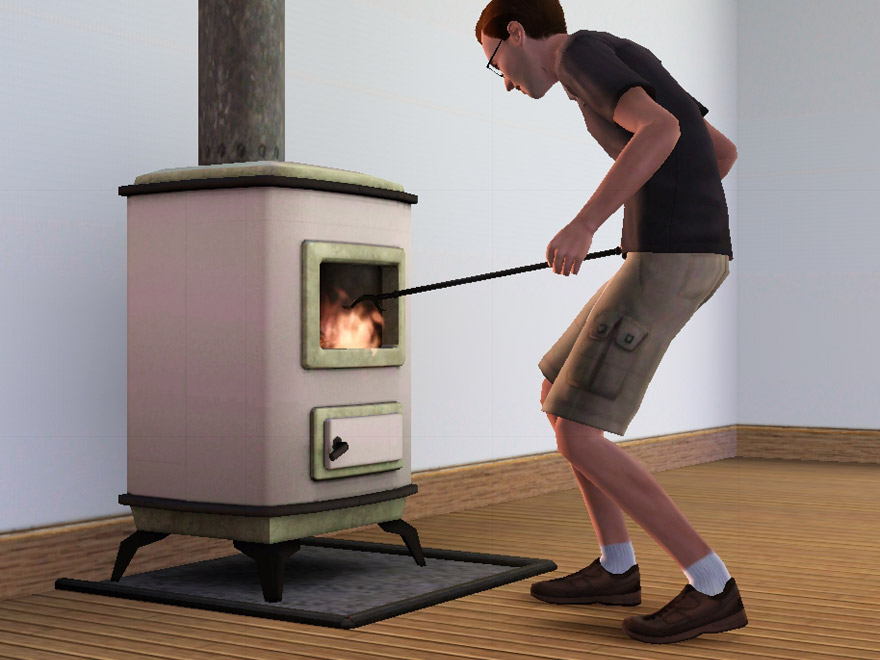
It has three recolourable channels: body, top/bottom/frames, and top and bottom rim plus feet and handle. Berta is cloned from the cheap modern EA fireplace and has the same presets as that – they’re not uber fantastic, but they make sense. See the "presets" screenshot.
Compatibility:
Made from 1.8.25 files. I'm told it works fine in newer games too, see the comments (thanks for letting me know!).
Known issues:
The stove is moved further back to the wall than the original one, so the fire is quite far in front now – flames will often appear to come out of the window, which looks a bit dangerous. (I know that a stove like this would normally have a door .. but sims can't very well poke a fire through a closed door, so I pretend that my sims are all slobs and have lost the door somehow).
There are two seams in the texture on the side and back of the body; this is because the entire witdh of the body wouldn't have fit on the map otherwise (without losing a lot of detail), so I had to cut the mesh somewhere. With more or less monochrome textures, it depends on the angle of light whether you can see it at all; with large floral patterns it's going to be more obvious. See the "tiling" screenshot below.
The UV map of one of the chimney parts is broken – I can't fix this with the tools that I have at the moment. See the "chimneybork" screenshot to see what it looks like. If this turns out to be fixable, I'll fix it; if not, I can live with it (I don't often study the chimneys of my sims' houses in detail).
Known nonissue:
There is a one-pixel line across all of the textures visible in some of the screenshots – I'm pretty sure this is my game, not the texture. If you look very closely on the "Berta-01" and the playtesting screenshots, you can see the same line on the wallpaper as well.
Made in blender with the help of s3pe, s3oc, Aorta, Photoshop, Milkshape, and S3 Object Mesh Tool.
Polygon Counts:
High detail mesh: 963F/1008V; low detail: 329F/423V, plus the chimney bits (those are identical to the EA ones – they're modular, so the total count depends on how many levels your house has).
This is a new mesh, and means that it's a brand new self contained object that usually does not require a specific Pack (although this is possible depending on the type). It may have Recolours hosted on MTS - check below for more information.
|
DickeBerta.zip
Download
Uploaded: 11th Feb 2010, 382.1 KB.
30,453 downloads.
|
||||||||
| For a detailed look at individual files, see the Information tab. | ||||||||
Install Instructions
1. Click the download button, or the filename, to download the file to your computer.
2. Extract the zip, rar, or 7z file. Now you will have either a .package or a .sims3pack file.
For Package files:
1. Cut and paste the file into your Documents\Electronic Arts\The Sims 3\Mods\Packages folder. If you do not already have this folder, you should read the full guide to Package files first: Sims 3:Installing Package Fileswiki, so you can make sure your game is fully patched and you have the correct Resource.cfg file.
2. Run the game, and find your content where the creator said it would be (build mode, buy mode, Create-a-Sim, etc.).
For Sims3Pack files:
1. Cut and paste it into your Documents\Electronic Arts\The Sims 3\Downloads folder. If you do not have this folder yet, it is recommended that you open the game and then close it again so that this folder will be automatically created. Then you can place the .sims3pack into your Downloads folder.
2. Load the game's Launcher, and click on the Downloads tab. Find the item in the list and tick the box beside it. Then press the Install button below the list.
3. Wait for the installer to load, and it will install the content to the game. You will get a message letting you know when it's done.
4. Run the game, and find your content where the creator said it would be (build mode, buy mode, Create-a-Sim, etc.).
Extracting from RAR, ZIP, or 7z: You will need a special program for this. For Windows, we recommend 7-Zip and for Mac OSX, we recommend Keka. Both are free and safe to use.
Need more help?
If you need more info, see:
- For package files: Sims 3:Installing Package Fileswiki
- For Sims3pack files: Game Help:Installing TS3 Packswiki
Loading comments, please wait...


Uploaded: 11th Feb 2010 at 6:34 PM
Updated: 11th Feb 2010 at 9:27 PM
-
New Chimney Colours for the Chimenea Muy Caliente Fireplace_FIXED_REDOWNLOAD
by cameranutz2 updated 11th Dec 2009 at 3:09pm
 18
32.7k
27
18
32.7k
27
-
by Lisen801 26th Aug 2010 at 7:04am
36
57.8k
99
-
-
by armiel 31st Jan 2011 at 5:37pm
101
211.6k
381
-
-
Medieval Fireplaces - Ye Olde Kingdom of Pudding
by The Merrye Makers 14th Jan 2012 at 12:52pm
14
51.6k
129
-
by TheJim07 21st Sep 2015 at 7:53am
4
10.5k
29
-
by TheJim07 16th Oct 2015 at 1:13pm
4
11.6k
33
-
-


-

by plasticbox 27th Mar 2015 at 6:21am
This is a set of playing cards without a table glued to its bottomside, so that sims can play cards more...
 86
47.5k
214
86
47.5k
214
-
by plasticbox 10th Dec 2015 at 5:59am
These are six recolours of the Maxis “Starboard” paneling. more...
3
20.9k
99
-
by plasticbox updated 9th Dec 2014 at 4:08pm
Some more plants fixed up and made available for Build/Buy. more...
24
110.6k
235
-
by plasticbox 3rd Apr 2015 at 3:16pm
This is the umbrella from the Maxis “My Yard or Yours” umbrella table without the table, which I find much more...
9
16.2k
81
-
by plasticbox 4th Nov 2014 at 5:39pm
A small house on a 15 x 25 lot, furnished for 4+1 sims. more...
11
27.8k
109
-
Newbie Road 57 [NL] - Two starters for under 15.000
by plasticbox 28th Mar 2006 at 11:17pm
Title: Newbie Road 57 [NL] - Two starters for under 15.000 Category: Lots & Housing > Residential > Starter Homes more...
 +1 packs
12 11.9k 10
+1 packs
12 11.9k 10 Nightlife
-

Newbie Road 38 [NL] - Starter House
by plasticbox 28th Jan 2006 at 10:37am
Title: Newbie Road 38 [NL] Category: Lots & Housing > Residential > Starter Homes Cost: 19.984 Lot size: 2x2 more...
+1 packs
15 8.9k Nightlife
-
Newbie Road 07 - Starter House
by plasticbox 17th Nov 2005 at 10:34am
Title: Newbie Road 07 Category: Lots & Housing > Residential > Starter Homes Cost: 19.995 Lot size: 3x2 more...
11
10.2k
3
-
Newbie Road 78 [NL] - Starter House
by plasticbox 21st May 2006 at 11:37pm
Title: Newbie Road 78 [NL] - Starter House Category: Lots & Housing > Residential > Starter Houses Cost: 19.661 more...
+1 packs
8 15.3k 12 Nightlife
-

Conversion Clothes "light" -- A bunch of texture-referencing edits [Freetime]
by plasticbox 22nd May 2008 at 12:14pm
There have been a lot of great conversion meshes uploaded recently that come with the original Maxis textures as recolours more...
+1 packs
10 25.8k 39 Free Time


About Me
– Feel free to recycle, you don’t need to ask.
– For the attribution, please link to the upload you’re using wherever possible (instead of my profile). This is particularly important with edits made for/with different games or game versions.
– If you use my stuff in something you make, please upload the result to a free, accessible, noncommercial site with no more restrictions than these. Code must remain open source; meshes and other material must remain re-usable.
Please do not redistribute any unmodified files – link to the upload post instead.