
 Sign in to Mod The Sims
 Faux Chimney in 3 Pieces
 Faux Chimney in 3 Pieces


ChimneyMAIN.JPG - width=800 height=600
ChimneyCOL.JPG - width=750 height=587
ChimneyCOL2.JPG - width=800 height=600
ChimneyCOL3.jpg - width=800 height=600
ChimneyREC1.jpg - width=800 height=600
ChimneyREC2.JPG - width=800 height=600
ChimneyREC3.JPG - width=800 height=600
ChimneyREC4.JPG - width=800 height=600

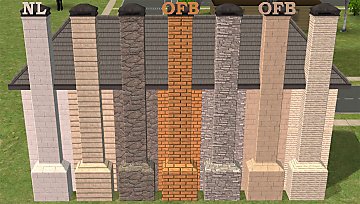
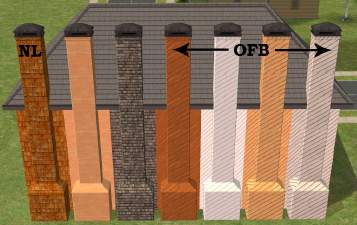
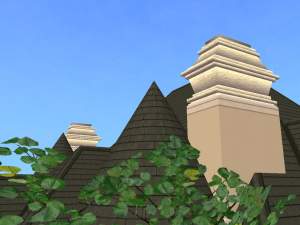
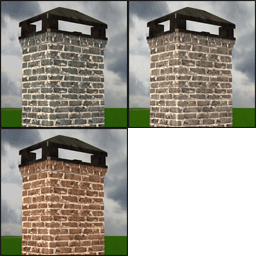
The 3 pieces are the base, an extension (for 2+story houses) and the top. There are 11 recolors- 10 are Maxis Match brick and stone. The textures don't match the Maxis walls exactly since I played with the textures to make them look a bit older. I used the repository technique on this set and the top is the MASTER- the files are clearly labeled.
Notes:
*The cheat "moveobjects on" must be used to place the extension or top on top of the base.
*The top can be placed anywhere on the roof if you'd like to use just that piece. You'll have to use the cheat to place it.
*These can be placed before or after the roof is put on the house. If you want to use just the top- place it after the roof is on.
*I cloned these from the Immobile Chimes sculpture. They take up 2 tiles and are base game.
*These can be found under Decorative>Sculptures and Outside>Decorative. They cost 13 Simoleons.
*Recolorable- NOTE: These all have a shadow mesh. It's a separate mesh and is not recolorable. Any texture you use will have the shadow on it. There is 1 recolorable subset and that is the brick/stone.
Credit goes to BandoGurl for the request and 2 of the textures used; Huge Lunatic for telling me how to get the Maxis textures used; blake_boy for the Tivoli Plantation furniture- which I studied to learn how to add a shadow mesh.

In the screenshots, you might notice the texture on the top is smaller and that there's a faint line between the pieces that's more noticeable on the lighter textures. I did try to fix these 2 things. In the end, I decided the smaller texture size didn't look too bad. Resizing the mesh to get rid of that line resulted in a tiny gap, no matter how small of a change I made- so I left it as is.
If you would rather have this set without the shadow mesh, in lighter colors and with the metal recolorable- that set can be found HERE - both sets use the same GUIDs, so if you have this set just let the other set over-write the files. (Even the recolors.)
Polygon Counts:
Base - 222
Extension - 30
Top - 1150
Additional Credits:
SimPE, MilkShape, UVMapper, PhotoShop CS2
This is a new mesh, and means that it's a brand new self contained object that usually does not require a specific Pack (although this is possible depending on the type). It may have Recolours hosted on MTS - check below for more information.
|
MLC-REVISEDFauxChimneySet.rar
| Meshes and 11 recolors.
Download
Uploaded: 13th Apr 2010, 359.8 KB.
1,630 downloads.
|
||||||||
| For a detailed look at individual files, see the Information tab. | ||||||||
Install Instructions
1. Download: Click the download link to save the .rar or .zip file(s) to your computer.
2. Extract the zip, rar, or 7z file.
3. Place in Downloads Folder: Cut and paste the .package file(s) into your Downloads folder:
- Origin (Ultimate Collection): Users\(Current User Account)\Documents\EA Games\The Sims™ 2 Ultimate Collection\Downloads\
- Non-Origin, Windows Vista/7/8/10: Users\(Current User Account)\Documents\EA Games\The Sims 2\Downloads\
- Non-Origin, Windows XP: Documents and Settings\(Current User Account)\My Documents\EA Games\The Sims 2\Downloads\
- Mac: Users\(Current User Account)\Documents\EA Games\The Sims 2\Downloads
- Mac x64: /Library/Containers/com.aspyr.sims2.appstore/Data/Library/Application Support/Aspyr/The Sims 2/Downloads
- For a full, complete guide to downloading complete with pictures and more information, see: Game Help: Downloading for Fracking Idiots.
- Custom content not showing up in the game? See: Game Help: Getting Custom Content to Show Up.
- If you don't have a Downloads folder, just make one. See instructions at: Game Help: No Downloads Folder.
Loading comments, please wait...



Uploaded: 13th Apr 2010 at 9:41 PM
Updated: 20th Apr 2010 at 9:05 PM - updated meshes; new screenshots
#decorative, #chimney, #brick, #stone, #outside, #maxis match
-
-
by feeEssen 7th Oct 2006 at 4:46pm
 6
8.2k
5
6
8.2k
5
-
by Kimsie 28th Apr 2008 at 1:25am
19
51.9k
76
-
by Kimsie 12th May 2008 at 2:35am
6
24.3k
16
-
by SimArchitect 3rd Sep 2008 at 5:11pm
35
33.1k
42
-
by ThatScaryChick 6th Dec 2010 at 9:32pm
15
41.3k
62
-
-
-
-


-
by mustluvcatz 2nd Feb 2017 at 5:42pm
The cabinet was originally requested by Christobal at Black Pearl Sims. more...
16
23k
81
-
On The Spot Texture Replacements
by mustluvcatz 10th Dec 2014 at 9:19am
Silly EA. more...
 2
12.2k
43
2
12.2k
43
-
by mustluvcatz 22nd Jan 2010 at 10:07pm
Stained glass again. I know- enough with the stained glass already! more...
-
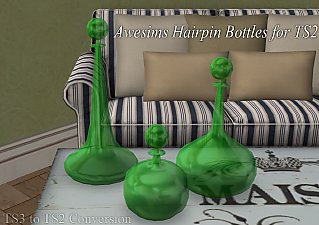
Hairpin Bottles (TS3 to TS2) - Update, placeable on OFB shelves
by mustluvcatz 11th Jan 2013 at 2:50am
:here: Updated 1/11/2013 - can be placed on OFB shelves. more...
11
17k
40
-
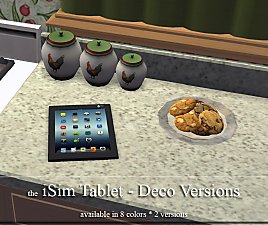
by mustluvcatz 19th Dec 2013 at 3:55am
Versions. Alrighty then. :) Here are 4 purely decorative versions of my iSim Tablet computer. more...
13
22.1k
73
-
by mustluvcatz 21st Sep 2012 at 10:20pm
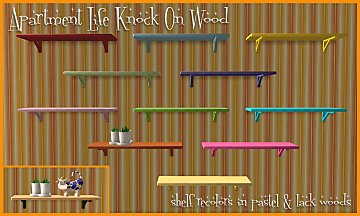
11 recolors of the 1x1 Knock On Wood shelf from Apartment Life. more...
+1 packs
13 21.5k 42 Apartment Life
-
by mustluvcatz 11th Feb 2015 at 9:14pm
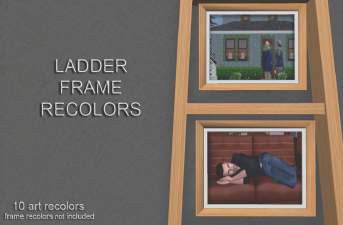
I recently uploaded a new mesh ON MY TUMBLR and decided to do some more recolors of the more...
9
7.9k
20
-
TS4 to TS2 Christmas Lighting Conversions
by mustluvcatz 3rd Dec 2021 at 8:07pm
13Pumpkin recently uploaded her TS4 2021 Christmas Gifts. These 2 sets of candles were part of that. more...
3
3.5k
15
-
It's A Wrap! ~More Holiday Deco~
by mustluvcatz 24th Dec 2011 at 1:22pm
This is something I used to do..wrap up some of the pictures hanging on my walls. more...
14
17.7k
25
-
by mustluvcatz 19th Sep 2013 at 12:49am
:here: You can download all 30 recolors in one .rar OR download 1-9, 10-18 or 19-30 in separate .rars. more...

About Me
The exception: My TS4 Robert Williamson sim. I would really like it if he's not edited in any way. He's my tribute to Robin Williams, who was someone I greatly admired. Changing him would make him just another sim.