
 Sign in to Mod The Sims
 More channels to various objects, now fully recolorable! Default Replacement, or Non Default Replacement!
 More channels to various objects, now fully recolorable! Default Replacement, or Non Default Replacement!


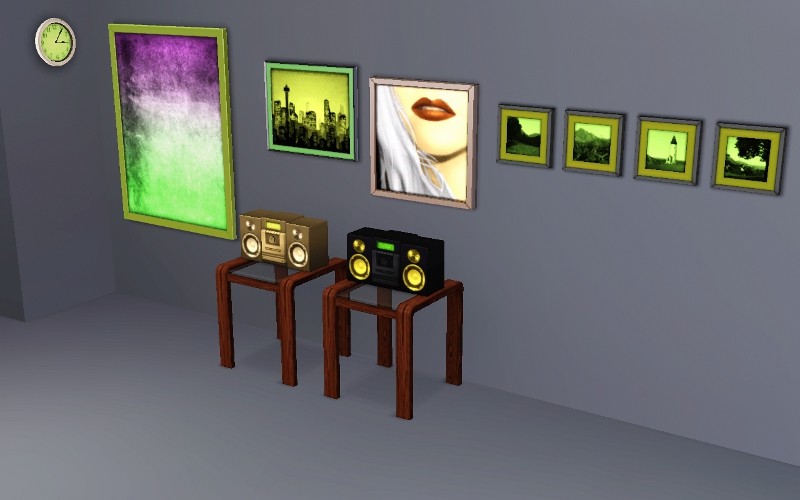
Screenshot.jpg - width=800 height=500
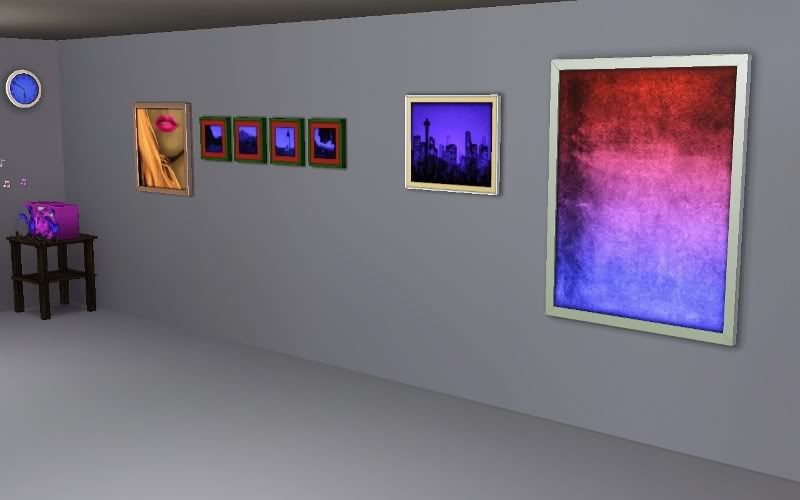
ScreenshotQ.jpg - width=800 height=500
This is now unlike my older extra channels to things, a default replacement! Something that I've been dying to learn how to do with adding channels, I already knew how to make default replacement meshes, but recolors always eluded me until now. I've tested the default replacements thoroughly in game and they are working fine, only issue with them is that thumbnails in my game at least still shows the old EA default colors, but they are fully recolorable and fully functional! I didn't do the alarm clock because I've already done that and shared here on mts. You can find the extra channels to the alarm clock in the related pages under creator recommendations.
I've packaged base game and HELS separately depending on which you own. So if you only have base game, download the base game one, if you have HELS download the High End Loft Stuff one.
Okay, so here's the new areas of recolorablity:
Wall Clock:
1st channel is the inside of the clock, second channel is the outside
HELS Painting:
1st and 2nd channels are the inside of the painting, they have a gradient (blending) effect. Third channel is the frame
Cityscapes Painting:
First channel is the inside of the painting, second channel is the inner frame, third channel is the outer frame.
Lips Painting:
1st channel is the girl's hair, second channel are the girl's lips, third channel is the girl's skin tone. The frame, and the girl's teeth are not recolorable.
Photo Series:
1st channel is the inside of the painting, second channel is the inner trim of the frame, third channel is the outer frame.
Boom Box:
1st channel is the box, second channel is the small rectangular display, third channel are the speakers.
Such fun adding channels for me and you both! hope you enjoy.
|
DefaultReplacement_3_Channel_High_End_Loft_Painting_jimTNW.zip
Download
Uploaded: 11th Apr 2010, 208.6 KB.
1,830 downloads.
|
||||||||
|
DefaultReplacement_Base_Game_Objects_jimTNW.zip
Download
Uploaded: 11th Apr 2010, 527.3 KB.
2,127 downloads.
|
||||||||
|
High_End_Loft_Recolorable_Painting_jimTNW.zip
Download
Uploaded: 11th Apr 2010, 185.2 KB.
1,865 downloads.
|
||||||||
|
BaseGame_Recolorable_Objects_jimTNW.zip
Download
Uploaded: 11th Apr 2010, 527.1 KB.
2,372 downloads.
|
||||||||
| For a detailed look at individual files, see the Information tab. | ||||||||
Install Instructions
1. Click the download button, or the filename, to download the file to your computer.
2. Extract the zip, rar, or 7z file. Now you will have either a .package or a .sims3pack file.
For Package files:
1. Cut and paste the file into your Documents\Electronic Arts\The Sims 3\Mods\Packages folder. If you do not already have this folder, you should read the full guide to Package files first: Sims 3:Installing Package Fileswiki, so you can make sure your game is fully patched and you have the correct Resource.cfg file.
2. Run the game, and find your content where the creator said it would be (build mode, buy mode, Create-a-Sim, etc.).
For Sims3Pack files:
1. Cut and paste it into your Documents\Electronic Arts\The Sims 3\Downloads folder. If you do not have this folder yet, it is recommended that you open the game and then close it again so that this folder will be automatically created. Then you can place the .sims3pack into your Downloads folder.
2. Load the game's Launcher, and click on the Downloads tab. Find the item in the list and tick the box beside it. Then press the Install button below the list.
3. Wait for the installer to load, and it will install the content to the game. You will get a message letting you know when it's done.
4. Run the game, and find your content where the creator said it would be (build mode, buy mode, Create-a-Sim, etc.).
Extracting from RAR, ZIP, or 7z: You will need a special program for this. For Windows, we recommend 7-Zip and for Mac OSX, we recommend Keka. Both are free and safe to use.
Need more help?
If you need more info, see:
- For package files: Sims 3:Installing Package Fileswiki
- For Sims3pack files: Game Help:Installing TS3 Packswiki
Loading comments, please wait...
Uploaded: 11th Apr 2010 at 2:05 PM
-
-
Painting Pandemonium! 15 non-default paintings for your sims! [Minor Update Aug. 6th]
by QBUILDERZ 6th Aug 2009 at 10:44am
 75
122.1k
132
75
122.1k
132
-
by cmomoney 1st Feb 2010 at 5:20pm
19
66.5k
164
-

I Wanna Be Your TeddyBear - Gleaming default replacement eyes
by Arisuka 18th Feb 2010 at 10:58pm
-
-
Default Replacement For Ventana Windows (TS2 Style) *Added Non Default Version*
by Elias943 2nd Apr 2010 at 6:30pm
30
43.9k
95
-
-
TV Channels Default Replacement (Update 3/5/26) - SimFlix Channel
by Twinsimming updated 21st Mar 2026 at 7:15am
-
-
The Sims 2 Grim Reaper Default Replacement
by VirtualHugs 1st Feb 2025 at 8:21am



-
by joninmobile 21st Apr 2009 at 2:37pm
These are some really nice linoleums in several colors for you all more...
 5
9.2k
9
5
9.2k
9
-
Truly Default Replacement Snacks Ritz Crackers, and Kraft Marshmallows
by joninmobile 14th Dec 2009 at 7:19pm
You know I was just playing my game today, and I saw my sim eating her marshmallows, and eating her more...
9
25.3k
28
-

by joninmobile 20th Apr 2010 at 4:58pm
I've written a new career of Pastor for you all to enjoy! more...
31
44.1k
59
-
by joninmobile 12th Dec 2007 at 3:59pm
Here are two blue floral carpets.They come in two distinct patterns.I hope yall enjoy these! more...
11
10.2k
11
-
by joninmobile 17th Oct 2007 at 11:03am
This is me embracing my Italian heritage.I hope ya'll enjoy this tile.Hit thanks if you like it.Comments are always more...
1
6.8k
11
-
Domino's and Pizza Hut Pizza Box Default Replacements in Simlish and English
by joninmobile 21st Apr 2009 at 3:05pm
:alarm: Only Download 1 (one) of these files. Do Not Download More Than One! more...
22
46.1k
73
-
"The meaning of fruit" recolors - lime
by joninmobile 12th Oct 2007 at 10:31pm
Here are some recolors of the meaning fruit(which can be found in the base game) in lime.In order to get more...
2
5.2k
5
-
Dorothy Wood Floors in 5 colors
by joninmobile 25th Feb 2008 at 11:22pm
Here is a set of wood floors called "Dorothy".I hope y'all enjoy these! more...
1
6.9k
5
-
by joninmobile 1st Nov 2007 at 9:44pm
Here are my four favorite colors in a tiled wall that I made using the gimp. more...
1
4.5k
1
-
by joninmobile 26th Jun 2010 at 2:40pm
I noticed in my game today there was this humongous plane sculpture. more...
9
13.6k
27


About Me
I hope you enjoy all the downloads I've brought to you over the years. It's been fun. Being a part of The Sims community has had it's ups and downs for me, but I keep on truckin' nonetheless. Lots and lots of drama, lots of pain and sorrow, but lots of laughs, and good times too. Made so many new friends over the years, and it all started by uploading to MTS way back in 2006. Have fun with my creations, that's what they're here for!
~ Jon