
 Sign in to Mod The Sims
 Medieval Female Hat: new mesh!
 Medieval Female Hat: new mesh!


01.jpg - width=900 height=369
01.jpg - width=880 height=809
02.jpg - width=754 height=750
03.jpg - width=1069 height=718
04.jpg - width=495 height=674
05.jpg - width=754 height=672

Here is my last entry for the Medieval Challenge.
It's a new mesh: the Medieval Female Hat:
Based on a real one.
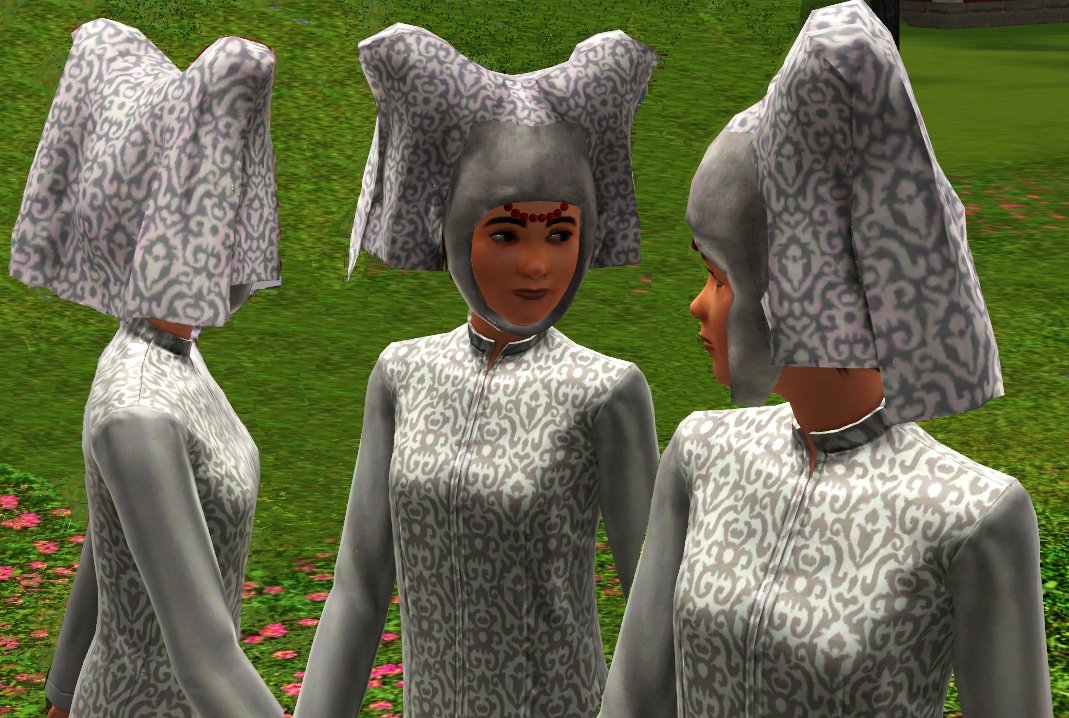
It can be found under Female Hair/Hat and it is available for Teens, Young Adults, Adults and Elders.
Recolourable Channels: 3
This is also my first CAS creation and I hope you will like it

-Maylin-
Polygon Counts:
High Details : 5496 Faces
Low Details: 2304 Faces
Additional Credits:
Created with Blender converted in Milkshape
TSRW, Delphy Sims3Pack Multi Installer
Whitherider and Lee for help and advices
This is a new mesh, and means that it's a brand new self contained object that usually does not require a specific Pack (although this is possible depending on the type). It may have Recolours hosted on MTS - check below for more information.
|
Maylin_Medieval Female Hat_160410.rar
Download
Uploaded: 16th Apr 2010, 2.07 MB.
6,666 downloads.
|
||||||||
| For a detailed look at individual files, see the Information tab. | ||||||||
Install Instructions
1. Click the download button, or the filename, to download the file to your computer.
2. Extract the zip, rar, or 7z file. Now you will have either a .package or a .sims3pack file.
For Package files:
1. Cut and paste the file into your Documents\Electronic Arts\The Sims 3\Mods\Packages folder. If you do not already have this folder, you should read the full guide to Package files first: Sims 3:Installing Package Fileswiki, so you can make sure your game is fully patched and you have the correct Resource.cfg file.
2. Run the game, and find your content where the creator said it would be (build mode, buy mode, Create-a-Sim, etc.).
For Sims3Pack files:
1. Cut and paste it into your Documents\Electronic Arts\The Sims 3\Downloads folder. If you do not have this folder yet, it is recommended that you open the game and then close it again so that this folder will be automatically created. Then you can place the .sims3pack into your Downloads folder.
2. Load the game's Launcher, and click on the Downloads tab. Find the item in the list and tick the box beside it. Then press the Install button below the list.
3. Wait for the installer to load, and it will install the content to the game. You will get a message letting you know when it's done.
4. Run the game, and find your content where the creator said it would be (build mode, buy mode, Create-a-Sim, etc.).
Extracting from RAR, ZIP, or 7z: You will need a special program for this. For Windows, we recommend 7-Zip and for Mac OSX, we recommend Keka. Both are free and safe to use.
Need more help?
If you need more info, see:
- For package files: Sims 3:Installing Package Fileswiki
- For Sims3pack files: Game Help:Installing TS3 Packswiki
Loading comments, please wait...



Uploaded: 16th Apr 2010 at 8:54 PM
Updated: 15th May 2010 at 4:20 PM
#Medieval, #Hat, #Female, #Historical, #Adult, #Teen, #Young Adult, #Elder, #medieval challenge
-
Peggy female "free hair" conversion
by Lunararc 18th Feb 2010 at 10:48pm
 39
115.9k
187
39
115.9k
187
Hair » Female » Young Adult
-
-
-
by Kiara24 20th Aug 2010 at 5:00am
39
79.3k
147
Hair » Female » Young Adult
-
-
CoolSims 74~ Re-retextured for Teen to Adult
by Eternila 26th Jul 2012 at 7:24pm
70
264.1k
894
Hair » Female » Young Adult
-
by ShojoAngel 16th Mar 2013 at 10:59am
+2 packs
21 92.2k 168 Pets
Pets
 Supernatural
Hair » Male » Young Adult
-
-
Skysims 178 Hair Retexture - Teen to Elder
by seafoamie 29th Jan 2014 at 10:18pm
110
196.9k
822
Hair » Female » Young Adult
-
by Onebeld 14th Feb 2022 at 11:54am
5
8.1k
21
Hair » Female » Young Adult



-
New mesh: net curtains and 7 recolours
by -Maylin- 28th Nov 2006 at 5:56pm
Hi everybody, :alarm:Updated 01/17/07: If you want the same curtains but working in diagonal wall too, please don't more...
 24
49.4k
47
24
49.4k
47
-
-
-
Naila Design: New Living Room Set
by -Maylin- 30th Sep 2009 at 4:56pm
Hi all, Here is my new modern living room set: It contains six new meshes more...
-
Retro Coffee Maker: new mesh and 8 recolors
by -Maylin- updated 13th Jul 2008 at 8:21pm
Hi all, I have created a new very "Retro" coffee maker, by request, based on a real one: more...
81
172.8k
254
-
-
-
*Please redownload* Fixed "Phantom of Opera": new ceiling lamp
by -Maylin- 9th Jan 2007 at 3:44pm
Hi all, As requested by EleonoruZZa, a new ceiling lamp "Phantom of Opera": Polys 2762 Vertices more...
28
58.8k
52
-
Elegance Dining Set : 4 new meshes & recolours
by -Maylin- 19th Mar 2009 at 3:36pm
Hi all This is not really a new dining room, but as I have completely redone, the meshes, more...
-
"Manhattan" living set : 8 new meshes just for "Him"!
by -Maylin- updated 25th Mar 2009 at 9:42pm
Hi all, Here is my new set created just for our men and called "Manhattan": more...


