
 Sign in to Mod The Sims
 Roans - Complete Marking Set
 Roans - Complete Marking Set


Blue roan.jpg - width=1080 height=713
Roans2.jpg - width=1142 height=713
Roans1.jpg - width=1280 height=668
Red roan.jpg - width=1280 height=668
Roan thumb.jpg - width=300 height=300

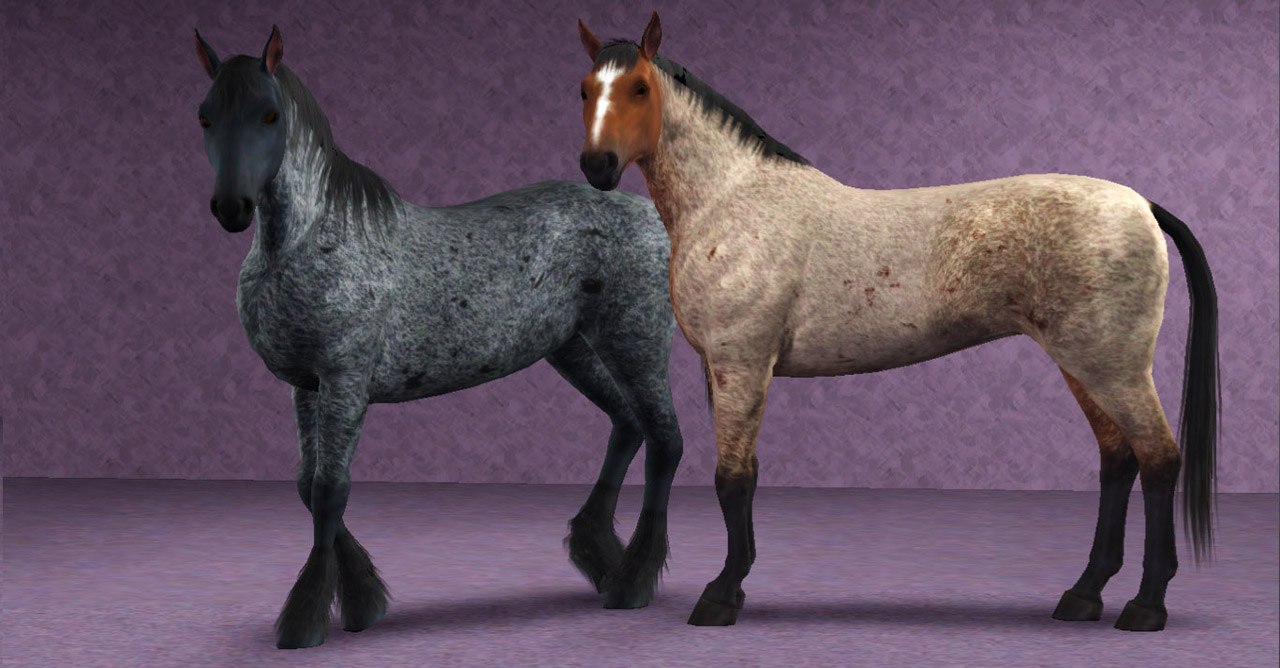
As there are a lot of screenshots required, the additional required screenshots are included in the first comments of the thread.
The 2 regions appear for horses only, the 4 markings are enabled for all species.
Terms of use
You may:
- Use these markings in your pictures and stories. A small link and credit would be greatly appreciated, but is not required
- Upload pets created with these markings to free sites only, with link to this page and a credit
You may not:
- Steal by claiming as your own, reuploading them anywhere, or by filesharing
- Clone or modify these markings in any way
- Package these markings with pet uploads. For pet uploads, please link to this page.
Want to make your own markings?
Head over to my Custom Pet Markings Tutorial.
Additional Credits:
I cannot give enough thanks to Batqueen23. She has been amazing to work with, testing all of the regions and markings when I needed a second opinion. She has been my best cheerleader, and has given me a gentle poke whenever I needed that too. Bat, you rock! Please check out her site.
A big thanks to everyone in General and Creation chat for their encouragement and support.
Created with: S3PE S3OC Adobe Photoshop CS5
|
PharaohHound_Roanmarkingset.zip
Download
Uploaded: 30th Apr 2012, 1.17 MB.
34,738 downloads.
|
||||||||
| For a detailed look at individual files, see the Information tab. | ||||||||
Install Instructions
1. Click the download button, or the filename, to download the file to your computer.
2. Extract the zip, rar, or 7z file. Now you will have either a .package or a .sims3pack file.
For Package files:
1. Cut and paste the file into your Documents\Electronic Arts\The Sims 3\Mods\Packages folder. If you do not already have this folder, you should read the full guide to Package files first: Sims 3:Installing Package Fileswiki, so you can make sure your game is fully patched and you have the correct Resource.cfg file.
2. Run the game, and find your content where the creator said it would be (build mode, buy mode, Create-a-Sim, etc.).
For Sims3Pack files:
1. Cut and paste it into your Documents\Electronic Arts\The Sims 3\Downloads folder. If you do not have this folder yet, it is recommended that you open the game and then close it again so that this folder will be automatically created. Then you can place the .sims3pack into your Downloads folder.
2. Load the game's Launcher, and click on the Downloads tab. Find the item in the list and tick the box beside it. Then press the Install button below the list.
3. Wait for the installer to load, and it will install the content to the game. You will get a message letting you know when it's done.
4. Run the game, and find your content where the creator said it would be (build mode, buy mode, Create-a-Sim, etc.).
Extracting from RAR, ZIP, or 7z: You will need a special program for this. For Windows, we recommend 7-Zip and for Mac OSX, we recommend Keka. Both are free and safe to use.
Need more help?
If you need more info, see:
- For package files: Sims 3:Installing Package Fileswiki
- For Sims3pack files: Game Help:Installing TS3 Packswiki
Loading comments, please wait...



-
Inscrutable Eyes for Cats(Default)
by cmomoney 28th Nov 2011 at 8:18pm
 +1 packs
35 71.1k 182
+1 packs
35 71.1k 182 Pets
Pets
Create-A-Pet » Genetics » Cats
-
by tachyglossus 7th Mar 2012 at 12:35pm
+1 packs
8 19.5k 18 Pets
-
Stupendous Splotches - 9 Markings
by PharaohHound 11th Mar 2012 at 12:20pm
+1 packs
29 148.6k 219 Pets
-
by PharaohHound 14th May 2012 at 4:13pm
+1 packs
24 65.7k 126 Pets
-
Percheron - Dapple Gray and Blue Roan
by Lea.Sikora 27th Dec 2012 at 1:13pm
-
by PharaohHound 30th Jul 2013 at 5:58pm
+1 packs
16 56k 94 Pets
Create-A-Pet » Genetics » Dogs
-
-
-
by aspenrose 31st Jul 2023 at 9:06pm
+1 packs
4 3.9k 25 Pets
Create-A-Pet » Genetics » Cats
-
by LarkyLovesYou 3rd Mar 2025 at 8:32pm
+1 packs
3 1.8k 16 Pets


-
Viola House - A Handsome Victorian Home
by PharaohHound 13th Mar 2017 at 2:28am
Viola House is a wonderful family home for any sim who's a history lover! more...
+4 packs
3 16.1k 41 Generations
Pets
Generations
Pets
 Supernatural
 Seasons
-
Chez Meline - A Garden Cottage
by PharaohHound 10th Feb 2019 at 8:14pm
Looking for a quiet spot to get away from the world? Chez Meline might just be the place for you! more...
+3 packs
3 9.8k 35 Pets
Supernatural
Seasons
-
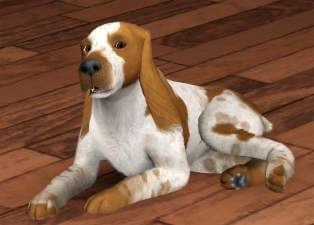
Missis and Oliver - English Cocker Spaniels
by PharaohHound 24th Dec 2011 at 5:51pm
Two darling English Cocker Spaniels more...
-
by PharaohHound 5th Jan 2015 at 10:25pm
These big beauties are ready for a good home with a loving Sim family! more...
-
by PharaohHound 13th Jun 2013 at 6:58pm
For the cowboy sim in all of us more...
-
I Feel Shingled Out - Fancy Victorian Shingles
by PharaohHound 13th Mar 2017 at 1:09am
As a great lover of not only Victorian style architecture but also wooden shingles, the complete lack of fancy cut more...
14
19.7k
99
-
by PharaohHound 8th Jan 2013 at 12:24am
Give your Weims and Dobes the big chest they've always wanted! more...
-

by PharaohHound 25th Feb 2019 at 9:17pm
John James Audubon (1785 - 1851) was an American naturalist and scientific illustrator, who is best known for his highly more...
6
8.2k
26
-
by PharaohHound 21st Jan 2014 at 10:07pm
The Canadian horse is a breed originally from the province of Quebec. more...
-
by PharaohHound 14th May 2009 at 9:28pm
Introducing my brand new Boxers! more...


Packs Needed
| Expansion Pack | |
|---|---|
 | Pets |
About Me
I'm pretty chill about stuff overall, with some boundaries:
- Please do not reupload my content unmodified anywhere else.
- Do not include my content with lots.
- Don't use any of my content as a base (including pets) or as CC (e.g. patterns used in a lot) in uploads for pay/donation
- If using my pets as a base, please credit me and link back to the original post
- If in the future I create any items worth recolouring, I welcome recolours provided they respect the previous policies.