
 Sign in to Mod The Sims
 Wolf Tails For All
 Wolf Tails For All


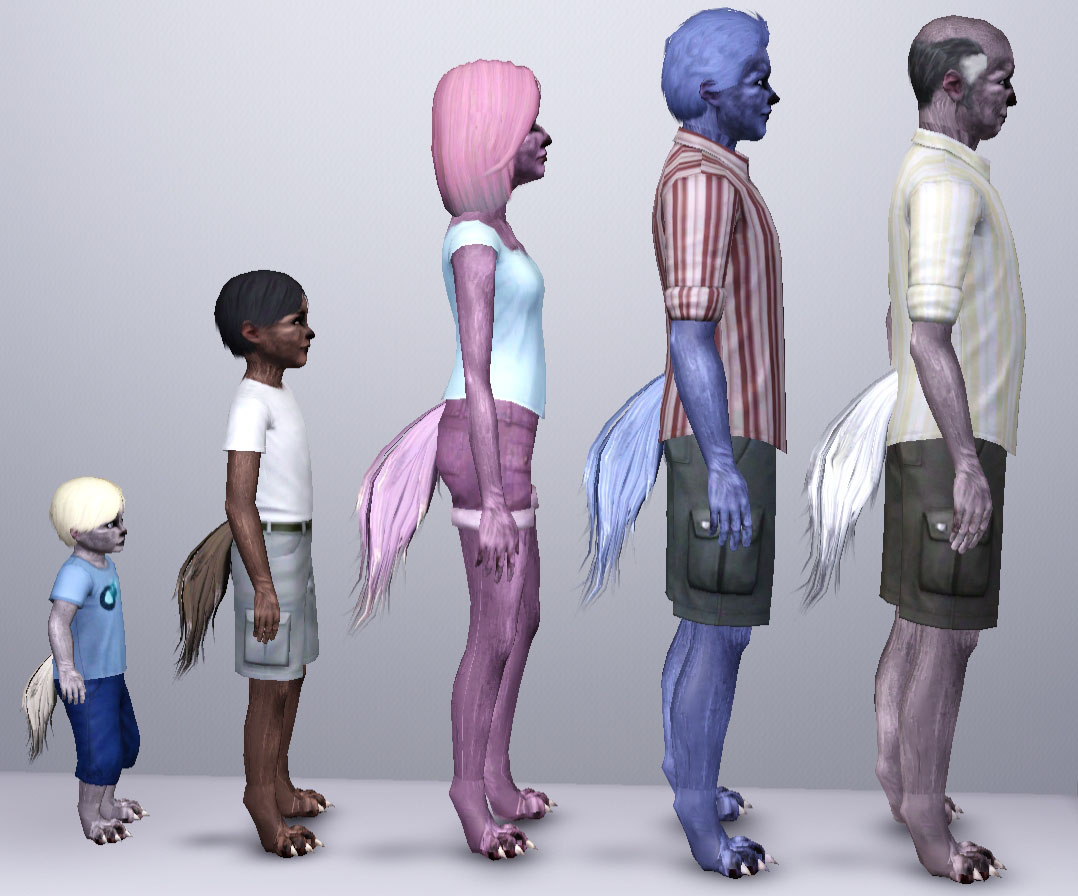
WolfTailAllAges.jpg - width=1078 height=896
WolfTailAngles.jpg - width=1324 height=896
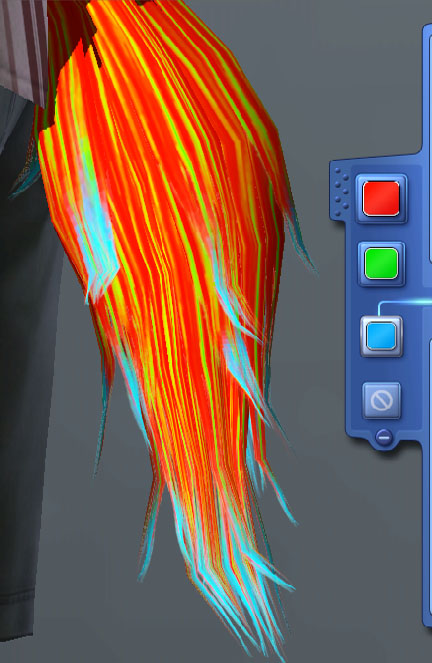
WolfTailRecolor.jpg - width=432 height=663
 *UPDATE* The teen-elder version of the tail has been fixed so that it should no longer crash your game when zooming out. Please download the newer, fixed version of the file if you were experiencing crashing when using the original file.
 A fluffy accessory tail designed after that of a wolf. It works for toddler through elder, and is great for werewolves and animal-like sims. It is under the bracelet category.
The recoloring channels are similar to hair, with a base color, a highlights color, and a tips color.
It is enabled for all categories, including naked but excluding valid for random. This way, they should not lose their tail when in the shower, and townies will not spawn with them. If the tail disappears in the shower, using a mod that lets you edit the naked outfit will allow you to put it back.
There is now a basegame-compatible Teen-Elder version
Custom Content in Pictures:
Beast Inside Skin by Moonskin93
https://simfileshare.net/download/399604/
Luminous eyes - Default Replacements by -Shady-
http://www.modthesims.info/download.php?t=386381
Polygon Counts:
LOD0:1584
LOD1:849
LOD2:460
Additional Credits:
Meshing Toolkit by CmarNYC
http://www.modthesims.info/download.php?t=481950
Delphy's Sims 3 Pack Multi-Extractor
http://www.modthesims.info/download.php?t=364038
MasterController by Twallan
http://nraas.wikispaces.com/MasterController
This is a new mesh, and means that it's a brand new self contained object that usually does not require a specific Pack (although this is possible depending on the type). It may have Recolours hosted on MTS - check below for more information.
|
WolfTail_T-E_Basegame.zip
| Fixed T-E that tail works with Base Game
Download
Uploaded: 24th Jan 2022, 357.0 KB.
2,801 downloads.
|
||||||||
|
WolfTailT-E.zip
| Fixed version of the Teen-Elder wolf tail.
Download
Uploaded: 25th May 2016, 402.9 KB.
12,685 downloads.
|
||||||||
|
WolfTail.zip
Download
Uploaded: 31st Mar 2015, 1.01 MB.
14,083 downloads.
|
||||||||
| For a detailed look at individual files, see the Information tab. | ||||||||
Install Instructions
1. Click the download button, or the filename, to download the file to your computer.
2. Extract the zip, rar, or 7z file. Now you will have either a .package or a .sims3pack file.
For Package files:
1. Cut and paste the file into your Documents\Electronic Arts\The Sims 3\Mods\Packages folder. If you do not already have this folder, you should read the full guide to Package files first: Sims 3:Installing Package Fileswiki, so you can make sure your game is fully patched and you have the correct Resource.cfg file.
2. Run the game, and find your content where the creator said it would be (build mode, buy mode, Create-a-Sim, etc.).
For Sims3Pack files:
1. Cut and paste it into your Documents\Electronic Arts\The Sims 3\Downloads folder. If you do not have this folder yet, it is recommended that you open the game and then close it again so that this folder will be automatically created. Then you can place the .sims3pack into your Downloads folder.
2. Load the game's Launcher, and click on the Downloads tab. Find the item in the list and tick the box beside it. Then press the Install button below the list.
3. Wait for the installer to load, and it will install the content to the game. You will get a message letting you know when it's done.
4. Run the game, and find your content where the creator said it would be (build mode, buy mode, Create-a-Sim, etc.).
Extracting from RAR, ZIP, or 7z: You will need a special program for this. For Windows, we recommend 7-Zip and for Mac OSX, we recommend Keka. Both are free and safe to use.
Need more help?
If you need more info, see:
- For package files: Sims 3:Installing Package Fileswiki
- For Sims3pack files: Game Help:Installing TS3 Packswiki
Loading comments, please wait...

Uploaded: 31st Mar 2015 at 10:08 PM
Updated: 24th Jan 2022 at 7:56 AM by Camkitty - made basegame compatible version for Teen-Elder
#wolf, #tail, #werewolf, #all ages, #toddler-elder, #supernatural, #camkitty, #animal, #anthro, #anthropomorphic
-
by ailivina 10th Sep 2009 at 2:33pm
 19
48.4k
73
19
48.4k
73
-

by newone08 3rd Nov 2009 at 12:31am
33
104.5k
233
-
by Anubis360 8th Mar 2010 at 5:06pm
140
148.4k
464
-
by Chicken0895 14th Mar 2011 at 5:09am
14
28.6k
32
-

-
Recolourable/Patternable Glass Wings, for All Ages
by Esmeralda 16th Sep 2012 at 8:34pm
36
46.7k
100
-
by Callia-Evergreen updated 29th Jan 2016 at 11:14pm
-
by Callia-Evergreen updated 23rd Jun 2023 at 2:59pm
17
44.7k
132
-
by Callia-Evergreen updated 24th Mar 2024 at 9:21pm
39
69.7k
110
-
by Callia-Evergreen 30th Jun 2016 at 10:24pm
21
51.2k
93


-
by Callia-Evergreen 27th Mar 2014 at 12:34am
"Well, Gordon, I see your HEV Suit still fits you like a glove. At least, the glove parts do." ~Dr. more...
-
by Callia-Evergreen 9th Jan 2017 at 10:27pm
Warpaint based off of Keenan Crier's, from Digimon. more...
2
7.9k
10
-
by Callia-Evergreen updated 24th Mar 2024 at 9:21pm
This set includes an accessory and makeup designed to be used in conjunction with facial sliders to achieve a wolf-like more...
39
69.8k
110
-
by Callia-Evergreen 28th May 2016 at 6:51am
Halvarg Felman was a warrior in a clan of barbarians. more...
-
by Callia-Evergreen 30th Jan 2022 at 2:46pm
This is a bone-based slider that scales up the ends of the fingers to create a paw-like hand effect. more...
-

by Callia-Evergreen 18th Nov 2024 at 2:25pm
-
Iridescent Bug Wings for Fairies (Default Replacements)
by Callia-Evergreen updated 8th Feb 2022 at 1:37pm
This is a set of three replacements for the fairy wings from Supernatural. more...
-
by Callia-Evergreen updated 29th Jan 2016 at 11:14pm
Update! more...
-
by Callia-Evergreen 4th Nov 2016 at 2:17am
Warpaint based off of Nissa Revane's, from Magic: The Gathering. more...
6
11k
25
-
by Callia-Evergreen 10th Jul 2016 at 9:39pm
Hoof feet for your sims! more...

About Me
I don't mind if you edit/use my sims content, but please give credit.
I'm not taking requests.
My DeviantArt page: http://camkitty2.deviantart.com/
I mostly post non-sims art there, but I also sometimes post pictures of sims stuff I am working on or have not released.
I only make content for Sims 3, not 2 or 4.