
 Sign in to Mod The Sims
 No More Video Distortion
 No More Video Distortion

NoVideoDistortion.jpg - width=918 height=693
 Updated 11-14-2018 To work with the 1.47.49 (November 13, 2018) game patch.
Description
The Sim's thought bubble in the screenshot best describes my initial thoughts when I noticed the screen distortion of TVs that began occuring with the January 7, 2016 game patch. I couldn't figure out what was going wrong with my game. Tried a game repair, but that didn't help. Finally last night I searched for a solution as surely this was happening to someone else? Quickly I found that it's happening to everyone else. Lots of folks are crying for a game option to turn that junk off, but apparantly EA thinks that if the game is sped up the video should look like a low quality VCR from the '80s.
Seems to me that if the TV looks like that sped up (which mine doesn't) then so should the Sims, right?
Or even better, let's just go back to the old way. The effect is easily turned off in the XML, but that requires a separate patch to every TV object and makes it so that any other TV mods would conflict with a mod to turn off that effect. So my answer was, of course, turn to the Python script.
This script just overrides the Python that sets up that effect to always turn it off - for every TV in every game pack, modded TVs, even new TVs that haven't been made yet. The mod name says it all.
Well, almost all. A Simmer pointed out that there was also a static noise that was replacing the audio for the video. I run with sound off or my own music playing over the game typically so I hadn't noticed. So now two new flavors of the mod are available. One just turns off the static effect, and the other removes the "mute" feature entirely from video clips so the sound for them will play normally.
Installation and Compatiblity
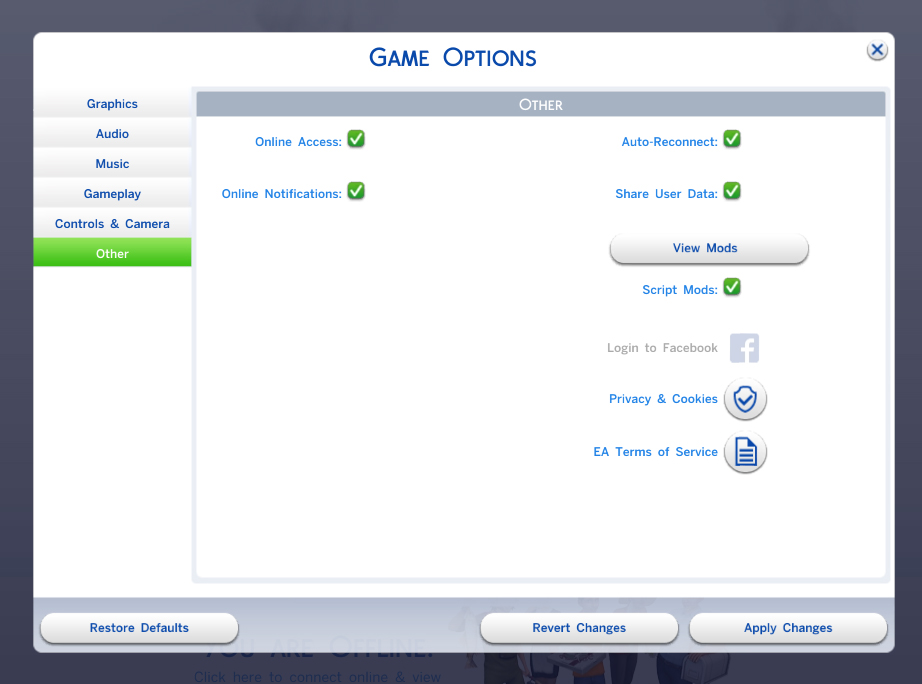
This is a script mod, so extract the TS4SCRIPT file contained in the download file into your mods folder. It can also be placed in a subfolder, but no more than ONE subfolder deep. Once installed, it will automatically turn off the video distortion with no user-intervention required.
You must have script mods enabled in your game options in order for this script to run. Every game patch will turn your mods back off, so be sure to turn it back on!
This mod is written to work with the version 1.47.49 (November 13, 2018) game patch; however, it should work with newer game patches.
Due to the way the mod is coded, it should be very stable with future changes to the video scripting unless major changes are made to the VideoComponent of the game. This may be the simplest mod I've made, took all of maybe 10 or 15 minutes to write - it literally took me far more time to make the screenshot and write this description. So if you're looking for mods to take apart to learn about writing mods, don't start here - but the source is included as I always do.
Additional Credits
EA, of course, for continuing to provide me with the "WTF?" moments that inspire my mods.
Oh, and Scripthoge as usual for the script injection method used.
Note from the Creator:
|
NoVideoDistortion-NoStatic.zip
| NoVideoDistortion + Turns off the static noise
Download
Uploaded: 14th Nov 2018, 2.3 KB.
14,693 downloads.
|
||||||||
|
NoVideoDistortion-NoMute.zip
| NoVideoDistortion + Video clip audio plays normally without muting
Download
Uploaded: 14th Nov 2018, 2.3 KB.
27,151 downloads.
|
||||||||
|
NoVideoDistortion.zip
| Remove video distortion from objects when speed 2 or higher is selected.
Download
Uploaded: 14th Nov 2018, 2.2 KB.
15,176 downloads.
|
||||||||
| For a detailed look at individual files, see the Information tab. | ||||||||
Install Instructions
1. Download: Click the File tab to see the download link. Click the link to save the .rar or .zip file(s) to your computer.
Read the upload description for installation instructions. If nothing else is specified, do the following:
2. Extract: Use WinRAR (Windows) to extract the .package file(s) (if included, ts4script as well) from the .rar or .zip file(s).
3. Cut and paste the .package file(s) (if included, ts4script as well) into your Mods folder
- Windows XP: Documents and Settings\(Current User Account)\My Documents\Electronic Arts\The Sims 4\Mods\
- Windows Vista/7/8/8.1: Users\(Current User Account)\Documents\Electronic Arts\The Sims 4\Mods\
Need more information?
- Anyone can use both .rar and .zip files easily! On Windows, use WinRAR.
- If you don't have a Mods folder, just make one.
- Mod still not working? Make sure you have script mods enabled
Loading comments, please wait...



Uploaded: 16th Feb 2016 at 6:31 AM
Updated: 14th Nov 2018 at 9:10 PM - Updated for Nov 13, 2018 game patch
#tv, #video, #scrambled, #distortion, #speed
-
by scripthoge 12th Sep 2014 at 8:33pm
 371
525k
1.1k
371
525k
1.1k
-
by krizz.88 21st Jun 2017 at 1:05pm
13
25.2k
62
-
-
by JungleSim 9th Oct 2022 at 11:39am
5.8k
8
-
-
-

by nickyclem1 updated 9th Nov 2024 at 11:42pm
10
41.7k
42
-

by nickyclem1 updated 9th Nov 2024 at 11:40pm
6
16.7k
30
-
by Scipio Garling 26th Nov 2024 at 10:18pm
8
14.4k
22
-

by baciaangi updated 14th Sep 2026 at 4:56pm
3
1.8k
4





-
-
-
-

-
-
-

Always Keep A Doctor At Hospital (Bugfix) - v5
by scumbumbo updated 22nd Feb 2019 at 12:20am
Mod to always keep at least one doctor at the hospital more...
+1 packs
71 92.2k 375 Get to Work
-
-
TS4 Package Searcher (Windows Only)
by scumbumbo updated 2nd Jan 2019 at 8:26am
Searches for Resources in .Package Files in Mods or Game Folders more...
67
71.2k
103
-

No Autonomous Buy Retail Store (BugFix)
by scumbumbo 16th Apr 2015 at 4:59pm
Bugfix for GTW to Disable Autonomous Attempts to Buy a Retail Store at Computers more...
17
21.7k
49

