Sign in to Mod The Sims
 Alternative Maxis Match Hair Retextures – Part 1
 Alternative Maxis Match Hair Retextures – Part 1


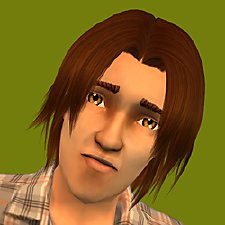
0.jpg - width=996 height=1056
Cazy Last Call in black.
1.jpg - width=1113 height=1038
TS3 Werewolf hair in brown.
2.jpg - width=564 height=936
Newsea Hideout Door in red.
3.jpg - width=1041 height=1050
TS3 Short Messy hair in blonde.
4.jpg - width=2300 height=895
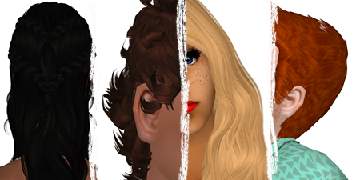
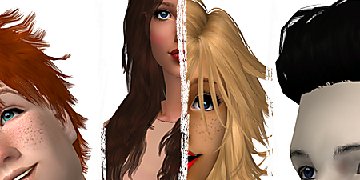
Cazy Last Call in blonde, red and brown.
5.jpg - width=2300 height=813
TS3 Werewolf hair in blonde, red and black.
6.jpg - width=2300 height=887
Newsea Hideout Door in blonde, brown and black.
7.jpg - width=2300 height=1002
TS3 Short Messy hair in black, red and brown.
8.jpg - width=2500 height=816
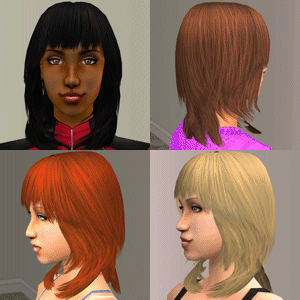
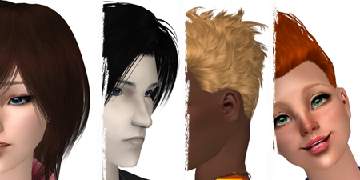
Cazy Last Call shown on a toddler, child, teen, and elder sim.
9.jpg - width=2100 height=627
Newsea Hideout Door shown on a toddler, child, teen, and elder sim.
10.jpg - width=2500 height=664
TS3 Short Messy hair shown on a toddler, child, teen, and elder sim.
11.jpg - width=2500 height=665
TS3 Werewolf hair shown on a toddler, child, teen, and elder sim.
x.png - width=450 height=225
Preview.


 I didn’t actually plan to do retextures at all, I just wanted to play the game and downloaded some Maxis Match hairs to have more choice for my sims. So how did it happen? Well, as I like Remi’s textures, I’ve never really liked the blonde hue she used, it seemed way too yellow for me, and a bit too light. I decided to do recolours, and one of the hairs I recoloured had the wavy version of her texture. I liked it so I did an experiment and put it on another hairstyle, it turned out to look good so I kept going. I was going to do blonde only as it annoyed me the most, but I wasn’t a fan of the too grey black either, and at some point I realised what felt slightly ‘wrong’ to me in those retextures I downloaded – shading! Or more accurately the lack of thereof, so the hairs looked a bit flat. Even Maxis hairs have shading, so I decided that mine having some won’t be bad, and will still count as Maxis Match, especially given that I don’t like when hair is too shiny so my shading is subtle.
That’s not the end of my retexture adventure though – after making quite a large amount of them, I decided to finally get rid of the blurriness in Bodyshop (it doesn’t understand my graphic card), and then I found out that not only was it blurry, but also reduced texture size while exporting, which meant I had to do all my retextures again from scratch... I was really annoyed, but actually it’s good it happened – while doing those retextures again (I haven’t finished yet), I use the original Remi texture from her tumblr instead of an exported one from a hairstyle retextured by someone else, my shading is much better than it was when I did them for the first time, and the red hue I decided on is more natural and nicer to look at than my previous one. I’d say that my retextures are something in between the traditional Remi and Pooklet versions – they have more noticeable shading, but they still match Maxis hair.
I’m a bit too chatty aren’t I (now when my English isn’t disastrous any more [please don’t read my old posts
 ] I’m more likely to say something, and sometimes I talk too much), so now I’ll provide some actual information:
- As I said before, the texture is Remi’s, I use the wavy one, sometimes I blend it more with her straight one.
- Shading is mine, I do it using the ‘try and check’ method, to decide where to try I look at the alpha, and sometimes I’m guided by looking at the texture that the edited hairstyle had before.
- Colours are mine. I created my blonde by editing Remi’s, and all my other colours are based on my blonde.
- I follow the crowd doing the right thing, so all the hairs are binned, familied, grey is linked to black, and unnecessary lifestages aren’t in the game (and I’m not referring to what EA did to poor toddlers in TS4).
Note: I said that I don’t like when black is too grey, so mine is much darker than you can normally see for retextures, but it’s not pure black covering the whole alpha making all the details invisible – as you can see in the pictures, the texture is perfectly visible when you look at my black hair. Also, the male hair meshes look a bit odd when you look at the back, but that’s the TS3 conversion fault, I’ve seen it on other converted hairs too, and I don’t have any influence on that as I only retextured them, without editing the meshes.
I’ve made quite a lot of retextures, so I’ll be uploading them in groups of four. I have more female than male hairs, but until I run out I’ll include something for both genders in each upload. This time the hairs are:
- Cazy Last Call converted by RentedSpace (mesh included)
- TS3 Werewolf hair converted by Julie J, all ages by Trapping (mesh included)
- Newsea Hideout Door converted by Martini (mesh included)
- TS3 Short Messy hair converted by Trapping (mesh included)
Additional Credits:
Cazy, Newsea, Julie J, Martini, Trapping, and RentedSpace for the meshes, Remi for textures.
|
hairMaleTS3Werewolf.rar
| TS3 Werewolf hair in all 4 colours, mesh included.
Download
Uploaded: 19th Nov 2016, 3.11 MB.
13,097 downloads.
|
||||||||
|
hairMaleTS3ShortMessy.rar
| TS3 Short Messy hair in all 4 colours, mesh included.
Download
Uploaded: 19th Nov 2016, 2.39 MB.
13,329 downloads.
|
||||||||
|
hairFemaleNewseaHideoutDoor.rar
| Newsea Hideout Door in all 4 colours, mesh included.
Download
Uploaded: 19th Nov 2016, 3.40 MB.
13,801 downloads.
|
||||||||
|
hairFemaleCazyLastCall.rar
| Cazy Last Call in all 4 colours, mesh included.
Download
Uploaded: 19th Nov 2016, 3.59 MB.
13,971 downloads.
|
||||||||
| For a detailed look at individual files, see the Information tab. | ||||||||
Install Instructions
1. Download: Click the download link to save the .rar or .zip file(s) to your computer.
2. Extract the zip, rar, or 7z file.
3. Place in Downloads Folder: Cut and paste the .package file(s) into your Downloads folder:
- Origin (Ultimate Collection): Users\(Current User Account)\Documents\EA Games\The Sims™ 2 Ultimate Collection\Downloads\
- Non-Origin, Windows Vista/7/8/10: Users\(Current User Account)\Documents\EA Games\The Sims 2\Downloads\
- Non-Origin, Windows XP: Documents and Settings\(Current User Account)\My Documents\EA Games\The Sims 2\Downloads\
- Mac: Users\(Current User Account)\Documents\EA Games\The Sims 2\Downloads
- Mac x64: /Library/Containers/com.aspyr.sims2.appstore/Data/Library/Application Support/Aspyr/The Sims 2/Downloads
- For a full, complete guide to downloading complete with pictures and more information, see: Game Help: Downloading for Fracking Idiots.
- Custom content not showing up in the game? See: Game Help: Getting Custom Content to Show Up.
- If you don't have a Downloads folder, just make one. See instructions at: Game Help: No Downloads Folder.
Loading comments, please wait...

Uploaded: 19th Nov 2016 at 4:40 PM
Updated: 23rd Nov 2016 at 8:31 PM
#hair, #maxis, #maxis match, #the sims 3, #ts3, #newsea, #cazy, #werewolf, #conversion, #natural, #male, #female, #hideout door, #last call, #messy, #short
-
-
-
-
-
-
-
-
-
by freidrew 19th May 2017 at 1:01am
 6
8.7k
18
6
8.7k
18
-



-
-
-
-
-
-
-
-

by Voeille updated 9th Dec 2016 at 11:15am
A Moroccan hotel placed on a beach lot, includes 7 fully furnished rooms. more...
+13 packs
24 28.8k 99 Family Fun
 University
 Glamour Life
 Nightlife
 Open for Business
 Pets
Pets
 Seasons
 Kitchen & Bath
 Bon Voyage
 Free Time
 Ikea Home
 Apartment Life
 Mansion and Garden
-
-