Sign in to Mod The Sims
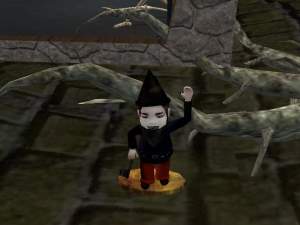
 Smurf's instead of gnome's
 Smurf's instead of gnome's


Smurf - Front.jpg - width=600 height=450
Smurf.jpg - width=381 height=331
Smurf PAPA.jpg - width=600 height=450
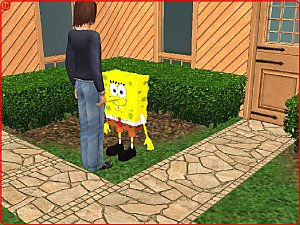
Hate gnome's why not have a smurf!
Yes now you can have a mini me in your yard to worship or kick. :howdy:
I will look at making more.
Bigger than a real smurf. Not life size, But scaled to that of a gnome for a more detailed model.
Poly Count:
Smurf - 3,730
Use's My Owen unique GUID, if you have a conflict tell me.

NOTE: Over write the old files of mine.
Instruction for installation are inside the rar as a txt.
------------------------------------------------------------------------
VISIT MY HOME PAGE:::
http://users.tpg.com.au/mickyss/
:baloons:
-------------------------------------------------------------------------
Check up my SimPE for Dummies - Textures and Models Guide hear.
http://forums.modthesims2.com/showt...32&page=1&pp=25
You maybe a king or a little street sweeper but sooner or later you'll dance with the reaper.
Bill and Teds Bogus Journey
This is a new mesh, and means that it's a brand new self contained object that usually does not require a specific Pack (although this is possible depending on the type). It may have Recolours hosted on MTS - check below for more information.
|
MTS-200505-Papa-Smurf.rar
Download
Uploaded: 22nd May 2005, 152.7 KB.
4,153 downloads.
|
||||||||
|
MTS-180505-Smurf.rar
Download
Uploaded: 20th May 2005, 121.2 KB.
4,933 downloads.
|
||||||||
| For a detailed look at individual files, see the Information tab. | ||||||||
Install Instructions
1. Download: Click the download link to save the .rar or .zip file(s) to your computer.
2. Extract the zip, rar, or 7z file.
3. Place in Downloads Folder: Cut and paste the .package file(s) into your Downloads folder:
- Origin (Ultimate Collection): Users\(Current User Account)\Documents\EA Games\The Sims™ 2 Ultimate Collection\Downloads\
- Non-Origin, Windows Vista/7/8/10: Users\(Current User Account)\Documents\EA Games\The Sims 2\Downloads\
- Non-Origin, Windows XP: Documents and Settings\(Current User Account)\My Documents\EA Games\The Sims 2\Downloads\
- Mac: Users\(Current User Account)\Documents\EA Games\The Sims 2\Downloads
- Mac x64: /Library/Containers/com.aspyr.sims2.appstore/Data/Library/Application Support/Aspyr/The Sims 2/Downloads
- For a full, complete guide to downloading complete with pictures and more information, see: Game Help: Downloading for Fracking Idiots.
- Custom content not showing up in the game? See: Game Help: Getting Custom Content to Show Up.
- If you don't have a Downloads folder, just make one. See instructions at: Game Help: No Downloads Folder.
Loading comments, please wait...



Uploaded: 20th May 2005 at 7:33 AM
Updated: 18th Dec 2005 at 4:37 AM
-

-
by GaryCXJk 30th Jun 2005 at 12:47pm
 13
4.7k
2
13
4.7k
2
-
by simsistic 26th Oct 2005 at 7:31pm
10
27.8k
14
-
by simsistic 27th Nov 2005 at 8:51pm
18
11.9k
4
-
by maree464 11th Dec 2005 at 4:45am
34
28.8k
18
-
by maree464 26th Jan 2006 at 11:46am
32
16.8k
7
-

by 01----Anne 28th Mar 2006 at 7:30pm
+1 packs
1 3.5k 4 Open for Business
-
-
-


-

-
-

-
-

-
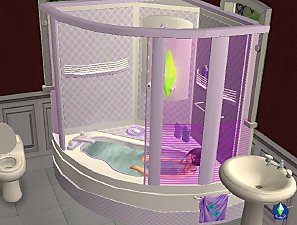
Corner Bath and Shower Unit - NOW FULLY working 2011
by mickyss updated 4th Sep 2011 at 9:06am
:jest: Corner Bath and Shower Unit - Pro - Bathtub Works. more...
-

-
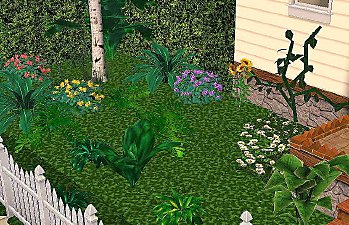
Lilac Plant, Conifer Pine Box Shrub, Bleeding Heart vine, Small Philli
by mickyss 1st Jul 2005 at 7:17am
Small Philli,Bleeding Heart vine, Baby Tears, Conifer Pine Box Shrub, Lilac Plant. more...
82
72.8k
44
-

-
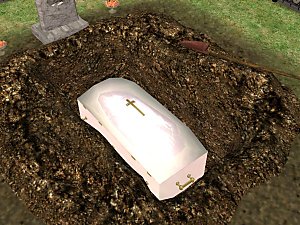
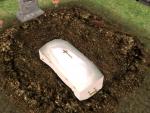
Caskets for hole with low Poly counts
by mickyss 11th May 2005 at 10:13am
Caskets for hole with low Poly counts. more...
28
36.6k
27