
 Sign in to Mod The Sims
 Sulani Realistic Map Override
 Sulani Realistic Map Override

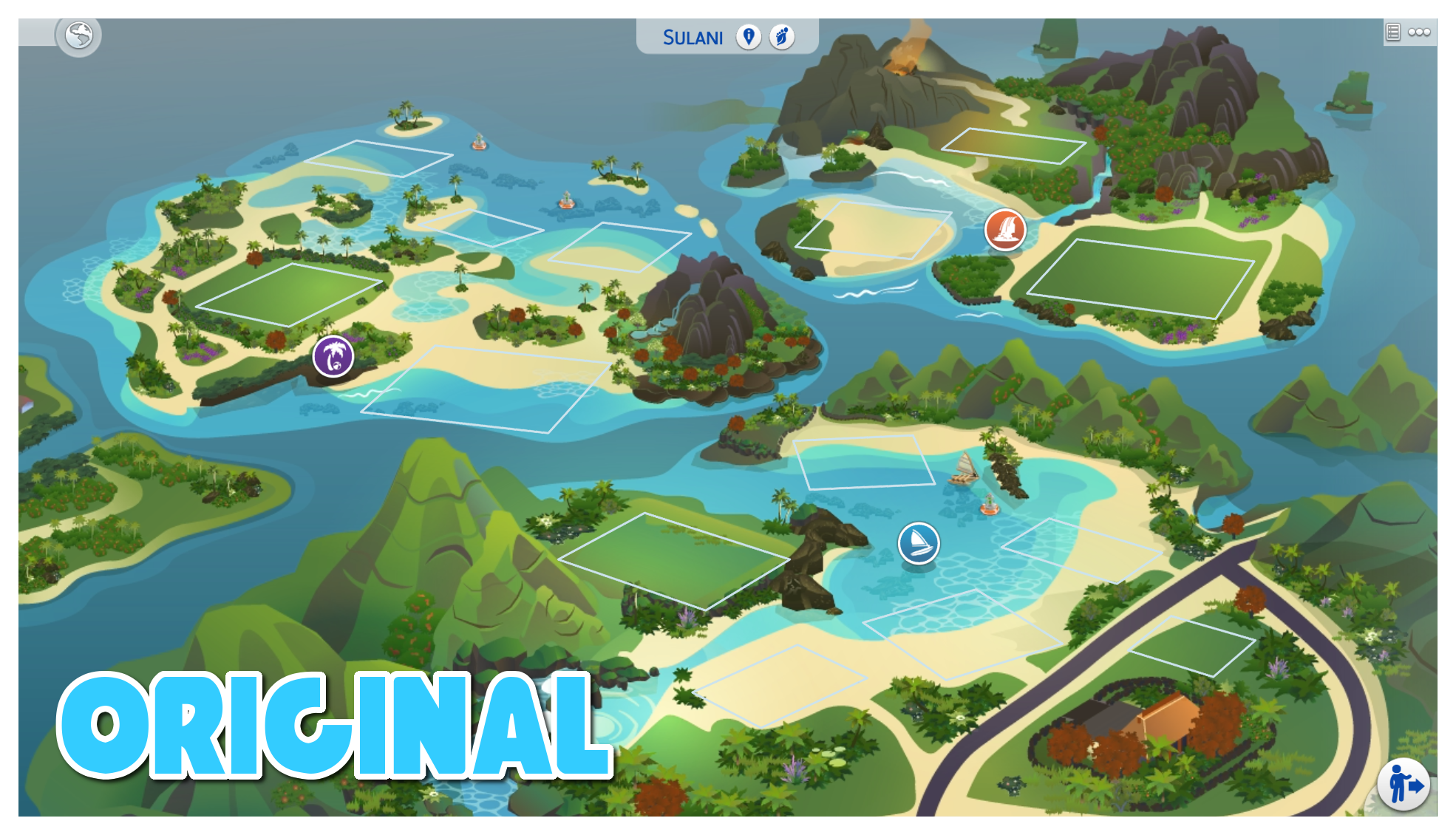


mts1.png - width=1200 height=1080
mts2.png - width=1970 height=1130
mts3.png - width=1970 height=1130
filled.png - width=1920 height=1080
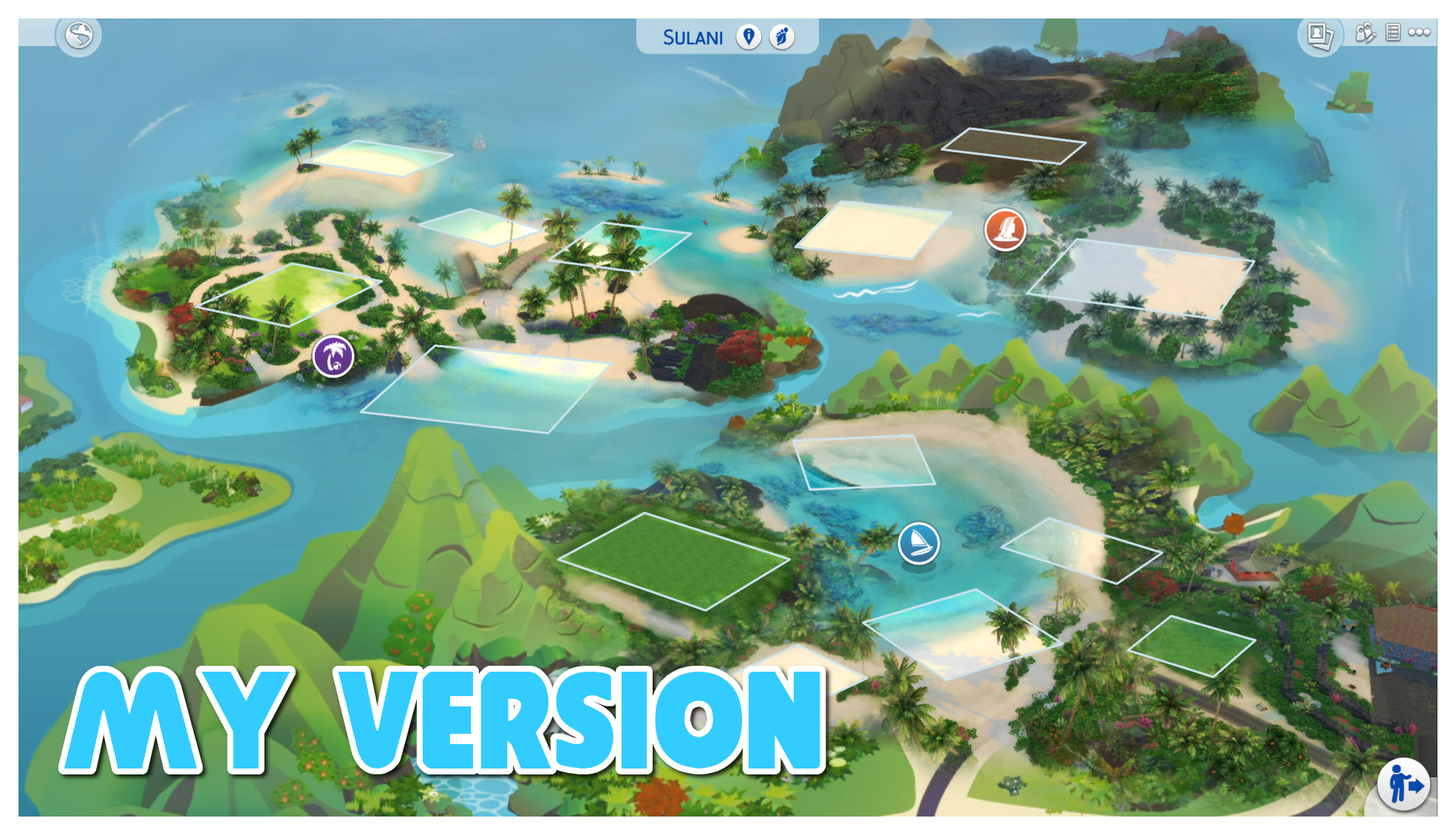
This is my first ever mod and it's a replacement for the Sulani map! I've been looking for one for a long time that fits my style more, but I haven't been able to find one so I made my own!
This map is a blend of the existing map artwork and screenshots from within the game which have all been combined together to make the map look much more like the actual world. I wanted to create something that feels more like an improved version of the map, rather than a totally new one and this is what I came up with! Each lot also has a glowing base under it, the same as if you hover over a lot in game to make them stand out a bit more and I've tried to make it look as much like the actual world as possible so I hope you like it!
To download the map, simply download the file, unzip it and put it straight into your mods file. Easy as that!
Important: This mod should be able to work on all screens, however because of the way it?s been put together it may not show properly for users with wider screens. Sadly there?s no way I can fix this without completely remaking it from scratch

This mod is a resource override for the existing Sulani map, what this means is that all it will affect is the background image. Saves and existing lots will still be there and won't be affected by putting this in your game.

|
OnverserSims' Sulani Custom Map.zip
Download
Uploaded: 22nd Aug 2020, 2.43 MB.
7,448 downloads.
|
||||||||
| For a detailed look at individual files, see the Information tab. | ||||||||
Install Instructions
1. Download: Click the File tab to see the download link. Click the link to save the .rar or .zip file(s) to your computer.
Read the upload description for installation instructions. If nothing else is specified, do the following:
2. Extract: Use WinRAR (Windows) to extract the .package file(s) (if included, ts4script as well) from the .rar or .zip file(s).
3. Cut and paste the .package file(s) (if included, ts4script as well) into your Mods folder
- Windows XP: Documents and Settings\(Current User Account)\My Documents\Electronic Arts\The Sims 4\Mods\
- Windows Vista/7/8/8.1: Users\(Current User Account)\Documents\Electronic Arts\The Sims 4\Mods\
Need more information?
- Anyone can use both .rar and .zip files easily! On Windows, use WinRAR.
- If you don't have a Mods folder, just make one.
- Mod still not working? Make sure you have script mods enabled

Loading comments, please wait...
-
by plasticbox 11th May 2015 at 12:58am
-
by plasticbox 24th Aug 2015 at 2:00am
-
by Menaceman44 updated 19th Mar 2026 at 6:59pm
-
Magnolia Promenade Colour Map Override
by Menaceman44 updated 7th Dec 2025 at 6:58pm
-
by Menaceman44 updated 7th Dec 2025 at 6:50pm
-
Newcrest Map Reimagined (Override)
by MySimsFever updated 29th Jul 2017 at 1:47pm
-
by Menaceman44 updated 7th Dec 2025 at 6:55pm
-
by Menaceman44 updated 14th Feb 2026 at 7:11pm
-
by Menaceman44 updated 7th Feb 2026 at 10:47pm
-


Packs Needed
| Expansion Pack | |
|---|---|
 | Island Living |