
 Sign in to Mod The Sims
 give me back my trait's order / categories, waaah!
 give me back my trait's order / categories, waaah!


cats-crop.png - width=1998 height=938
okladka2.png - width=1581 height=937
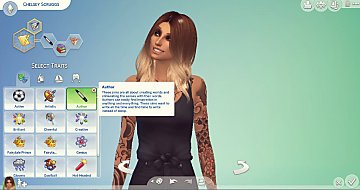
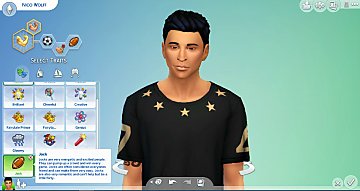
So inspired by BosseladyTV I made a mod so the old categories of traits are back now.
It’s tuning mod so it will conflict with any mod that is doing simillar things or just editing tuning/simdata of EA traits (is not conflicting with new traits, tho).
I also moved Rancher trait to Hobby category (because of reasons) and Horse Lover to Lifestyle (because it’s same category as Cat Lover and Dog Lover)
(not tested without packs, tested with game version 1.99)
How to insall:
just unzip a archiv and paste the *.package file in your ../documents/Electronic Arts/The Sims 4/Mods folder
exact files edited:
545AC67A!005FDD0C!00000000000041B7.trait_Ambitious.SimData.xml
545AC67A!005FDD0C!00000000000041BE.trait_Childish.SimData.xml
545AC67A!005FDD0C!00000000000041C0.trait_Clumsy.SimData.xml
545AC67A!005FDD0C!00000000000041D0.trait_Insane.SimData.xml
545AC67A!005FDD0C!0000000000002591.trait_Perfectionist.SimData.xml
545AC67A!005FDD0C!0000000000002594.trait_Snob.SimData.xml
545AC67A!005FDD0C!000000000002691A.trait_CatLover.SimData.xml
545AC67A!005FDD0C!000000000002691B.trait_DogLover.SimData.xml
CB5FDDC7!00000000!0000000000006B1B.trait_active.TraitTuning.xml
CB5FDDC7!00000000!0000000000006D0A.trait_LovesOutdoors.TraitTuning.xml
CB5FDDC7!00000000!00000000000041B7.trait_Ambitious.TraitTuning.xml
CB5FDDC7!00000000!00000000000041BE.trait_Childish.TraitTuning.xml
CB5FDDC7!00000000!00000000000041C0.trait_Clumsy.TraitTuning.xml
CB5FDDC7!00000000!00000000000041D0.trait_Insane.TraitTuning.xml
CB5FDDC7!00000000!0000000000002591.trait_Perfectionist.TraitTuning.xml
CB5FDDC7!00000000!0000000000002594.trait_Snob.TraitTuning.xml
CB5FDDC7!0000001E!0000000000038CF4.trait_RecycleDisciple.TraitTuning.xml
CB5FDDC7!00000002!0000000000018FC0.trait_Squeamish.TraitTuning.xml
CB5FDDC7!00000009!000000000001EC88.trait_DanceMachine.TraitTuning.xml
CB5FDDC7!00000014!0000000000031B16.trait_Paranoid.TraitTuning.xml
CB5FDDC7!00000019!000000000002691A.trait_CatLover.TraitTuning.xml
CB5FDDC7!00000019!000000000002691B.trait_DogLover.TraitTuning.xml
CB5FDDC7!00000034!000000000003ED55.Trait_AnimalEnthusiast.TraitTuning.xml
CB5FDDC7!00000037!000000000004E5C5.trait_HorseLover.TraitTuning.xml
CB5FDDC7!00000037!000000000004E5DC.trait_Rancher.TraitTuning.xml
545AC67A!005FDD0C!000000000001EC88.trait_DanceMachine.SimData.xml
545AC67A!005FDD0C!000000000003ED55.Trait_AnimalEnthusiast.SimData.xml
545AC67A!005FDD0C!000000000004E5C5.trait_HorseLover.SimData.xml
545AC67A!005FDD0C!000000000004E5DC.trait_Rancher.SimData.xml
545AC67A!005FDD0C!0000000000006B1B.trait_active.SimData.xml
545AC67A!005FDD0C!0000000000006D0A.trait_LovesOutdoors.SimData.xml
545AC67A!005FDD0C!0000000000018FC0.trait_Squeamish.SimData.xml
545AC67A!005FDD0C!0000000000031B16.trait_Paranoid.SimData.xml
545AC67A!005FDD0C!0000000000038CF4.trait_RecycleDisciple.SimData.xml
| Filename | Type | Size |
|---|---|---|
| [ senni ] DESTROY_NEW_ORDER_of_traits.zip | zip | |
| [ senni ] DESTROY_NEW_ORDER_of_traits.package | package | 23592 |
|
[ senni ] DESTROY_NEW_ORDER_of_traits.zip
Download
Uploaded: 20th Aug 2023, 22.5 KB.
1,482 downloads.
|
||||||||
| For a detailed look at individual files, see the Information tab. | ||||||||
Install Instructions
1. Download: Click the File tab to see the download link. Click the link to save the .rar or .zip file(s) to your computer.
Read the upload description for installation instructions. If nothing else is specified, do the following:
2. Extract: Use WinRAR (Windows) to extract the .package file(s) (if included, ts4script as well) from the .rar or .zip file(s).
3. Cut and paste the .package file(s) (if included, ts4script as well) into your Mods folder
- Windows XP: Documents and Settings\(Current User Account)\My Documents\Electronic Arts\The Sims 4\Mods\
- Windows Vista/7/8/8.1: Users\(Current User Account)\Documents\Electronic Arts\The Sims 4\Mods\
Need more information?
- Anyone can use both .rar and .zip files easily! On Windows, use WinRAR.
- If you don't have a Mods folder, just make one.
- Mod still not working? Make sure you have script mods enabled

Loading comments, please wait...

Uploaded: 20th Aug 2023 at 11:25 AM
#trait, #traits, #traits' order, #traits' categories, #CAS
-
-
-

-
by Diffevair 14th Jan 2018 at 1:34pm
 19
196.6k
184
19
196.6k
184
-
-
-
-
-
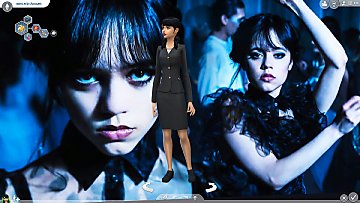
Changing your CAS wallpaper to Wednesday?
by Mandragoule 16th Mar 2023 at 8:41pm
-



-
-


Kitty Night Light~! [14 swatches]
by Senni 17th Jul 2022 at 5:12pm
https://thumbs.modthesims.info/getimage.php?file=2107663 just a little happy accident~ I was sad that there are only 3 night lights. And was curious... more...
+1 packs
3 4.7k 25 Parenthood
-
-

The Sims 4 Cottage Living: BG Garden Planter Box for Oversized Crop too [NEED Cottage Living]
by Senni 12th Feb 2023 at 1:46pm
1
9.5k
31
-


-


every language have english version names [CAS & random townies] WORKS FOR PETS TOO!
by Senni updated 30th Dec 2023 at 11:54pm
:!!: Tested with all packs and witch 24 may 2022 patch :!!: :!!: I would like to know how it more...
-

Sims 4 High School Years: shorter cafeteria (without dummy soda machine) [fully functional!]
by Senni updated 7th Nov 2022 at 12:08am
+1 packs
3 10.1k 14 High School Years
-


by Senni 20th Aug 2023 at 11:36am
8
39.2k
28
-
by Senni 6th Jul 2023 at 8:58pm
11
71.2k
23
-
[OMSP] completely invisible shelf with dresser hang option, many slots (115)!
by Senni 11th Nov 2022 at 11:24am
8
11.7k
21


