
 Sign in to Mod The Sims
 CAS QuickFind - Favorites and Recent History, Built Into CAS
 CAS QuickFind - Favorites and Recent History, Built Into CAS
SCREENSHOTS


QF-Fav.gif - width=1280 height=719
QF-Expl.png - width=1920 height=1080
QF-Favs.png - width=1920 height=1080
QF-Recent.png - width=1920 height=1080
Downloaded 847 times
22 Thanks
14 Favourited
3,025 Views
Say Thanks!
Thanked!
Personal Picked Upload!
This is a personal favourite of the creator!
CAS QuickFind
Tired of scrolling through the same CAS category trying to find that one hairstyle, top, accessory, or pair of shoes again?
XtremSyn · CAS QuickFind turns the randomize dice into a Favorites control directly inside Create-a-Sim.
Star the catalog items you love, switch to a filtered Favorites view, and return to them without searching through the entire category again. Your saved favorites remain available across game restarts.
Version: 1.0.0
Supported Game Patch: The Sims 4 1.126+

Installation Instructions
Close The Sims 4 before installing or updating CAS QuickFind.
Example of a Correct Installation — More Columns Compatibility
Make sure the compatibility package and official More Columns package are in the same folder, or the override may not work.
The ! at the beginning of the QuickFind compatibility package helps ensure it loads after the More Columns package.
Main Features
Favorites Built Into the CAS Dice
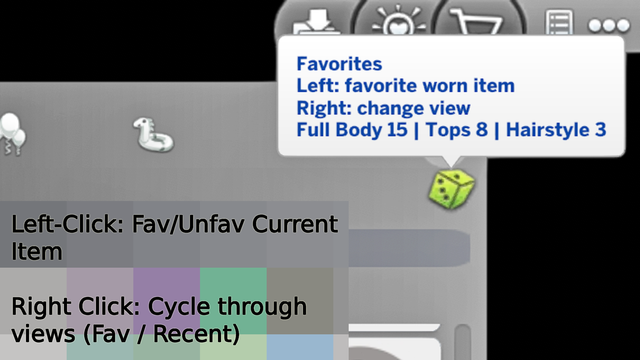
Save Unlimited Favorites
Star hairstyles, clothing, accessories, shoes, and other catalog items while browsing CAS.
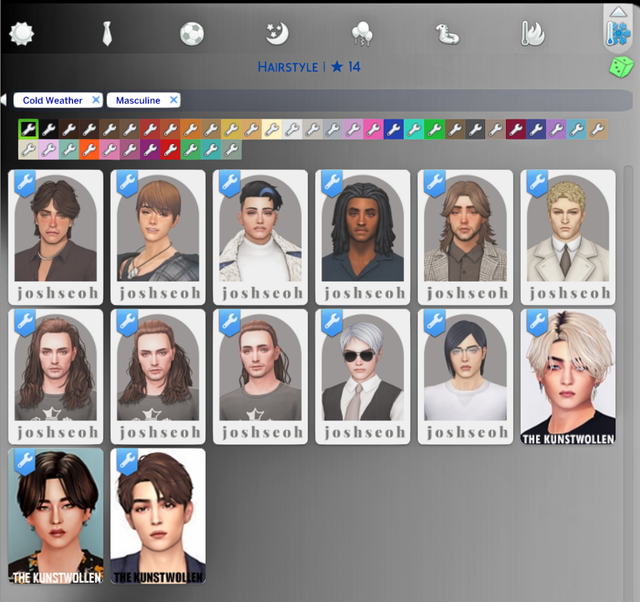
Favorites That Stay Saved
Your favorites persist across game restarts, so your saved pieces remain available the next time you open CAS.
Clear Feedback Inside CAS
The CAS title displays:
Hovering over the dice also displays a quick control guide and category information when available.
Left-click dice
Favorite or unfavorite the currently worn catalog item.
Right-click dice
Cycle through:
Hold right-click for around five seconds
Clear the current category's Favorites or Recent list, depending on the active view.
Forgot to favorite something before clicking away?
The Recent view remembers the last 35 worn or clicked items per clothing category, giving you a quick trail back to the pieces you were just comparing.
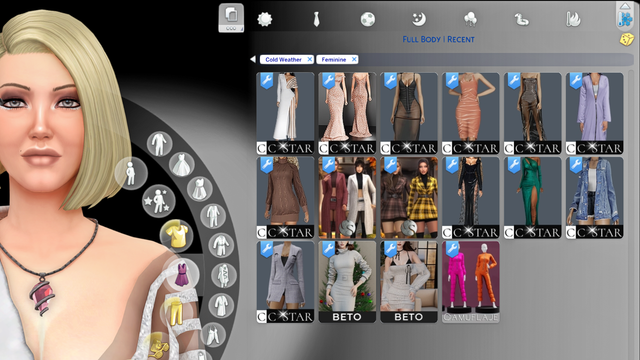
Right-click the dice until you reach:
The dice changes to a yellow tint while Recent is active, making the current view easy to identify.
Recent history is tracked separately for each clothing category, so recently viewed hairstyles do not get mixed with tops, shoes, or accessories.
CAS QuickFind supports:
QuickFind does not replace More Columns. It adds its Favorites interface on top of the matching layout.
Available commands:
Check the installed version and current setup.
Export your saved favorite data.
The exported .json file can be found in:
View a full favorites-by-category breakdown.
Tired of scrolling through the same CAS category trying to find that one hairstyle, top, accessory, or pair of shoes again?
XtremSyn · CAS QuickFind turns the randomize dice into a Favorites control directly inside Create-a-Sim.
Star the catalog items you love, switch to a filtered Favorites view, and return to them without searching through the entire category again. Your saved favorites remain available across game restarts.
Version: 1.0.0
Supported Game Patch: The Sims 4 1.126+
Installation Instructions
Close The Sims 4 before installing or updating CAS QuickFind.
- Download and extract the CAS QuickFind archive.
- Choose exactly one QuickFind UI package matching your CAS layout.
- For the standard CAS layout, install the stock 2-column package.
- For More Columns, install the matching 3, 4, 5, or 6-column QuickFind compatibility package.
- Place the selected package and script in your Mods folder.
- Restart The Sims 4.
----------
Important
Install only one QuickFind UI package.
Do not combine the stock 2-column QuickFind package with a More Columns compatibility package.
More Columns users must keep the matching official More Columns package installed.
This release supports game patch 1.126+.
Install only one QuickFind UI package.
Do not combine the stock 2-column QuickFind package with a More Columns compatibility package.
More Columns users must keep the matching official More Columns package installed.
This release supports game patch 1.126+.
----------
Example of a Correct Installation — Vanilla Sims 4 UI
Code:
XtremSyn_CASQuickFind_1.126.package
XtremSyn_CASQuickFind_1.126.ts4script
----------
Example of a Correct Installation — More Columns Compatibility
Make sure the compatibility package and official More Columns package are in the same folder, or the override may not work.
The ! at the beginning of the QuickFind compatibility package helps ensure it loads after the More Columns package.
Code:
!XtremSyn_CASQuickFind_1.126_MC6_Compatibility.package
More_CAS_Columns_(6_Columns).package
XtremSyn_CASQuickFind_1.126.ts4script
----------
Main Features
Favorites Built Into the CAS Dice
- Left-click the dice — Favorite or unfavorite the catalog item currently worn by your Sim.
- Right-click the dice — Switch between All → Favorites → Recent → All.
- Hold right-click for about five seconds — Clear the current category's Favorites or Recent list, depending on the active view.
Save Unlimited Favorites
Star hairstyles, clothing, accessories, shoes, and other catalog items while browsing CAS.
Favorites That Stay Saved
Your favorites persist across game restarts, so your saved pieces remain available the next time you open CAS.
Clear Feedback Inside CAS
The CAS title displays:
- The current clothing category and favorite count
- Favorited and Unfavorited confirmations
- Clearing... while holding the clear control
- The number of favorites removed when clearing finishes
Hovering over the dice also displays a quick control guide and category information when available.
----------
Controls at a GlanceLeft-click dice
Favorite or unfavorite the currently worn catalog item.
Right-click dice
Cycle through:
Code:
All → Favorites → Recent → All
Hold right-click for around five seconds
Clear the current category's Favorites or Recent list, depending on the active view.
----------
Find Recently Used Items AgainForgot to favorite something before clicking away?
The Recent view remembers the last 35 worn or clicked items per clothing category, giving you a quick trail back to the pieces you were just comparing.
Right-click the dice until you reach:
Code:
Recent
The dice changes to a yellow tint while Recent is active, making the current view easy to identify.
Recent history is tracked separately for each clothing category, so recently viewed hairstyles do not get mixed with tops, shoes, or accessories.
----------
Stock CAS and More Columns SupportCAS QuickFind supports:
- Stock 2-column CAS
- Official More Columns by weerbesu in 3, 4, 5, or 6-column layouts
QuickFind does not replace More Columns. It adds its Favorites interface on top of the matching layout.
----------
Live Status and Export ToolsAvailable commands:
Code:
qf.status
Check the installed version and current setup.
Code:
qf.fav_export
Export your saved favorite data.
The exported .json file can be found in:
Code:
Documents\Electronic Arts\The Sims 4\
Code:
qf.fav_stats
View a full favorites-by-category breakdown.
----------
Requirements- The Sims 4 patch 1.126+
- More Columns by weerbesu is required only when using one of the 3–6-column compatibility packages.
Star it. Filter it. Find it again.
Advertisement:
| Filename | Type | Size |
|---|---|---|
| XtremSyn_CASQuickFind_1.126.zip | zip | |
| !XtremSyn_CASQuickFind_1.126_MC3_Compatibility.package | package | 170559 |
| !XtremSyn_CASQuickFind_1.126_MC4_Compatibility.package | package | 170572 |
| !XtremSyn_CASQuickFind_1.126_MC5_Compatibility.package | package | 170572 |
| !XtremSyn_CASQuickFind_1.126_MC6_Compatibility.package | package | 170571 |
| XtremSyn_CASQuickFind_1.126.package | package | 169583 |
| XtremSyn_CASQuickFind_1.126.ts4script | ts4script | 7177 |
| XtremSyn_CASQuickFind_Translation_TEMPLATE.package | package | 542 |
| !ONLY INSTALL ONE (READ MOD DETAILS).txt | txt | 373 |
|
XtremSyn_CASQuickFind_1.126.zip
Download
Uploaded: 15th Aug 2026, 795.9 KB.
511 downloads.
|
||||||||
| For a detailed look at individual files, see the Information tab. | ||||||||
Install Instructions
Basic Download and Install Instructions:
Need more information?
1. Download: Click the File tab to see the download link. Click the link to save the .rar or .zip file(s) to your computer.
Read the upload description for installation instructions. If nothing else is specified, do the following:
2. Extract: Use WinRAR (Windows) to extract the .package file(s) (if included, ts4script as well) from the .rar or .zip file(s).
3. Cut and paste the .package file(s) (if included, ts4script as well) into your Mods folder
- Windows XP: Documents and Settings\(Current User Account)\My Documents\Electronic Arts\The Sims 4\Mods\
- Windows Vista/7/8/8.1: Users\(Current User Account)\Documents\Electronic Arts\The Sims 4\Mods\
Need more information?
- Anyone can use both .rar and .zip files easily! On Windows, use WinRAR.
- If you don't have a Mods folder, just make one.
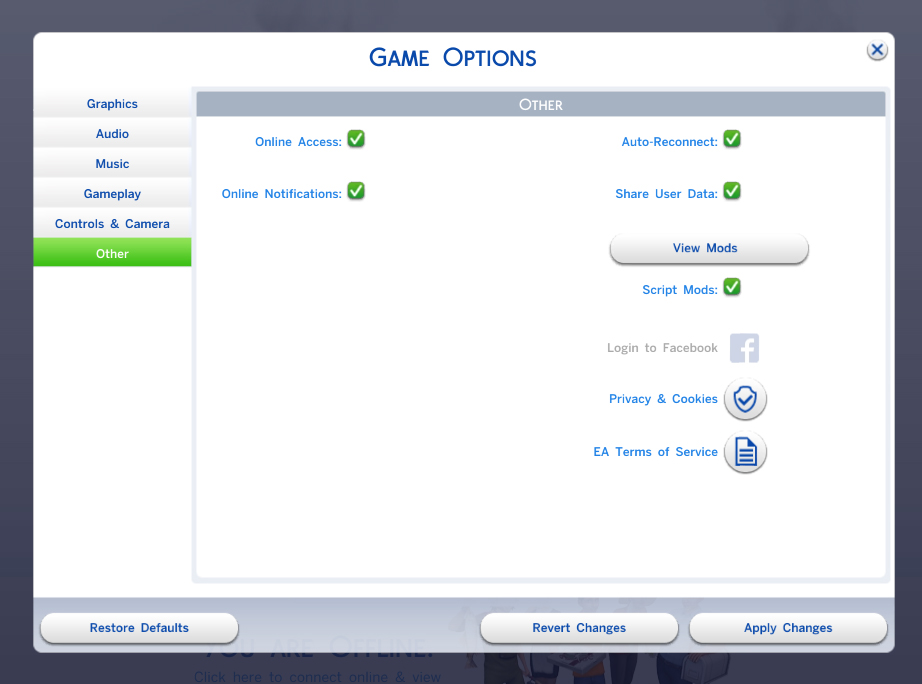
- Mod still not working? Make sure you have script mods enabled
Advertisement:
Loading comments, please wait...
Author

Download Details
Packs:
None, this is Sims 4 base game compatible!
Uploaded: 9th Aug 2026 at 11:35 AM
Updated: 20th Aug 2026 at 5:37 PM
Uploaded: 9th Aug 2026 at 11:35 AM
Updated: 20th Aug 2026 at 5:37 PM
Type:
– CAS Mods
: Mods which alter or improve Create-A-Sim
Other Download Recommendations:
-
by christmas fear 15th Oct 2014 at 4:59am
 7
17.7k
16
7
17.7k
16
-
-

by lemememeringue 14th Aug 2018 at 9:55pm
+1 packs
7 14.3k 20 Vampires
-
by littledica 12th Mar 2020 at 4:54pm
74
627.6k
456
-

-

Changing your CAS wallpaper to Wednesday?
by Mandragoule 16th Mar 2023 at 8:41pm
-

-
-
by nomadjc 10th Jan 2026 at 11:49am
5
5.7k
15
-


About Me
What happens in The Sims… stays in The Sims.
I create Sims 4 mods at the moment, building features that I personally wish to have in the game.
If you love my mods, be sure to check out my Patreon (18+) for early access content.
I create Sims 4 mods at the moment, building features that I personally wish to have in the game.
If you love my mods, be sure to check out my Patreon (18+) for early access content.