Sign in to Mod The Sims
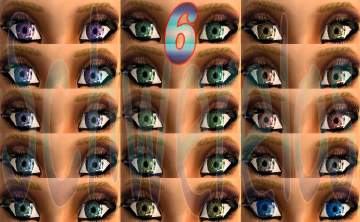
 Second Recolor-Collection - Moonrise, Polarlights, Sunrise
 Second Recolor-Collection - Moonrise, Polarlights, Sunrise

moonrise_ingame.jpg - width=600 height=450

I`ve done sooooo many recolores... it will take years to upload all of them....
the second collections
For more Pics follow the links:
(they might take a few seconds to load) :blah:
Sunrise
http://schwerelos21.xardas.lima-cit...s/sunrise_1.jpg
in Game:
http://schwerelos21.xardas.lima-cit...rise_ingame.jpg (not all at this pic, but all in the game
 )
)Polarlights
1: http://schwerelos21.xardas.lima-cit...1collection.jpg
2: http://schwerelos21.xardas.lima-cit...2collection.jpg
In Game
1: http://schwerelos21.xardas.lima-cit...ghts_ingame.jpg
2: http://schwerelos21.xardas.lima-cit...hts2_ingame.jpg
-> please do not offer my work on any sites
have fun
This custom content if it is not clothing, may require a seperate download to work properly. This is available at Colour Enable Package (CEP) by Numenor.
|
sunrise1Collection_Schwerelos2005.rar
Download
Uploaded: 11th Aug 2005, 2.02 MB.
1,057 downloads.
|
||||||||
|
polarlight1Collection_Schwerelos2005.rar
Download
Uploaded: 11th Aug 2005, 3.65 MB.
1,075 downloads.
|
||||||||
|
moonrise1Collection_Schwerelos2005.rar
Download
Uploaded: 11th Aug 2005, 958.4 KB.
1,145 downloads.
|
||||||||
| For a detailed look at individual files, see the Information tab. | ||||||||
Install Instructions
1. Download: Click the download link to save the .rar or .zip file(s) to your computer.
2. Extract the zip, rar, or 7z file
3. Place in Downloads Folder: Cut and paste the .package file(s) into your Downloads folder:
- Origin (Ultimate Collection): Users\(Current User Account)\Documents\EA Games\The Sims™ 2 Ultimate Collection\Downloads\
- Non-Origin, Windows Vista/7/8/10: Users\(Current User Account)\Documents\EA Games\The Sims 2\Downloads\
- Non-Origin, Windows XP: Documents and Settings\(Current User Account)\My Documents\EA Games\The Sims 2\Downloads\
- Mac: Users\(Current User Account)\Documents\EA Games\The Sims 2\Downloads
- Mac x64:
/Library/Containers/com.aspyr.sims2.appstore/Data/Library/Application Support/Aspyr/The Sims 2/Downloads
Need more information?
- For a full, complete guide to downloading complete with pictures and more information, see: Game Help: Downloading for Fracking Idiots.
- Custom content not showing up in the game? See: Game Help: Getting Custom Content to Show Up.
- If you don't have a Downloads folder, just make one. See instructions at: Game Help: No Downloads Folder.
Loading comments, please wait...



Uploaded: 11th Aug 2005 at 4:03 PM
Updated: 31st Oct 2005 at 3:31 PM
-
by shameless_wedgie 19th Apr 2005 at 5:29pm
 1
4.4k
1
1
4.4k
1
-

by maree464 3rd Oct 2005 at 6:41am
6
5.4k
1
-
-
-

by Mirjam 25th Jan 2006 at 9:31am
8
6.7k
1
-
by Elaxx 27th Feb 2006 at 5:11pm
3
7.1k
1
-
by Sirella 20th Apr 2006 at 7:59pm
3
5.4k
1
-
-

by Sirella 11th May 2006 at 4:33pm
2
6.7k
4
-
by poundingheart 22nd Aug 2006 at 6:38am
+1 packs
9 5.8k 2 Nightlife


-
-
-
-
-
-
-
-
-
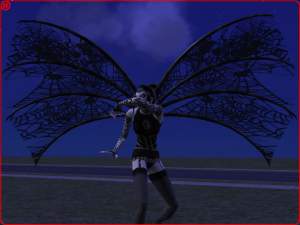
Spider... Wings? o.O Whatever...
by q3tbo 24th Sep 2006 at 3:12am
:wtf: It's for Adults, can be found in Game under "glasses" and needs no EP. more...
31
58.8k
42
-