Sign in to Mod The Sims
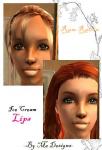
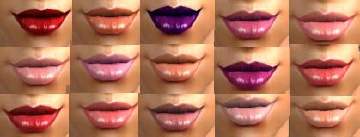
 Ice Cream Lips
 Ice Cream Lips
SCREENSHOTS


Peach Ice Cream Lips.JPG - width=420 height=620
Strawberry Ice Cream Lips.JPG - width=420 height=620
Bubblegum Ice Cream Lips.JPG - width=420 height=620
Downloaded 341 times
22 Thanks
0 Favourited
8,821 Views
Say Thanks!
Thanked!
My first submission to mts2! This is my first set of lipglosses/lipstick ever and I'm pretty pleased with how they came out! Set 2 is also now out!
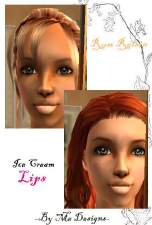
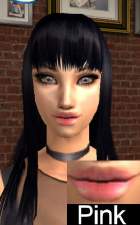
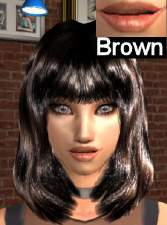
There are 2 pictures per color so you can see how the color looks on different skintones.
[EDIT]
Oh yes and you may re-distribute the lip colors with sims if you credit it to by me designs and no re-uploading to your site though.

Peach Ice Cream Lips

Strawberry Ice Cream Lips

Bubblegum Ice Cream Lips
Download them separetly, or together! Enjoy
There are 2 pictures per color so you can see how the color looks on different skintones.
[EDIT]
Oh yes and you may re-distribute the lip colors with sims if you credit it to by me designs and no re-uploading to your site though.
Peach Ice Cream Lips
Strawberry Ice Cream Lips
Bubblegum Ice Cream Lips
Download them separetly, or together! Enjoy
Advertisement:
|
BubblegumIceCreamLips.rar
Download
Uploaded: 29th Aug 2005, 60.9 KB.
350 downloads.
|
||||||||
|
StrawberryIceCreamLips.rar
Download
Uploaded: 29th Aug 2005, 50.3 KB.
377 downloads.
|
||||||||
|
PeachIceCreamLips.rar
Download
Uploaded: 29th Aug 2005, 51.7 KB.
442 downloads.
|
||||||||
|
IceCreamLips1.rar
Download
Uploaded: 29th Aug 2005, 162.9 KB.
532 downloads.
|
||||||||
| For a detailed look at individual files, see the Information tab. | ||||||||
Install Instructions
Basic Download and Install Instructions:
1. Download: Click the download link to save the .rar or .zip file(s) to your computer.
2. Extract the zip, rar, or 7z file.
3. Place in Downloads Folder: Cut and paste the .package file(s) into your Downloads folder:
1. Download: Click the download link to save the .rar or .zip file(s) to your computer.
2. Extract the zip, rar, or 7z file.
3. Place in Downloads Folder: Cut and paste the .package file(s) into your Downloads folder:
- Origin (Ultimate Collection): Users\(Current User Account)\Documents\EA Games\The Sims™ 2 Ultimate Collection\Downloads\
- Non-Origin, Windows Vista/7/8/10: Users\(Current User Account)\Documents\EA Games\The Sims 2\Downloads\
- Non-Origin, Windows XP: Documents and Settings\(Current User Account)\My Documents\EA Games\The Sims 2\Downloads\
- Mac: Users\(Current User Account)\Documents\EA Games\The Sims 2\Downloads
- Mac x64: /Library/Containers/com.aspyr.sims2.appstore/Data/Library/Application Support/Aspyr/The Sims 2/Downloads
- For a full, complete guide to downloading complete with pictures and more information, see: Game Help: Downloading for Fracking Idiots.
- Custom content not showing up in the game? See: Game Help: Getting Custom Content to Show Up.
- If you don't have a Downloads folder, just make one. See instructions at: Game Help: No Downloads Folder.
Advertisement:
Loading comments, please wait...
Author

Download Details
Packs:
None, this is Sims 2 base game compatible!
Uploaded: 29th Aug 2005 at 11:09 PM
Updated: 1st Nov 2008 at 3:12 AM by Canoodle
Uploaded: 29th Aug 2005 at 11:09 PM
Updated: 1st Nov 2008 at 3:12 AM by Canoodle
Other Download Recommendations:
-
-
-
-
-
-
by Belle_Ange_16 16th Nov 2005 at 9:13pm
-
-
-
-

by JohnBrehaut1 12th Aug 2006 at 7:27pm


More downloads by star31591:
See more