Quick Reply
Search this Thread
Test Subject
Original Poster
#1 Old 2nd Feb 2025 at 10:11 AM
Default Old tools like Sim Enhancer do not work for Sims 1 Legacy

Sim Enhancer requires your User Data to be in the same folder as the sims.exe and in the same folder as your data (skins, heads, that sort of thing)
Sims Legacy does not store your user data in the User Data files in the steam (or ea) folder, instead it stores your save data in the Users/Save Games/Electronic Arts folder by themselves, if you tell Sim Enhancer where your sims.exe file is it won't work because the save data in that folder is never used, and if you try to direct it to the Users file then it won't have access to any of your skins or heads. Hopefully soon a new application will come out to let you do this stuff, but currently it isn't possible.
Theorist
#2 Old 2nd Feb 2025 at 6:30 PM Last edited by Corylea : 2nd Feb 2025 at 7:53 PM.
Quote: Originally posted by thalion740
Sim Enhancer requires your User Data to be in the same folder as the sims.exe and in the same folder as your data (skins, heads, that sort of thing)
Sims Legacy does not store your user data in the User Data files in the steam (or ea) folder, instead it stores your save data in the Users/Save Games/Electronic Arts folder by themselves, if you tell Sim Enhancer where your sims.exe file is it won't work because the save data in that folder is never used, and if you try to direct it to the Users file then it won't have access to any of your skins or heads. Hopefully soon a new application will come out to let you do this stuff, but currently it isn't possible.

Sim Enhancer is a VERY useful program, but a lot of what it does can be done by other mods. The supersculpture at Some Sim Things lets you alter interests and skills, C&C's dresser lets you change your sim's outfits, the personality bookcase at Some Sim Things lets you alter personality points, and so on. The supersculpture lets you maximize a skill with one click; if you want to add one point at a time, my Skill Picture will do that.

If you have a copy of The Sims 1 installed in the old place, it might be possible to copy the saved games into that installation as Neighborhood 9, alter them with the Enhancer, then transfer them back again. But most people who've bought Legacy probably don't also have the old Sims 1 also installed. :-)

Edited to add: I just tried the trick of moving from one installation to another and back again, and when I did, the EA App told me that some of my files were corrupted. I did make some fairly extensive changes, so it's possible that smaller changes might work. But at least for what I did, Legacy did not like the UserData file that was altered by Sim Enhancer.

I've made some mods for The Sims 1 -- yes, The Sims ONE :-) -- which you can find at http://corylea.com/Sims1ModsByCorylea.html
Test Subject
#3 Old 20th Feb 2025 at 12:36 PM
Quote: Originally posted by Corylea
I just tried the trick of moving from one installation to another and back again, and when I did, the EA App told me that some of my files were corrupted. I did make some fairly extensive changes, so it's possible that smaller changes might work. But at least for what I did, Legacy did not like the UserData file that was altered by Sim Enhancer.


I can confirm that altering a save from the Legacy Edition with SimEnhancer will corrupt the save beyond repair! Even if it's a save started with the Complete Colletion and then transfered to the Legacy Edition - once you save the game through the Legacy Edition, DO NOT edit it with SimEnhance as even the smallest change will render your save unplayable, and transferring it back to the Complete Collection won't recover it.
I guess this could only mean that the Legacy Edition does something different when it saves the game, compared to the Complete Collection.
The Sims 2 Legacy Edition has been notorious for corrupting saves on its own, and I believe the same thing could be happening with the Sims 1 Legacy since many player have reported multiple game crashes (which often times is a sign of save corruption).
I don't trust the Legacy Edition, it's not safe to play and save corruption is really a thing, which is why I'm sticking to the Complete Collection.
Instructor
#4 Old 20th Feb 2025 at 3:42 PM
Quote: Originally posted by carlao1124
I can confirm that altering a save from the Legacy Edition with SimEnhancer will corrupt the save beyond repair! Even if it's a save started with the Complete Colletion and then transfered to the Legacy Edition - once you save the game through the Legacy Edition, DO NOT edit it with SimEnhance as even the smallest change will render your save unplayable, and transferring it back to the Complete Collection won't recover it.
I guess this could only mean that the Legacy Edition does something different when it saves the game, compared to the Complete Collection.
The Sims 2 Legacy Edition has been notorious for corrupting saves on its own, and I believe the same thing could be happening with the Sims 1 Legacy since many player have reported multiple game crashes (which often times is a sign of save corruption).
I don't trust the Legacy Edition, it's not safe to play and save corruption is really a thing, which is why I'm sticking to the Complete Collection.

Only EA would manage such a thing. Sigh.

♫ I'm on a ride, and I wanna get off, but they won't slow down the roundabout :| ♫
Field Researcher
#5 Old 25th Feb 2025 at 12:37 PM
Quote: Originally posted by carlao1124
I can confirm that altering a save from the Legacy Edition with SimEnhancer will corrupt the save beyond repair! Even if it's a save started with the Complete Colletion and then transfered to the Legacy Edition - once you save the game through the Legacy Edition, DO NOT edit it with SimEnhance as even the smallest change will render your save unplayable, and transferring it back to the Complete Collection won't recover it.
I guess this could only mean that the Legacy Edition does something different when it saves the game, compared to the Complete Collection.
The Sims 2 Legacy Edition has been notorious for corrupting saves on its own, and I believe the same thing could be happening with the Sims 1 Legacy since many player have reported multiple game crashes (which often times is a sign of save corruption).
I don't trust the Legacy Edition, it's not safe to play and save corruption is really a thing, which is why I'm sticking to the Complete Collection.


@carlao1124 What were the indications of corruption? I want to use the SimEnhancer to edit the interests of premade sims, I don't like how they're randomized so I'd prefer to take a more calculated approach pre-gameplay. From my brief testing, it seemed that making a backup of the UserData in the Steam Installation folder, then replacing this with a copy of whats in the Saved Games location that has already been saved once post-first launch, then using the SimEnhancer from the Steam Installation Directory to change interests and saving, then copying over just the specific character file (and perhaps the Neighborhood file too) into the Saved Games location then restoring the Steam files from the backup seems to work fine...but there's a lot more testing to be done and I'm worried I'll be in for a nasty surprise.
Test Subject
#6 Old 28th Feb 2025 at 8:19 PM
Quote: Originally posted by BellaDovah
@carlao1124 What were the indications of corruption? I want to use the SimEnhancer to edit the interests of premade sims, I don't like how they're randomized so I'd prefer to take a more calculated approach pre-gameplay... [...] ...but there's a lot more testing to be done and I'm worried I'll be in for a nasty surprise.


I lost an entire save because I started it with the Legacy Edition and then edited it with SimEnhancer. The game crashes right before the Neighborhood screen (and after the splash logo). Luckily, I could still load that save in SimEnhancer, so I literally copied every piece of information on my sims, and then re-created everything in a brand new save. I made another test where I started a new save with the Legacy Edition, then I edited only 1 sim with SimEnhancer and it corrupted that save too, so at least on my end (and as Corylea confirmed it too) , that's what's going on. It seems to break only your sims, but you can sill transfer your lots to a new save. I decided to settle for the Ultimate Collection, which has always worked great all these years. It's a shame because I really wanted to play the re-release, but I don't wanna risk losing a save and, like you, I need SimEnhancer to make the Townies the way I want them.
Field Researcher
#7 Old 28th Feb 2025 at 11:00 PM
Quote: Originally posted by carlao1124
I lost an entire save because I started it with the Legacy Edition and then edited it with SimEnhancer. The game crashes right before the Neighborhood screen (and after the splash logo). Luckily, I could still load that save in SimEnhancer, so I literally copied every piece of information on my sims, and then re-created everything in a brand new save. I made another test where I started a new save with the Legacy Edition, then I edited only 1 sim with SimEnhancer and it corrupted that save too, so at least on my end (and as Corylea confirmed it too) , that's what's going on. It seems to break only your sims, but you can sill transfer your lots to a new save. I decided to settle for the Ultimate Collection, which has always worked great all these years. It's a shame because I really wanted to play the re-release, but I don't wanna risk losing a save and, like you, I need SimEnhancer to make the Townies the way I want them.


Thanks for clarifying! Sorry you lost a save. I thought I had it working with the Legacy Collection for a moment, until I tried to edit any of the premade Unleashed families like Goth Sr or Claire Charming, then my game would crash during launch. Luckily I'm just in a testing phase and have backups so would restore anything I experiment with anyway. It seems to be a problem with the way SimEnhancer saves data. I have also installed the Complete Collection and found that there's no problem in making the edits to that with SimEnhancer and then copying those saves from the Complete Collection to Legacy Collection, that works absolutely fine, the issue is with directly saving LC files with the SimEnhancer.
Lab Assistant
#8 Old 5th Mar 2025 at 8:36 AM
I just added SimExplorer and it is working with the new Legacy Sims.
I've uploaded it to my SimsFileShare if anyone needs it.
I am going to test more of the older programs to see if they are compatible with the Legacy Sims.
http://simfil.es/5335673/
Lab Assistant
#9 Old 5th Mar 2025 at 8:43 AM
I also added SimCatagorizer and it is working. You just need to set the path to where the game is loaded.
I'll share the program here too if anyone wants it.
http://simfil.es/5335674/
Test Subject
#10 Old 8th Mar 2025 at 12:33 AM
SimCatagorizer i keep getting error even with VB6 runtime...
Field Researcher
#11 Old 8th Mar 2025 at 2:27 AM
Quote: Originally posted by izaan22
SimCatagorizer i keep getting error even with VB6 runtime...


That's because it needs Visual Basic 6 runtime installed in order to run. It's not a Legacy specific bug. The readme mentions this:

Quote: Originally posted by SimCategorizer364\ReadMe.txt
3. Installation

SimCategorizer should be installed into a directory all by itself. Create a directory under The Sims, copy the file to and run it. It doesn't get any easier than that.

The program requires Visual Basic 6 runtime files. The VB 6 runtime files may be downloaded from the following location:
http://download.microsoft.com/downl.../VBRun60sp4.exe

No additional files are required by SimCategorizer.
Test Subject
#12 Old 8th Mar 2025 at 9:14 PM
Quote: Originally posted by purplewowies
That's because it needs Visual Basic 6 runtime installed in order to run. It's not a Legacy specific bug. The readme mentions this:


VB6 Runtime is Visual Basic 6 runtime, still keeping error as i check i did installed it, then i give up and use SE Object Manager it did work but still paid and i use free try.
Test Subject
#13 Old 15th Mar 2025 at 11:25 AM
May I ask whether Transmogrifier works with Legacy? I was reading Corylea's tutorial on hacking objects on Reddit, but it's pre-Legacy.
Theorist
#14 Old 15th Mar 2025 at 7:11 PM Last edited by Corylea : 15th Mar 2025 at 9:28 PM.
Quote: Originally posted by SilveryHobgoblin
May I ask whether Transmogrifier works with Legacy? I was reading Corylea's tutorial on hacking objects on Reddit, but it's pre-Legacy.

The Transmogrifier looks for The Sims, so it MIGHT not be able to find The Sims Legacy. I don't know if it searches registry entries, or if it searches files. I think it searches for sims.exe, though, and the Legacy game still has that.

IF it can't find your installation of The Sims, there are two possibilities:

If it searches files, then you could try making folders Maxis\The Sims in your Program Files (x86) directory, then copying all of the Legacy files to C:\Program Files (x86)\Maxis\The Sims. Objects cloned would be in C:\Program Files (x86)\Maxis\The Sims\Downloads\Transmogrified, but it would be a simple matter to move them back to your Legacy installation.

If it searches the registry, then getting it to work would require hacking the registry to add an entry for The Sims, then doing the file copying mentioned above. It's VERY easy for things to go wrong when hacking the registry, so I really don't recommend it, but it is a way...

But I THINK it looks for sims.exe, and if it does, it should work with Legacy. (I can't test this for you, because I also have The Complete Collection installed, and have had TMog working with TCC for several years now.)

I've made some mods for The Sims 1 -- yes, The Sims ONE :-) -- which you can find at http://corylea.com/Sims1ModsByCorylea.html
Field Researcher
#15 Old 15th Mar 2025 at 11:18 PM
By default, I think T-mog looks for your install path using the registry... but it ALSO includes in its "About the Sims Transmogrifier..." button an option to set the Sims install path, where you can tell it where your Sims exe is! (I opened T-mog just to confirm this because there are SOME programs that guess via the registry but let you manually set the location if the registry entry is wrong or missing for whatever reason.)
Field Researcher
#16 Old 30th Oct 2025 at 11:09 PM
Default Help TS1
Quote: Originally posted by Corylea
Sim Enhancer is a VERY useful program, but a lot of what it does can be done by other mods. The supersculpture at Some Sim Things lets you alter interests and skills, C&C's dresser lets you change your sim's outfits, the personality bookcase at Some Sim Things lets you alter personality points, and so on. The supersculpture lets you maximize a skill with one click; if you want to add one point at a time, my Skill Picture will do that.

If you have a copy of The Sims 1 installed in the old place, it might be possible to copy the saved games into that installation as Neighborhood 9, alter them with the Enhancer, then transfer them back again. But most people who've bought Legacy probably don't also have the old Sims 1 also installed. :-)

Edited to add: I just tried the trick of moving from one installation to another and back again, and when I did, the EA App told me that some of my files were corrupted. I did make some fairly extensive changes, so it's possible that smaller changes might work. But at least for what I did, Legacy did not like the UserData file that was altered by Sim Enhancer.


Hello! I specifically used "SimEnhancer," among other things, to assign a customized nude body to a specific Sim. For example, if their body has an "unofficial" pale skin tone, I needed them to appear that tone when showering. Or, if their whole body is covered in tattoos, I needed that to show too. Now, I can't seem to do this manually. Does anyone know how to do it?
Additionally, I'd like to replace official skins, especially the textures, to add more quality now that I have Legacy and it looks better. By this, I mean for townies whose skins aren't found in the game data folder, like Elvira and Homer, etc.
Is there a program that allows me to do this?

*}·SeluXereZ·{*
Theorist
#17 Old 31st Oct 2025 at 3:59 AM
Quote: Originally posted by SeluXereZ
Hello! I specifically used "SimEnhancer," among other things, to assign a customized nude body to a specific Sim. For example, if their body has an "unofficial" pale skin tone, I needed them to appear that tone when showering. Or, if their whole body is covered in tattoos, I needed that to show too. Now, I can't seem to do this manually. Does anyone know how to do it?


You can open a character file with IFF Pencil 2 and edit some of the things in it, but the only skins I'm aware of being able to edit with that are the normal outfit and the head; I have no idea where the information about a character's nude skin is stored within the character file.


Quote: Originally posted by SeluXereZ
Additionally, I'd like to replace official skins, especially the textures, to add more quality now that I have Legacy and it looks better. By this, I mean for townies whose skins aren't found in the game data folder, like Elvira and Homer, etc.
Is there a program that allows me to do this?


The way to do this is to find out where the official textures are stored, which is usually inside a .far file. Find out WHICH .far file the skin you want to override is, then name the new version with the exact same name as the skin file you're overriding and put that skin file into the folder where the .far file is located. You don't have to put anything INTO the .far file, though you do have to preserve the internal file structure.

For example, the vampire NPC who sells dragon items in Magic Town -- Vicki Vampiress -- has a skin named MagicFAFitlgt_Vampiress.bmp. Inside the .far file, this skin is located in a Skins folder, so you'd make a Skins folder inside the ExpansionPack7 folder and put the skin in there.

I've made some mods for The Sims 1 -- yes, The Sims ONE :-) -- which you can find at http://corylea.com/Sims1ModsByCorylea.html
Field Researcher
#18 Old 2nd Nov 2025 at 12:25 AM
Quote: Originally posted by Corylea
You can open a character file with IFF Pencil 2 and edit some of the things in it, but the only skins I'm aware of being able to edit with that are the normal outfit and the head; I have no idea where the information about a character's nude skin is stored within the character file.


The way to do this is to find out where the official textures are stored, which is usually inside a .far file. Find out WHICH .far file the skin you want to override is, then name the new version with the exact same name as the skin file you're overriding and put that skin file into the folder where the .far file is located. You don't have to put anything INTO the .far file, though you do have to preserve the internal file structure.

For example, the vampire NPC who sells dragon items in Magic Town -- Vicki Vampiress -- has a skin named MagicFAFitlgt_Vampiress.bmp. Inside the .far file, this skin is located in a Skins folder, so you'd make a Skins folder inside the ExpansionPack7 folder and put the skin in there.


Thanks! I've found some FAR files that contain some content. For example, in the "ExpansionPack06" folder, I found materials and skins for Superstars, but I still haven't found the file where the base game skins are located.

Also, I must have done something, though I don't understand what, but now the Sims' fists appear green or white when they close their hands, as if it can't find the texture. And for example, when they pick up the phone. I don't know, something strange; I'll investigate what's wrong. But I'm posting this here in case you know what it could be.

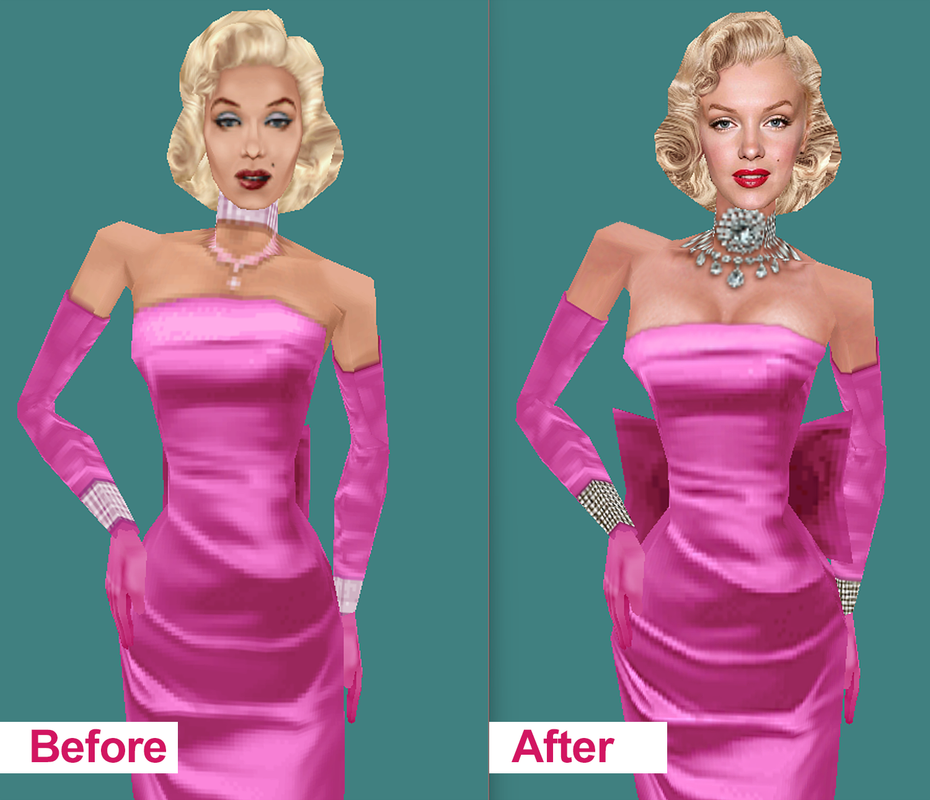
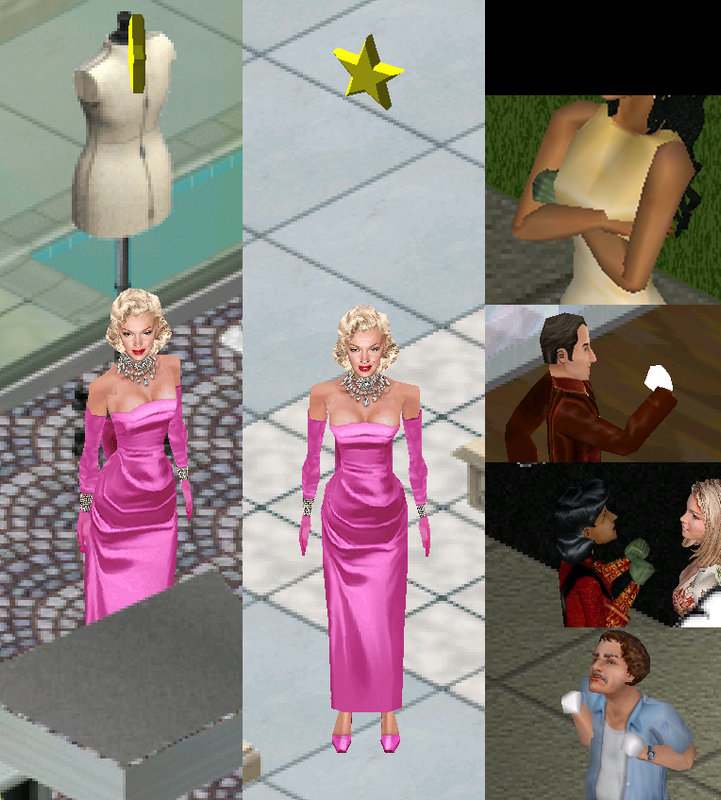
The idea behind finding the FAR files is to re-texture some of the game's skins, to make their faces more detailed and realistic. Like what I did with the official Marilyn M. Sim. I gave her a more realistic and sharper look.


By the way, I didn't know how to import the new texture into Far. "Exporting" was easy, but I don't know how to "import." On the other hand, I managed to get the skin to show up in the game by placing the "Skin" folder I exported inside the "Expansion Pack 06" folder, but the mesh I replaced isn't visible; only the texture works.

Also, in this screenshot, I'm showing the issue with the hands. As you can see, they appear white and sometimes green (they look like zombie hands), only in the "closed fist" position.

I then deleted the "Skins" folder I had added, but the problem persists.


*}·SeluXereZ·{*
Field Researcher
#19 Old 2nd Nov 2025 at 1:38 AM
Importing is almost never recommended because NOT importing keeps the far itself safe in case something goes wrong (and importing shouldn't be needed to get things to work)--the way you usually do a default replacement is to place a file with the same identifying characteristics (filename, GUID also in the case of objects but that's not as relevant to skins) but with changed content in the same folder as the far file it came out of, with the same folder structure as inside of the far (so if the file is inside a skins folder in the far then it's inside a newly created skins folder in the folder the far file is in, to match the structure inside the far).

...The green hands seem like they might be hands that go with a specific skin that might have come with Complete Collection?? (The white hands historically mean the texture it's trying to use isn't at the correct bit depth for the game to read.)

One solution you could use to change skins without making default replacements is NPC replacer (for NPCs) or SimWardrobe (for standard Sims). These might require you to add DLLs or other system files to your system for them to work (and they can behave a little funny sometimes on modern systems), but they allow you to manually set your install location so they can be used even though Legacy doesn't make a registry entry with the install path. SimWardrobe just directly edits and saves the Sim itself since it's not inside a far file (but it won't allow editing of the nude skin, at least in a post-UL install like I have--it will just show you what the nude skin your game is using looks like). NPC Replacer on the other hand basically creates a default replacement for you of a given NPC with the changes you've made to their outfit, name, etc. incorporated and places it in the right folder hierarchy to work.
Theorist
#20 Old 2nd Nov 2025 at 3:31 AM
Quote: Originally posted by Corylea
You don't have to put anything INTO the .far file, though you do have to preserve the internal file structure.

For example, the vampire NPC who sells dragon items in Magic Town -- Vicki Vampiress -- has a skin named MagicFAFitlgt_Vampiress.bmp. Inside the .far file, this skin is located in a Skins folder, so you'd make a Skins folder inside the ExpansionPack7 folder and put the skin in there.


In case what I said above wasn't clear enough, let me say it more strongly, then. DO NOT PUT ANYTHING INTO THE GAME'S .FAR FOLDERS. I explained earlier how to override what's in the .far files, so just do that.

The nude skins are in textures.far, which is in the GameData/Textures folder. They have names like NFFatdark_01.bmp and NMSknlgt_01.bmp and so on, one for each combination of body shape and skin color.

The white hands are because the game can't find the texture for the hands, and the green hands are because it's using the wrong texture.

I've made some mods for The Sims 1 -- yes, The Sims ONE :-) -- which you can find at http://corylea.com/Sims1ModsByCorylea.html
Field Researcher
#21 Old 2nd Nov 2025 at 4:02 AM
Quote: Originally posted by Corylea
In case what I said above wasn't clear enough, let me say it more strongly, then. DO NOT PUT ANYTHING INTO THE GAME'S .FAR FOLDERS. I explained earlier how to override what's in the .far files, so just do that.

The nude skins are in textures.far, which is in the GameData/Textures folder. They have names like NFFatdark_01.bmp and NMSknlgt_01.bmp and so on, one for each combination of body shape and skin color.

The white hands are because the game can't find the texture for the hands, and the green hands are because it's using the wrong texture.


Okay, two things.

First, thanks for your replies. Regarding the NPC replacement, it seems to work. I wasn't familiar with it, but I installed it and replaced Marilyn, and now my version is showing up in the game, both the texture and the mesh modification. That's great!


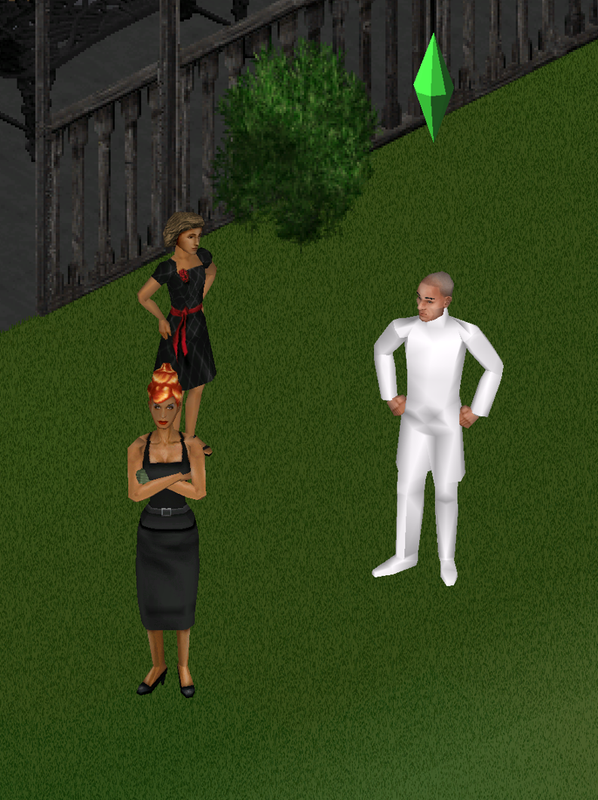
Regarding the hand problem, I just realized it's not just the hands; it's something worse. It seems I must have accidentally touched or damaged something related to the base game skins—I mean, all or most of the base game skins, because you all know Elvira, Homer, and his daughter, right? And we know what they look like. Well, in my game, where they were fine until yesterday, this is how they appear now. It's as if their original clothes and heads aren't there. :S


Yes, this is now my Goth family! I need to fix this, or I'll have to reinstall everything.

*}·SeluXereZ·{*
Field Researcher
#22 Old 2nd Nov 2025 at 4:06 AM
Quote: Originally posted by Corylea
In case what I said above wasn't clear enough, let me say it more strongly, then. DO NOT PUT ANYTHING INTO THE GAME'S .FAR FOLDERS. I explained earlier how to override what's in the .far files, so just do that.

The nude skins are in textures.far, which is in the GameData/Textures folder. They have names like NFFatdark_01.bmp and NMSknlgt_01.bmp and so on, one for each combination of body shape and skin color.

The white hands are because the game can't find the texture for the hands, and the green hands are because it's using the wrong texture.


Yesterday, while searching for information, chatGPT mentioned that exact file, "textures.far," but it's not in my folder; I simply don't have it.

I'm sorry if I didn't understand the instructions correctly; my language is Spanish, and sometimes I get confused with translations.

*}·SeluXereZ·{*
Field Researcher
#23 Old 2nd Nov 2025 at 4:28 AM
If you don't have a Textures.far in The Sims\GameData\Textures (it's a 25MB file in there) then that very well may be your problem if it's entirely basegame stuff doing that. Textures.far has a lot of basegame textures in it (but no meshes)--heads and bodies and hands (both for playable Sims and NPCs), props like the police nightsticks or newspaper when held, etc.

If it's truly not there and it's not somewhere else like your computer's recycle bin, then I've uploaded mine here if that helps (this file probably stays the same between different installations as opposed to some that might have been patched (so a base game Textures.far will probably be the same as a Legacy Edition Textures.far), but mine is from a Deluxe + all EPs installation): http://www.simfileshare.net/download/5780482/
Field Researcher
#24 Old 2nd Nov 2025 at 12:55 PM
Quote: Originally posted by purplewowies
If you don't have a Textures.far in The Sims\GameData\Textures (it's a 25MB file in there) then that very well may be your problem if it's entirely basegame stuff doing that. Textures.far has a lot of basegame textures in it (but no meshes)--heads and bodies and hands (both for playable Sims and NPCs), props like the police nightsticks or newspaper when held, etc.

If it's truly not there and it's not somewhere else like your computer's recycle bin, then I've uploaded mine here if that helps (this file probably stays the same between different installations as opposed to some that might have been patched (so a base game Textures.far will probably be the same as a Legacy Edition Textures.far), but mine is from a Deluxe + all EPs installation): http://www.simfileshare.net/download/5780482/


THANK YOU! The texture problem is indeed solved. My Goth family is back to normal, the closed fists look fine again, and the phone has its texture back.

If the "Texture.far" file was in the folder, I was wrong, but it was corrupted. I remember that after installing the "FARx" program, it was the first file I tried to open, and it wouldn't open. It gave me an error message, and I think that's when the file got corrupted, because that's when everything started happening. I was able to open yours with that program, and I replaced it in my game folder, and now it's fixed... so thank you very much.

Yesterday I tried searching for it online but couldn't find it, so I thought I was going to have to either keep searching for hours or reinstall, so you've saved me a lot of time.

*}·SeluXereZ·{*
Field Researcher
#25 Old 8th Dec 2025 at 2:44 PM
Quote: Originally posted by thalion740
Sim Enhancer requires your User Data to be in the same folder as the sims.exe and in the same folder as your data (skins, heads, that sort of thing)
Sims Legacy does not store your user data in the User Data files in the steam (or ea) folder, instead it stores your save data in the Users/Save Games/Electronic Arts folder by themselves, if you tell Sim Enhancer where your sims.exe file is it won't work because the save data in that folder is never used, and if you try to direct it to the Users file then it won't have access to any of your skins or heads. Hopefully soon a new application will come out to let you do this stuff, but currently it isn't possible.


I'm considering a possible solution. (I haven't tried it, but I'm posting it here first in case someone has.) What if we make a copy of our main legacy game folder, then copy the contents of the saved games to the "User" folder and paste them into the copy we made of the Game data folder? Then we open SimsEnmaker3D, specify the path to this copy (which will contain both saved games and custom heads and skins), modify whatever we want, and then copy that "userdata" file back into our original "user" folder. Do you think this will work? (Ideally, this should all be tested with backups.) But it could be a solution for changing something specific. What do you think?

*}·SeluXereZ·{*
Page 1 of 2
Back to top