Quick Reply
Search this Thread
Test Subject
Original Poster
#1 Old 17th Aug 2025 at 11:37 PM
Default RoseSims2 veil fix
Hi everyone,

I recently downloaded a face veil from RoseSims2, but it was made quite a long time ago and doesn’t appear on my Sim’s face.
https://web.archive.org/web/2011062...ims3_acc018.htm

Could anyone advise me on how to fix it or point me in the right direction? It's categorised as glasses.

Thanks in advance!

Test Subject
#2 Old 18th Aug 2025 at 1:08 AM
Quote: Originally posted by dekjfvaolgeiao
Hi everyone,

I recently downloaded a face veil from RoseSims2, but it was made quite a long time ago and doesn’t appear on my Sim’s face.
https://web.archive.org/web/2011062...ims3_acc018.htm

Could anyone advise me on how to fix it or point me in the right direction? It's categorised as glasses.

Thanks in advance!


I converted a very similar veil from Dead or Alive if you want to try that instead. You can download it here.
Test Subject
Original Poster
#3 Old 18th Aug 2025 at 2:12 AM
Quote: Originally posted by bomaye
I converted a very similar veil from Dead or Alive if you want to try that instead. You can download it here.


That looks amazing, thank you so much!
Inventor
#4 Old 18th Aug 2025 at 2:14 AM
Edit: Though you've found an alternate option, it's good to have the solution incase anyone wants to know why the original is broken and how to fix it:

My best guess is that the SimGlass shader was changed and no longer works for this kind of transparency or the material settings Rose used.

Changing the shader to SimHair fixes it, though it's VERY transparent - you might want to tweak the shader settings, or edit the alpha of the texture itself to be lighter (= more opaque).

First, you'll want to convert the .sims3pack to .package with Delphy's Multi-Installer.
Then use MeshToolKit's Package Tools > Name Those Files on the package so you can identify the parts.
Open in S3PE, select the lod1 GEOM, and press Grid on the bottom panel to edit. Click the dropdown arrow until you see the shader, change to SimHair.

It's also possible to export shader settings from other meshes if you just want to get a fresh copy from an accessory that supports transparency (like the CC linked above), using SimGeom Editor's Export/Import MTNF.
That way you can use an accessory shader like the unnamed 0xDC077A45, which is still invisible with the current settings on the mesh.

Cardinal has been taken by a fey mood!
Scholar
#5 Old 18th Aug 2025 at 5:38 AM
It's been about 3 or 4 years since I fixed those for someone. I just don't remember what was wrong with them. I'll try to find them.

Shiny, happy people make me puke!
Test Subject
Original Poster
#6 Old 19th Aug 2025 at 4:40 AM
Quote: Originally posted by CardinalSims
Edit: Though you've found an alternate option, it's good to have the solution incase anyone wants to know why the original is broken and how to fix it:

My best guess is that the SimGlass shader was changed and no longer works for this kind of transparency or the material settings Rose used.

Changing the shader to SimHair fixes it, though it's VERY transparent - you might want to tweak the shader settings, or edit the alpha of the texture itself to be lighter (= more opaque).

First, you'll want to convert the .sims3pack to .package with Delphy's Multi-Installer.
Then use MeshToolKit's Package Tools > Name Those Files on the package so you can identify the parts.
Open in S3PE, select the lod1 GEOM, and press Grid on the bottom panel to edit. Click the dropdown arrow until you see the shader, change to SimHair.

It's also possible to export shader settings from other meshes if you just want to get a fresh copy from an accessory that supports transparency (like the CC linked above), using SimGeom Editor's Export/Import MTNF.
That way you can use an accessory shader like the unnamed 0xDC077A45, which is still invisible with the current settings on the mesh.


Thank you so much, I haven't tried to tweak the shader in any item on sims 3 but it seems pretty doable! Really appreciate the explanation, I'm pretty sure that could've saved some objects I stopped using through the years because they started to look funky lol

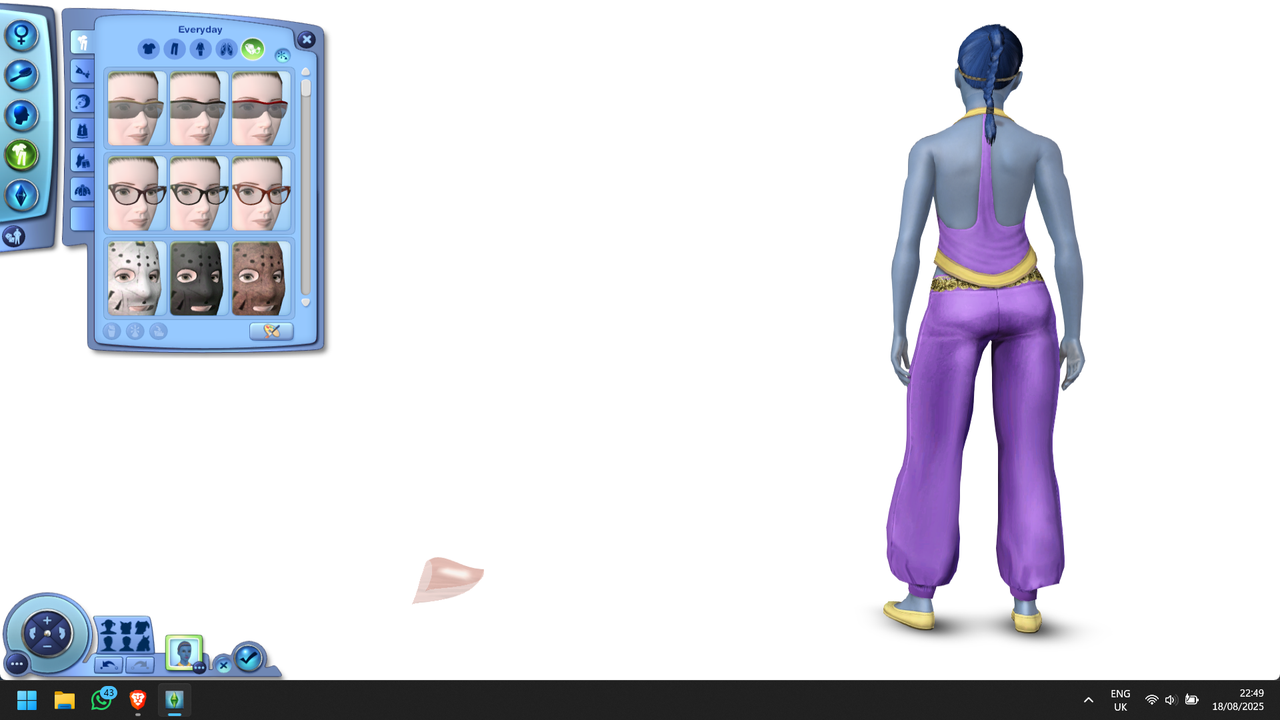
I was about to mess around with the shading when I realised the item was showing up properly, just not in the right place:


I accidentally zoomed out of my sim's face and turned it around, that's when the veil appeared. It was rigged to my sim's left hand side, on the floor, offscreen, the entire time. I guess it's the bones that might need attention now
Inventor
#7 Old 19th Aug 2025 at 10:54 AM
Quote: Originally posted by dekjfvaolgeiao
I accidentally zoomed out of my sim's face and turned it around, that's when the veil appeared. It was rigged to my sim's left hand side, on the floor, offscreen, the entire time. I guess it's the bones that might need attention now

Hmm, that's unusual - I didn't have to modify the bones at all to see it correctly, just the shader tweak I mentioned. The mesh is assigned entirely to HeadNew, which is pretty standard for a head accessory.

SimGlass is used for glasses accessories, so it can be ruled out that the shader itself is broken in that way. It could be something outdated in the shader data that wasn't valid for SimHair and thus not affecting it, I'll see if a fresh copy from a pair of EA glasses fixes it.

Cardinal has been taken by a fey mood!
Scholar
#8 Old 19th Aug 2025 at 4:44 PM
There is something odd with SimGlass shader. I once tried using it for shoes, and a similar result, the shoes, which had the correct foot and toe bones, appeared off of the feet. Use SimHair, and play with the alpha as @CardinalSims said, to get a good appearance. Be sure the mesh has backfaces, like hair, and don't merge after the backfaces are added. You can also assign to eye glasses bone, which makes it adjustable to the eye glasses sliders.

Shiny, happy people make me puke!
Back to top