Posts: 227
Thanks: 15462 in 19 Posts
17 Achievements
 Circular Shadow Behind The Head
Hi! To start, I've already sent this question privately to "@LUCPIX", but just in case anyone else knows how to access the game's settings to change things, I'm posting it here as well. Or if you know of any mods for this.
There's always been something that bothers me a little. It's not a big deal, but if it were possible to remove it or modify it., I'd love to.
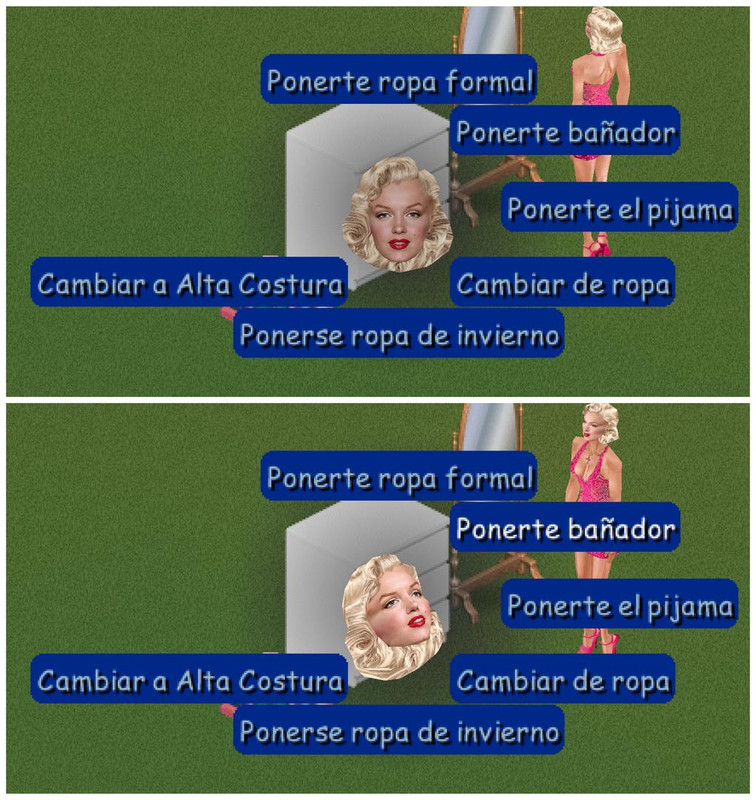
When you click on the TheSims1 player, the head appears, and right in front of it is a black circular shadow. This shadow moves behind the head when you select an interaction, but if you don't select anything, the shadow is always in front of the face.
My question is: Could you make that shadow always be behind the head and not in front, or simply remove it?
(I assume you know what I mean, but I'll show you a screenshot. If you look at the first screenshot, the face has a gray shadow, which darkens it, and when you select an option, the face lights up, which is really just the shadow moving into the background.)
Greetings!

 Sign in to Mod The Sims


 11th Dec 2025 at 7:57 PM