Quick Reply
Search this Thread
Test Subject
Original Poster
#1 Old Today at 1:55 PM
Default PC reboot error (Legacy)
So I jinxed it. I blogged about how great Legacy Edition is and how I've not had a single reboot, and the very next day, yep, I got the reboot on Legacy.

Following on from this thread:
https://modthesims.info/showthread.php?t=696929

TL;DR: running the disc version of Seasons on Win10 made my PC reboot usually at least once per session.

After 40+ hours of glitch free running of Legacy edition via Steam, I finally got the exact same glitch (I uninstalled the disc version after a few days of having Legacy, using Glary).

80-90% of the time, this happens when buying or changing an outfit using InSim wardrobe adjuster or Numenor/Marylou's hacked coat hook. BUT it has happened a few times on unoccupied lots when building. For instance, once I was deleting a wall and my PC rebooted. I don't remember it ever happening with change appearance, just clothing and sometimes building.

So it could be InSim or the the coathook, or could it be a thumbnail issue? I've never had this issue when running the old versions of the game on my old crappy PCs.

The one that happened on Legacy I was about to buy these Maxis shorts:
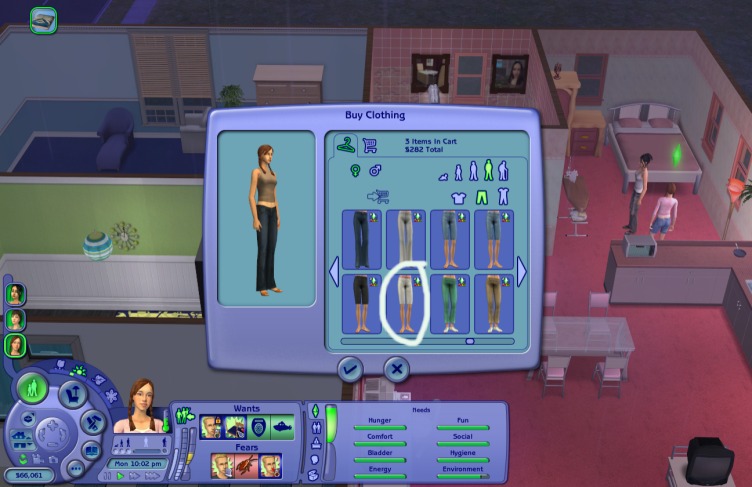


Then everything froze for about 3-4 seconds, cursor wouldn't move, screen went black for about 5 seconds, then my boot menu appeared. So exactly the same as the disc version.

But then the next time I tried to buy the shorts, as you can see above, no crash. The error isn't easy to replicate, there is no one exact thing that makes it happen.

Given this is the first time it's happened in 40+ hours of run time, removing my CC folder isn't really going to be helpful (especially as I'm only setbuilding and screenshooting, so I need the CC).

I'll clear the thumbnails and cigens and them, but it's going to be hard to tell if that's the cause since this isn't an easily repeatable crash. Last time, doing that made the reboot happen within minutes of playing.

I had done multiple outfit changes for my Sims up to this point and not had the crash, it just lags sometimes as it generates the thumbnails. But here, the thumbnails were already generated.

I have only ever had this PC blackscreen on me once, and that was when I was using kdenlive on Linux Mint.

I have other games on Steam that run fine, I think BG3 is the most resource hogging game I have and it never crashed my PC.

This isn't a major issue, as long as it doesn't start happening more frequently.

Interestingly, I didn't get an error log file. The last one I have on here is Sims2Exception 2026.06.25 17.08.57.txt which is from the disc version, so I don't know if Legacy doesn't create crash logs?

Here is an interesting thing though. My config showed 4GB when I was running the disc nocd with the 4gb patch.

Is this normal for Legacy or has something gone wrong with the install? I haven't tampered with the game files, just let Steam install, no 4gb applied to the legacy version. All hacks and CC are in my user folder.

Code:
Log generated on 2/28/2935093, 13:14

=== Application info ===
Name:            The Sims 2 Legacy
Version:         1.18.0.187
Build:           ReleaseSRT
=== Machine info ===
OS version:      Windows NT 0.0
CPU:             4471.600097Mhz, Name:AuthenticAMD, FPU:1, MMX:1
Memory:          0MB
Free memory:     0MB
User:           
Computer:        TAMAKI
=== Sound device info ===
Name:            Unknown
Driver:          Unknown
=== Graphics device info ===
Number:          0
Name (driver):   Radeon RX 590 Series
Name (database): Radeon RX 590 Series <<NOT FOUND IN DATABASE!>>
Vendor:          
Chipset:         Vendor: 1002, Device: 67df, Board: 2391148c, Chipset: 00e1
Driver:          aticfx32.dll, Version: 31.0.21018.6011, GUID: D7B71EE2-249F-11CF-4760-8B514EC2D235
Driver version:  6011
Monitor:         \\.\DISPLAY1
Monitor aspect:  1.842307, <<UNRECOGNIZED>>
Screen mode:     1920x1080x32BPP,59Hz
HW T&L:          Fixed function:1 Programmable:3.0
Pixel program:   3.0
Texture stages:  8
AppControlledAA: 1


Has anyone else had this issue and what's the likeliest cause? Why is the config log so weird?
YO!
retired moderator
#2 Old Today at 2:37 PM
Quote: Originally posted by SilverArrowsAgain
TL;DR: running the disc version of Seasons on Win10 made my PC reboot usually at least once per session.


Then everything froze for about 3-4 seconds, cursor wouldn't move, screen went black for about 5 seconds, then my boot menu appeared.


To be clear, you mean that your computer actually restarted (not just that the game crashed)?

If so, then that almost certainly points to hardware error. Either your computer is overheating, or the power is insuffucient, or you have a faulty device.

What I would recommend to do is to take a look at your event logs, and see if there are any clues in there as to what's happening. Do you get a blue screen with an error code on it? The times you are experiencing these crashes are when the game is using memory or scratching to disc, and those times typically cause the computer to use more resources. The crashes will be unpredictable, you likely won't be able to reproduce them.
Mad Poster
#3 Old Today at 3:06 PM Last edited by simmer22 : Today at 9:02 PM.
The "0 MB" for memory tells me that either the game doesn't have enough memory diverted to handle the game, or memory/CPU intensive tasks causes the game (and PC) to error out.

Unstable/faulty RAM can cause random PC reboots if the RAM fails to read/write the data. An overheating CPU/GPU can also cause this.

Thypical ingame tasks that are memory/CPU intensive are accessing "buy clothes", loading CAS, applying skin overlays (werewolf, suntan, etc.), loading lots (especially CC-heavy ones), deleting large portions of walls/floors, and anything else that causes "a few seconds lag" while loading.

I don't think crash logs get made if the system reboots, only if the game crashes to desktop.

If the PC and hardware is older, it's more likely something's off with it. Anything from needing a good dust cleanout, to needing repasting for the CPU/GPU, to failing hardware thant needs replacing.

I don't know if there is a working nocd for Legacy - it's possible changes were made to the EXE file for Legacy, too. Just so you're aware there could be compatibility issues if you're using one for UC/M&G.
Test Subject
Original Poster
#4 Old Today at 5:07 PM
Tbh this PC scares me, it makes weird noises. Tropico 3 & 4 make it buzz, which I'm hoping is just coil whine, but I'm half expecting it to blow up one day. I don't get any weird noises on TS2 though.

I don't know if you remember from the other thread, but this PC was custom built by my cousin a few years ago and refurbed by my uncle. He's ill, so I don't like to bug him with stuff like this. My computer nerd days are long gone.

But your explanations of it being a hardware issue sound likely. I'm running the game in Windowed mode, HQ settings and I do usually have my browser and HTML editor open, so I suppose that isn't helping.

I'm not using a nocd anymore, I uninstalled the disc games+HCPlus. I'm running the Steam version only now.

Quote:
I don't think crash logs get made if the system reboots, only if the game crashes to desktop.

I did get crash logs on the reboots from the disc version, the times on the log matched when the game crashed.

Quote:
To be clear, you mean that your computer actually restarted (not just that the game crashed)?


Yep, exactly as I said. Everything freezes, can't tab out or move the cursor, then a few seconds later the screen goes black, then after about 5 seconds I get the boot menu. This only happened once on Legacy, but was a recurring thing on disc Seasons, even after the 4GB patch. It's not a regular BSOD, I got enough of those on the old Dell from hell. I've had one BSOD on Cities: Skylines, but that's it. This is just freeze/black screen/boot menu.

It's just weird that newer games don't give me trouble.

Just to make things more fun, Bodyshop (legacy modded version from here) has stopped working. I was using it fine, then a few days ago it would do a command prompt window, but nothing loaded.
When I rebooted, then loaded the actual game, then exited, I could get Bodyshop to run.

Today I get an "application has crashed" etc message as soon as the window opens. And my tower makes a weird noise too as it's loading Bodyshop, which it didn't do before.

Moved out the entire DL folder, deleted groups, cigen, thumbnails. Same error.
Also, I never ran the disc bodyshop after I installed legacy, just in case.


(Now you see why this game stresses me out so much )
Screenshots
Mad Poster
#5 Old Today at 8:58 PM
For Bodyshop, crashing could mean RAM issues (check if you need to apply the 4GB fix, not sure with the Legacy version), or it could mean you've got buggy CC or borked cache files.

If you have a Nvidia card, check that the GraphicsRule file has the line/fix I mentioned here, in the topic by Epi:
https://modthesims.info/showpost.ph...625&postcount=7
Without it, the game AND Bodyshop are more likely to crash (been there myself, though I didn't have trouble with reboots)

Not 100% sure if the Legacy Bodyshop is connected the same way to the game's folder, but usually after running it, you'll see the stats in the Config-Log (says "bodyshop" instead of TS2 - they usually share the file, last run program is the one showing the stats). If it has iffy stats on memory, you'll have to fix that.
Back to top
