
 Sign in to Mod The Sims
 New edited elder meshes.
 New edited elder meshes.


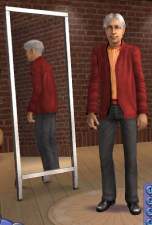
beforeimg.jpg - width=290 height=574
afterimg.jpg - width=290 height=574
a. a shirt with a stomach a little thinner than the original shirt.
b. Longer Pants; Lets face it, our elder males where wearing high waters.
c. Wider Leg pants on the same pair of pants.
So in total only two new meshes. Please test these out ^_^
This is my first time uploading a my meshes to the site, please listen ^_^
1. You may recolor with proper credit.
2. Meshes may not be uploaded to any other sites.
3. You can post your recolors on your site, but for the mesh please link back here.
4. If you are inspired to recolor my mesh, could you post on here and say you recolored it, or PM me. I would really appreciate that.
Thanks for reading and I hope you like!
This is a new mesh, and means that it's a brand new self contained object that usually does not require a specific Pack (although this is possible depending on the type). It may have Recolours hosted on MTS - check below for more information.
|
JFH_longerelderpantsMESH.rar
Download
Uploaded: 18th Nov 2005, 233.5 KB.
624 downloads.
|
||||||||
|
JFH_eldersmallertopMESH.rar
Download
Uploaded: 18th Nov 2005, 254.5 KB.
595 downloads.
|
||||||||
| For a detailed look at individual files, see the Information tab. | ||||||||
Install Instructions
1. Download: Click the download link to save the .rar or .zip file(s) to your computer.
2. Extract the zip, rar, or 7z file.
3. Place in Downloads Folder: Cut and paste the .package file(s) into your Downloads folder:
- Origin (Ultimate Collection): Users\(Current User Account)\Documents\EA Games\The Sims™ 2 Ultimate Collection\Downloads\
- Non-Origin, Windows Vista/7/8/10: Users\(Current User Account)\Documents\EA Games\The Sims 2\Downloads\
- Non-Origin, Windows XP: Documents and Settings\(Current User Account)\My Documents\EA Games\The Sims 2\Downloads\
- Mac: Users\(Current User Account)\Documents\EA Games\The Sims 2\Downloads
- Mac x64: /Library/Containers/com.aspyr.sims2.appstore/Data/Library/Application Support/Aspyr/The Sims 2/Downloads
- For a full, complete guide to downloading complete with pictures and more information, see: Game Help: Downloading for Fracking Idiots.
- Custom content not showing up in the game? See: Game Help: Getting Custom Content to Show Up.
- If you don't have a Downloads folder, just make one. See instructions at: Game Help: No Downloads Folder.
Loading comments, please wait...
Uploaded: 18th Nov 2005 at 5:51 AM
Updated: 30th Mar 2009 at 8:21 PM - Pic edit
-
-
-
-
-
by frizelbliz 3rd Jan 2007 at 3:15pm
-
-
-
-
-
Three Recolors of a Family Fun Outfit for Elder Men
by gabilei123 4th Mar 2017 at 6:44pm


-
by KiaraRawks 22nd May 2012 at 3:23pm
A small home office set for your sims. It includes 12 meshes in total, some recolorable and some not. more...
 18
55.4k
105
18
55.4k
105
-

by KiaraRawks 10th Jul 2011 at 12:16am
Just a simple edit to the base game bodysuit that I've added four different little critters to. more...
15
50.7k
100
-
[Just For Him] Child clothing "3"
by KiaraRawks 10th Jan 2006 at 8:09pm
Here is more clothing off my site Just For Him! more...
-
A Box of Toys ....Because not all kids have a toy chest.
by KiaraRawks 2nd Mar 2009 at 3:32pm
A simple cardboard box containing your kid's toys. more...
 102
100.4k
245
102
100.4k
245
-
by KiaraRawks 21st Dec 2005 at 10:01pm
Here is a room based on a girly pattern I found on a site. more...
-
by KiaraRawks 23rd Feb 2006 at 10:59pm
This is a bedroom of my cat when he was a kitten and not so fat LOL. more...
-

by KiaraRawks 21st Feb 2006 at 3:31am
Heres a tux for your little girls. Its everyday wear only. more...
-
by KiaraRawks 5th Feb 2006 at 1:13am
I hope you like this bathroom. I tried uploading it hours earlier but it wouldnt work. more...
-
by KiaraRawks 21st Nov 2005 at 7:54pm
I have finally finished my waifish dress for adult females. So now they can wear formal attire! more...
-
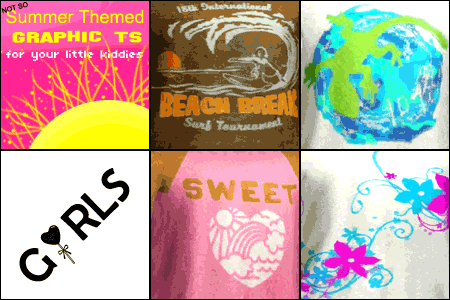
"Summer" Themed Graphic Ts for Kids
by KiaraRawks 30th Jun 2011 at 11:29pm
This is a set of six graphic t-shirts for your boys and girls. There's three different designs for both male and female children in two separate packages. more...
13
36.4k
69


About Me
You may never upload my meshes to any other site. Meshes must be linked to where they can be downloaded; Meaning please do not package my meshes with your recolored objects.
Clothing:
Meshes must be linked back MTS2 for downloaders to download, if you decide to recolor. Never include my meshes in your zips or rars unless you have permission from me.
If you want include clothing made by me or yourself on my mesh, the mesh as stated above must be linked to download here at MTS2 but the clothing recolor itself may be uploaded with your sim.