Sign in to Mod The Sims
 Vivian Nguyen
 Vivian Nguyen
SCREENSHOTS


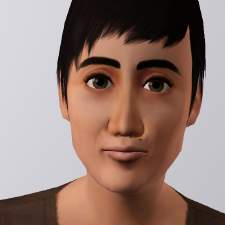
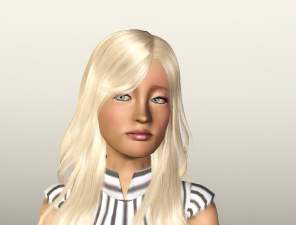
Vivian1.jpg - width=1000 height=750
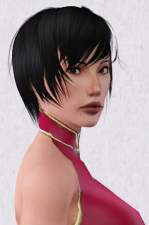
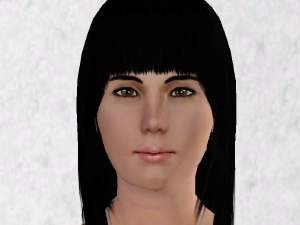
Vivian2.jpg - width=1000 height=751
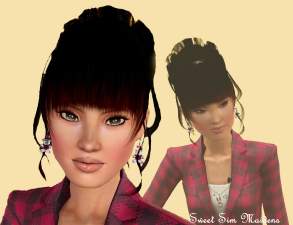
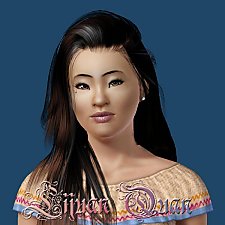
Vivian3.jpg - width=1000 height=750
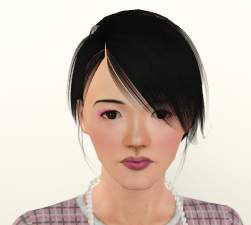
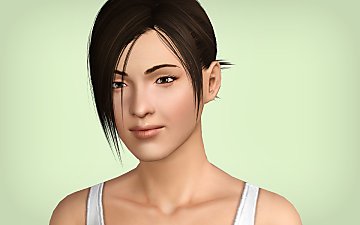
Vivian4.jpg - width=1000 height=693
Downloaded 915 times
411 Thanks
10 Favourited
30,691 Views
Say Thanks!
Thanked!
Vivian Nguyen is a reserved sim who likes to live life with zen-like elegance. She is is very self-contained and not easy to get to know, but once you do, you'll find out she is really very sweet.
(If she is too sweet for you, she also looks great all punked up too.)
Traits:
* Neat
* Perfectionist
* Unflirty
* Vegetarian
* Virtuoso
Favourites:
* French Toast
* Classical Music
* Grey
Lifetime Wish:
* Master of the Arts
CUSTOM CONTENT:
Appearance:
If you would like Vivian to look exactly as she does in my pictures, I use...
* Eye Defaults: by Aikea Guinea
* Face Skin Defaults: by Aikea Guinea
* Body Skin Defaults: by HystericalParoxism
* Shine Defaults: by HystericalParoxism
* Slider Hack: I used Rick & Delphy's to create Vivian. If you are going to play around with her facial structure in CAS you will need to have either that, or AwesomeMod or Indie Stone installed in order to avoid her parameters resetting.
Clothing:
Vivian's blouse uses DecoSwirl by Lethe_s from her Deco Pattern Set!
Her pyjama pants use #7 by ashleydoom from her 10 Mixed Patterns
INSTALLATION
Download and extract from the zip file then simply place the .SIM file in your My Documents\Electronic Arts\The Sims 3\SavedSims\ folder. Then you'll find her in CAS in your pre-made Sim Bin.
Additional Credits:
Special thanks to all those listed above for sharing their tools, skins and textures.
(If she is too sweet for you, she also looks great all punked up too.)
Traits:
* Neat
* Perfectionist
* Unflirty
* Vegetarian
* Virtuoso
Favourites:
* French Toast
* Classical Music
* Grey
Lifetime Wish:
* Master of the Arts
CUSTOM CONTENT:
Appearance:
If you would like Vivian to look exactly as she does in my pictures, I use...
* Eye Defaults: by Aikea Guinea
* Face Skin Defaults: by Aikea Guinea
* Body Skin Defaults: by HystericalParoxism
* Shine Defaults: by HystericalParoxism
* Slider Hack: I used Rick & Delphy's to create Vivian. If you are going to play around with her facial structure in CAS you will need to have either that, or AwesomeMod or Indie Stone installed in order to avoid her parameters resetting.
Clothing:
Vivian's blouse uses DecoSwirl by Lethe_s from her Deco Pattern Set!
Her pyjama pants use #7 by ashleydoom from her 10 Mixed Patterns
INSTALLATION
Download and extract from the zip file then simply place the .SIM file in your My Documents\Electronic Arts\The Sims 3\SavedSims\ folder. Then you'll find her in CAS in your pre-made Sim Bin.
Additional Credits:
Special thanks to all those listed above for sharing their tools, skins and textures.
Advertisement:
|
Vivian_Nguyen.zip
Download
Uploaded: 15th Jul 2009, 317.6 KB.
5,376 downloads.
|
||||||||
| For a detailed look at individual files, see the Information tab. | ||||||||
Install Instructions
Quick Guide:
1. Click the filename or the download button to download the sim to your computer.
2. Extract the zip, rar, or 7z file.
2. Select the .sim file you got from extracting.
3. Cut and paste it into your Documents\Electronic Arts\The Sims 3\SavedSims folder. If you do not have this folder yet, it is recommended that you open the game, enter Create-a-Sim, and save a sim to the sim bin to create this folder, rather than doing so manually. After that you can close the game and put the .sim file in SavedSims
4. Once the .sim file is in SavedSims, you can load the game, and look for your sim in the premade sims bin in Create-a-Sim.
Extracting from RAR, ZIP, or 7z: You will need a special program for this. For Windows, we recommend 7-Zip and for Mac OSX, we recommend Keka. Both are free and safe to use.
Need more help?
If you need more info, see Game Help:Installing TS3 Simswiki for a full, detailed step-by-step guide! Special Installation Instructions
1. Click the filename or the download button to download the sim to your computer.
2. Extract the zip, rar, or 7z file.
2. Select the .sim file you got from extracting.
3. Cut and paste it into your Documents\Electronic Arts\The Sims 3\SavedSims folder. If you do not have this folder yet, it is recommended that you open the game, enter Create-a-Sim, and save a sim to the sim bin to create this folder, rather than doing so manually. After that you can close the game and put the .sim file in SavedSims
4. Once the .sim file is in SavedSims, you can load the game, and look for your sim in the premade sims bin in Create-a-Sim.
Extracting from RAR, ZIP, or 7z: You will need a special program for this. For Windows, we recommend 7-Zip and for Mac OSX, we recommend Keka. Both are free and safe to use.
Need more help?
If you need more info, see Game Help:Installing TS3 Simswiki for a full, detailed step-by-step guide! Special Installation Instructions
- If you get an error that says "This content requires expansion pack data that is not installed", please use Clean Installer to install this sim.
Meshes needed
This download requires one or more meshes to work properly. Please check the Description tab for information about the meshes needed, then download them below:| MTS cannot guarantee any off-site links will be available |
| modthesims.info/d/346292 (non-MTS link) |
| modthesims.info/d/352093 (non-MTS link) |
Advertisement:
Loading comments, please wait...
Author

Download Details
Packs:
None, this is Sims 3 base game compatible!
Uploaded: 15th Jul 2009 at 12:37 PM
Updated: 16th Jul 2009 at 3:43 AM - fixed bb code error
Uploaded: 15th Jul 2009 at 12:37 PM
Updated: 16th Jul 2009 at 3:43 AM - fixed bb code error
Tags
Other Download Recommendations: