
 Sign in to Mod The Sims
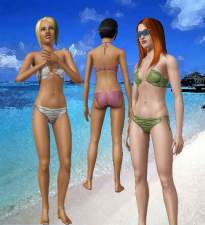
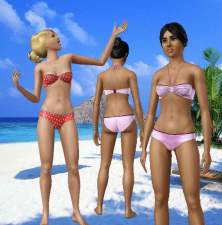
 80's Bikinis
 80's Bikinis


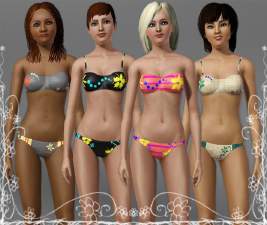
ScreenShot149.jpg - width=894 height=609
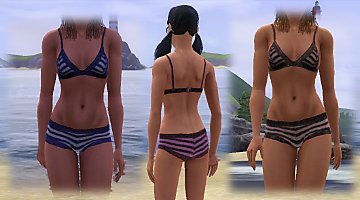
ScreenShot068.jpg - width=927 height=665
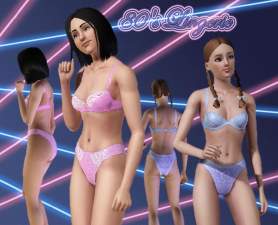
Screenshot-244.jpg - width=962 height=710
This have 2 channels.
I want to thank bootz for the feedback.
I hope you enjoy!


Additional Credits:
Delphy and CTU Team for CTU I want to thank 234jiao for the skin
You can find in Newsee and oepu MTS the hair of the models
|
80'sSwimBottom.rar
Download
Uploaded: 3rd Dec 2009, 45.2 KB.
9,774 downloads.
|
||||||||
|
80'sSwimTop.rar
Download
Uploaded: 3rd Dec 2009, 40.1 KB.
10,259 downloads.
|
||||||||
| For a detailed look at individual files, see the Information tab. | ||||||||
Install Instructions
1. Click the download button, or the filename, to download the file to your computer.
2. Extract the zip, rar, or 7z file. Now you will have either a .package or a .sims3pack file.
For Package files:
1. Cut and paste the file into your Documents\Electronic Arts\The Sims 3\Mods\Packages folder. If you do not already have this folder, you should read the full guide to Package files first: Sims 3:Installing Package Fileswiki, so you can make sure your game is fully patched and you have the correct Resource.cfg file.
2. Run the game, and find your content where the creator said it would be (build mode, buy mode, Create-a-Sim, etc.).
For Sims3Pack files:
1. Cut and paste it into your Documents\Electronic Arts\The Sims 3\Downloads folder. If you do not have this folder yet, it is recommended that you open the game and then close it again so that this folder will be automatically created. Then you can place the .sims3pack into your Downloads folder.
2. Load the game's Launcher, and click on the Downloads tab. Find the item in the list and tick the box beside it. Then press the Install button below the list.
3. Wait for the installer to load, and it will install the content to the game. You will get a message letting you know when it's done.
4. Run the game, and find your content where the creator said it would be (build mode, buy mode, Create-a-Sim, etc.).
Extracting from RAR, ZIP, or 7z: You will need a special program for this. For Windows, we recommend 7-Zip and for Mac OSX, we recommend Keka. Both are free and safe to use.
Need more help?
If you need more info, see:
- For package files: Sims 3:Installing Package Fileswiki
- For Sims3pack files: Game Help:Installing TS3 Packswiki
Loading comments, please wait...

Uploaded: 3rd Dec 2009 at 2:32 AM
Updated: 14th Dec 2009 at 12:12 AM
-
Lara BodyShape Top and Bottom Meshes Non-Default.
by RoguePilot 2nd Aug 2009 at 11:38pm
-
by kuchikisan92 6th Aug 2009 at 7:25pm
 22
91.3k
108
22
91.3k
108
-
-
-
-
-
-
by Kiara24 28th Aug 2010 at 11:49pm
14
72.4k
133
-
Variable Set: Top & Bottom for (Y)AF
by sosliliom 11th Sep 2010 at 9:59pm
39
106.5k
331
Female » Mixed Sets » Adult
-
by Kiara24 22nd Sep 2010 at 7:37pm
18
63.7k
97

-
-

-

-

-
Deco Campfire Cooking Pot, Market Stalls & Chamber Pot - Ye Olde Kingdom of Pudding
by The Merrye Makers 8th Dec 2011 at 1:47pm
Miscellanous Decorative Ye Olde Kingdom of Pudding Medieval Objects Decorative Campfire Cooking Pot, Market Stalls, and Decorative Chamber Pot more...
18
51.7k
124
-
Medieval Fireplaces - Ye Olde Kingdom of Pudding
by The Merrye Makers 14th Jan 2012 at 12:52pm
A mediveal Floor Torch and Campfire which are both functioning fireplaces. Made by Hekate999 for The Merrye Makers. more...
14
51.4k
128
-
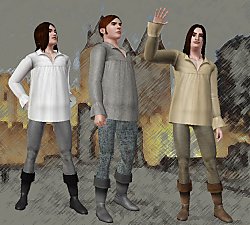

Medieval Clothes for Men / Medieval Challenge
by Kiara24 12th Apr 2010 at 5:44pm
I made this men clothes for the Medieval challenge. This is not a complete suit, is a top, pants and more...
62
126.9k
229
Male » Everyday » Young Adult
-
-
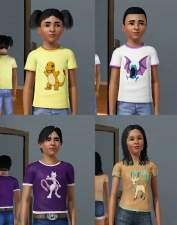
Pokémon T-shirts for children and teen’s
by Kiara24 27th Jul 2009 at 6:09am
I made t-shirts for children boys and girls and for Teen boys and teen girls with seven Pokémons. more...
14
23k
57
-
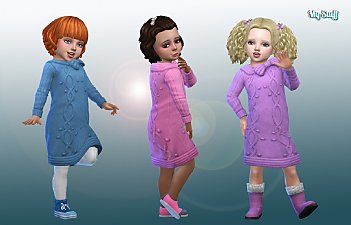

Dress Oversized Sweater for Toddlers
by Kiara24 11th Nov 2018 at 12:13am
Is available in casual, formal, cold weather and party, 20 options. more...
 16
40.2k
93
16
40.2k
93
Female » Mixed Sets » Toddler


About Me
Subscribe to my channel.