
 Sign in to Mod The Sims
 Flintstones Type car and Mammoth Tusk Parking Space
 Flintstones Type car and Mammoth Tusk Parking Space


uvs.jpg - width=1000 height=500
driving1.jpg - width=800 height=600
driving2.jpg - width=800 height=600
parked.jpg - width=800 height=600
Flintstones Car and Mammoth Tusk Parking Space
Details:
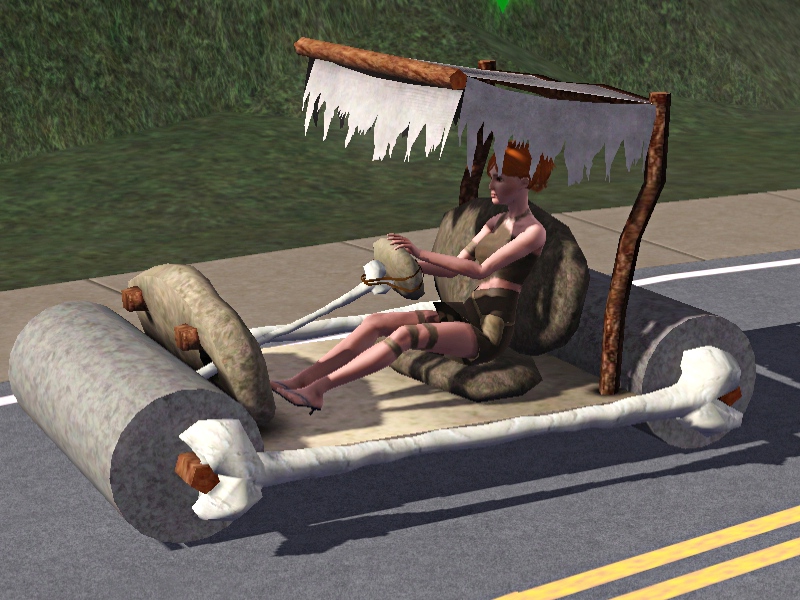
Here is a new car and parking spot for your stone-age Sims. Unfortunately, I can't get her to run with her feet (like in the cartoons) instead of driving...but don't think I didn't try! This car comes complete with a mammoth tusk parking spot for a bit more realism. Not much to say about it but is great for your "Homemade-type" themes.
Can I recolor them?
Yes! The car is 3 channel recolorable but the parking space is not.
Where are they?
They are found under misc vehicles. The car is 550 Simoleons and the parking space is 5 Simoleons.
Will they work for your setup?
Pretty sure you need "Ambitions" and I have all patches installed. I don't know if you need to also but thought I would let you know.
What can you do with them?
Feel free to recolor, retexture, or anything you like. Just please credit me for the meshes or textures and please only upload on MTS.
Issues
Sims' toes stick just a little bit into the rock. It's barely noticeable especially when driving but I thought I would point it out. (See pic).
Polygon Counts:
Car: 3157
Parking Space: 504
Additional Credits:
Made with:
Gimp
TSR Workshop
Milkshape 3D
This is a new mesh, and means that it's a brand new self contained object that usually does not require a specific Pack (although this is possible depending on the type). It may have Recolours hosted on MTS - check below for more information.
|
Stone Age Pack.rar
Download
Uploaded: 15th Dec 2011, 1,023.2 KB.
9,071 downloads.
|
||||||||
| For a detailed look at individual files, see the Information tab. | ||||||||
Install Instructions
1. Click the file listed on the Files tab to download the file to your computer.
2. Extract the zip, rar, or 7z file. Now you will have either a .package or a .sims3pack file.
For Package files:
1. Cut and paste the file into your Documents\Electronic Arts\The Sims 3\Mods\Packages folder. If you do not already have this folder, you should read the full guide to Package files first: Sims 3:Installing Package Fileswiki, so you can make sure your game is fully patched and you have the correct Resource.cfg file.
2. Run the game, and find your content where the creator said it would be (build mode, buy mode, Create-a-Sim, etc.).
For Sims3Pack files:
1. Cut and paste it into your Documents\Electronic Arts\The Sims 3\Downloads folder. If you do not have this folder yet, it is recommended that you open the game and then close it again so that this folder will be automatically created. Then you can place the .sims3pack into your Downloads folder.
2. Load the game's Launcher, and click on the Downloads tab. Find the item in the list and tick the box beside it. Then press the Install button below the list.
3. Wait for the installer to load, and it will install the content to the game. You will get a message letting you know when it's done.
4. Run the game, and find your content where the creator said it would be (build mode, buy mode, Create-a-Sim, etc.).
Extracting from RAR, ZIP, or 7z: You will need a special program for this. For Windows, we recommend 7-Zip and for Mac OSX, we recommend Keka. Both are free and safe to use.
Need more help?
If you need more info, see:
- For package files: Sims 3:Installing Package Fileswiki
- For Sims3pack files: Game Help:Installing TS3 Packswiki
Loading comments, please wait...


 View with Names
Uploaded: 15th Dec 2011 at 12:12 AM
Updated: 15th Dec 2011 at 12:41 AM by leesester - fix typo in thread title
#Stone age, #flintstones, #ancient-theme, #castaway, #cast away, #car
-
by Nandonalt 22nd Aug 2009 at 1:44pm
 36
67.9k
71
36
67.9k
71
-
Completely Invisible Parking Spaces Updated 2010-10-30
by GiveTheNineARide 16th Jul 2010 at 6:18pm
60
93.6k
279
-
REQ: FoodTruck as Car *UPDATED 28/11/10*
by pcexpert updated 28th Nov 2010 at 12:07pm
+1 packs
3 23.6k 20 Late Night
-
Concrete Parking Barrier Replacement
by HystericalParoxysm 20th Jun 2011 at 9:34pm
-
Castaway/Shipwrecked Set Part 2 - PETS patch compatible!
by lhawk07 updated 24th Oct 2011 at 4:50pm
-
Castaway/Shipwrecked Set Part 3: Pets Patch Compatible!
by lhawk07 updated 21st Nov 2011 at 5:01pm
-
by lhawk07 4th Nov 2011 at 1:36pm
20
49.1k
89
-
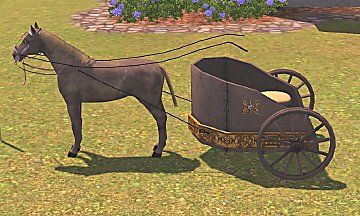
Roman Gladiator Chariot and Parking Space
by lhawk07 17th Nov 2011 at 1:28am
+1 packs
32 50.7k 64 Ambitions
-
-


-
-
3 New Pet houses for cats or dogs large and small versions
by lhawk07 28th Nov 2011 at 11:41pm
A few new houses for your pets more...
+1 packs
25 56.8k 163 Pets
Pets
-
-
Munsters Model T Ford Koach car
by lhawk07 3rd Jan 2012 at 12:06am
For your Gothic Sims! more...
+1 packs
27 44.2k 107 Ambitions
-
Female Fantasy Faun/Satyr (clothing)
by lhawk07 18th Dec 2011 at 5:17am
For your fantasy-based Sims! more...
 6
40.8k
59
6
40.8k
59
-
Magic Garden PLUS Hello kitty, zebra, and Teddy Bear High Chair: Now Pets Patch Compatible
by lhawk07 24th Sep 2011 at 12:58pm
Another creation for your princess/fairy themed kids rooms! more...
-
-
New Cat Collars -- Fish, Paws, and Hearts Theme - recolors/retextures
by lhawk07 17th Nov 2011 at 8:23pm
For the kitties! more...
+1 packs
5 29.6k 78 Pets
-
3 New Shiftable Curtain Meshes for Single Windows: PETS compatible
by lhawk07 29th Oct 2011 at 10:52am
3 new curtains to better fit those cheap windows more...
12
32.4k
72
-
Redneck Set Part 1: PETS COMPATIBLE
by lhawk07 25th Oct 2011 at 8:48pm
Inlcuded: Beer can windchime, car up on blocks (2), license plate mural, seat, mirrors, and engine more...
15
38.2k
77


Packs Needed
| Base Game | |
|---|---|
| Sims 3 |
| Expansion Pack | |
|---|---|
| Ambitions |