
 Sign in to Mod The Sims
 Writer's Retreat
 Writer's Retreat


.jpg?cb=1343603322)


front view all.jpg - width=1021 height=559
back.jpg - width=1000 height=750
bath.jpg - width=1000 height=750
garageinside.jpg - width=1000 height=750
birdseye.jpg - width=1000 height=750
birdseye2.jpg - width=1000 height=750
deb.jpg - width=1000 height=750
kitchen (2).jpg - width=1000 height=711
second.jpg - width=1000 height=750
living.jpg - width=1000 height=750


.jpg?cb=1343603322)


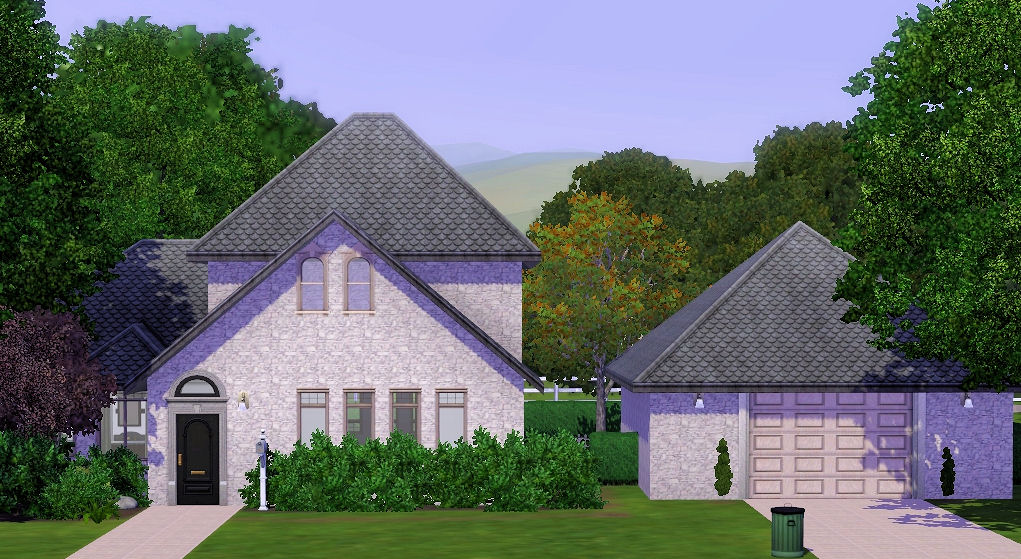
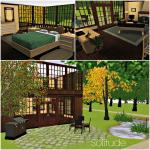
This lovely home has a unique but comfortable floorplan. Perfect for your sims dedicated to reading and writing. It contains every book available at the bookstore already! A spiral staircase brings you to yet another reading area, and a desk and computer overlooking the home.
Writer's Retreat has...
1 Bedroom w/ reading 'den'
1 Bathroom
Second floor 'landing'
Seperate Garage
Patio
Firepit
Fully landscaped
The house has plenty of room for expansion.
Now, as much as I hate to upload custom content with my lots, there is one piece of CC in the home. This being the staircase, I felt it necessary to complete the feel of the lot. You can find the link to the download at the bottom of this page.
Lot Size: 35 x 35
Furnished Price : 82, 405
Unfurnished : 33, 869
Custom Content Included:
- Original Spiral Stairs by hexameter
|
Writer's Retreat-ByDreanne.rar
Download
Uploaded: 31st Jul 2012, 2.39 MB.
1,648 downloads.
|
||||||||
| For a detailed look at individual files, see the Information tab. | ||||||||
Install Instructions
1. Click the file listed on the Files tab to download the file to your computer.
2. Extract the zip, rar, or 7z file.
2. Select the .sims3pack file you got from extracting.
3. Cut and paste it into your Documents\Electronic Arts\The Sims 3\Downloads folder. If you do not have this folder yet, it is recommended that you open the game and then close it again so that this folder will be automatically created. Then you can place the .sims3pack into your Downloads folder.
5. Load the game's Launcher, and click on the Downloads tab. Select the house icon, find the lot in the list, and tick the box next to it. Then press the Install button below the list.
6. Wait for the installer to load, and it will install the lot to the game. You will get a message letting you know when it's done.
7. Run the game, and find your lot in Edit Town, in the premade lots bin.
Extracting from RAR, ZIP, or 7z: You will need a special program for this. For Windows, we recommend 7-Zip and for Mac OSX, we recommend Keka. Both are free and safe to use.
Need more help?
If you need more info, see Game Help:Installing TS3 Packswiki for a full, detailed step-by-step guide!
Loading comments, please wait...

 View with Names
Uploaded: 31st Jul 2012 at 4:09 PM
-
-
by Elise Bennett 15th Nov 2009 at 2:15am
 1
7.3k
1
1
7.3k
1
-
-
by LifesLover 25th Sep 2010 at 10:44pm
+2 packs
12 11.4k 4 World Adventures
 Ambitions
-
by Johnny_Bravo 12th Jan 2011 at 6:32am
+2 packs
3 11.5k 7 High-End Loft Stuff
Ambitions
High-End Loft Stuff
Ambitions
-
by Johnny_Bravo 28th Feb 2011 at 12:18am
+2 packs
8 11.4k 8 High-End Loft Stuff
Ambitions
-
by catalina_45 26th Apr 2011 at 4:18pm
+5 packs
6 38.9k 24 High-End Loft Stuff
Ambitions
 Fast Lane Stuff
 Late Night
 Outdoor Living Stuff
-
-
-
by EmilyRP96 23rd Oct 2025 at 7:06pm
+20 packs
931 1 World Adventures
High-End Loft Stuff
Ambitions
Fast Lane Stuff
Late Night
Outdoor Living Stuff
 Generations
 Town Life Stuff
 Master Suite Stuff
 Pets
Pets
 Katy Perry Stuff
 Showtime
 Diesel Stuff
 Supernatural
 70s, 80s and 90s Stuff
 Seasons
 Movie Stuff
 University Life
 Island Paradise
 Into the Future


Packs Needed
| Base Game | |
|---|---|
| Sims 3 |
| Expansion Pack | |
|---|---|
| Pets |