
 Sign in to Mod The Sims
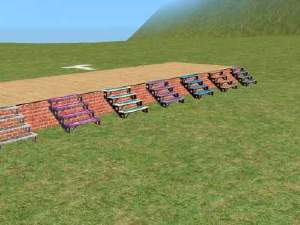
 *Recolourable* Holy Smoke modular stairs
 *Recolourable* Holy Smoke modular stairs


snapshot_00000001_0f3f872c.jpg - width=600 height=450
snapshot_00000001_2f3f8a39.jpg - width=600 height=450
Immagine 1.jpg - width=288 height=200
Immagine 2.jpg - width=366 height=290
Immagine 3.jpg - width=706 height=566
Numenor_HolySmokeStairs_Snapshot.jpg - width=528 height=448

 18 MAR 2007 - BUGFIX
 These stairs have been online for almost two years, and so far they worked well. But they had a little bug nevertheless
 In some games (especially the base-game, without any EP) the catalog icon for the modular stairs was empty. This is because these stairs were made in a very old format (the old "EP Ready format, created when UNI first came out).
Updating them to the current correct format would have meant breaking all the existing recolours (there are so many around the net, not only here at MTS2); and so I've fixed it in a way that... you shouldn't try at home
(like they say in TV  ).
).The important thing is that now the icon is visible in catalog and all the existing recolours still work! :D
Of course, if you never had problems with the catalog icon, redownloading is optional.
-------------------------------------------------------------
FAQ: Why there is no text file to install with these stairs, like all the other custom modular stairs?That's because these stairs are intended to override the Maxis originals, and therefore uses the same Maxis text file already installed with the game.
-------------------------------------------------------------
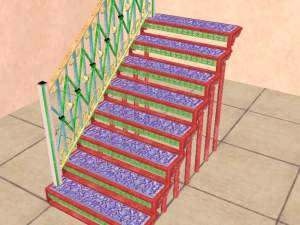
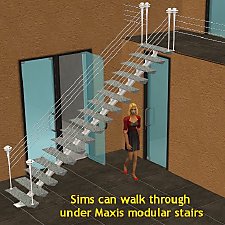
I think that the Holy Smoke is the most useful staircase, because it lets the sims pass under it. But the standard grey/bluish colour doesn't match *all* the furniture styles.
So, I decided to make it recolourable.
But the internal file structure, and the lacking of a correct filenaming led me to actually clone the original stairs.
At first, I thought to *add* a new modular stair to the catalog, then I thought it would be useless to have two identical stairs, one recolourable and one not.
So I decided to set this staircase to override the original one.
Don't worry, though: I said override, not overwrite
When you get bored of my staircase, just delete the package from the downloads folder, and the original staircase will be back in the catalog.IMPORTANT: this is to be considered an Alpha release! Though it is stable, EP-compliant and works fine, still it's a little "tricky" to recolour.
Installation instructions
Unrar both the attached files to the downloads folder. In the first archive there is the "main" package (the stairs themselves), in the second there are some recolours for the metal part and for the glass parts.
How to create custom recolours
Open SimPE's Object Workshop (current release is v. 029) and choose the "Load Object" tab. Browse the downloads folder and load the "STEPS_90NMNglass_main.package". Proceed with the recolour as usual.
NOTE: you can choose to recolour the metal part or the glass part (or both).
You can use the attached template texture as a guide for your recolours.Since the original texture contains an alpha channel (transparency), I strongly suggest that you import your custom texture in the package using the option "Build DXT" + "Commit", instead of "Import" + "Update all sizes" + "Commit": using the "Build DXT" creates a more accurate texture.
How to apply the recolour to the staircase
Here come the tricky part, because you will not find the different colours in the catalog (I guess that this section of the catalog doesn't manage multiple colour options).
Choose the standard Holy Smoke stairs from the catalog and place it on the lot. Add the railings if you like, but remember that adding the reailings after having recoloured the stairs may cause their reverting to original colour.
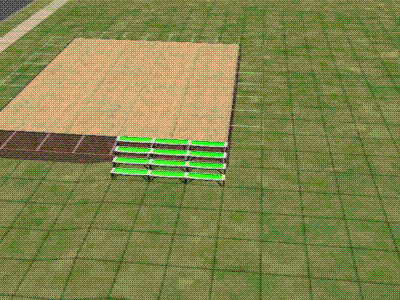
Now, select the Design Tool and click, in turn, on each step: now you can choose the colours for the metal part and for the glass.
If I ever find a way to recolour all the stairs at once, you'll be the first to know...
But there's a good side effect: you can apply a different colour to each step!
KNOWN ISSUE
Once recoloured, you should't add or delete railings to the stairs, otherwise it will revert to the original colour. But this "reverting" is only temporary: if you save and exit the lot, and then re-enter it, you'll find that the staircase has again the new colour you applied to it
OK, enough... Download and enjoy! Let me know any (unknown) issues you may find.
This is a new mesh, and means that it's a brand new self contained object that usually does not require a specific Pack (although this is possible depending on the type). It may have Recolours hosted on MTS - check below for more information.
|
Numenor_HolySmokeStairs_TEMPLATE.rar
Download
Uploaded: 18th Mar 2005, 76.1 KB.
23,799 downloads.
|
||||||||
|
Numenor_HolySmokeStairs_metal+glass_transparent.rar
Download
Uploaded: 12th Mar 2005, 1.3 KB.
33,614 downloads.
|
||||||||
|
Numenor_HolySmokeStairs_recolours.rar
Download
Uploaded: 12th Mar 2005, 317.5 KB.
34,195 downloads.
|
||||||||
|
Numenor_HolySmokeStairs_main.rar
Download
Uploaded: 12th Mar 2005, 129.6 KB.
39,546 downloads.
|
||||||||
| For a detailed look at individual files, see the Information tab. | ||||||||
Install Instructions
1. Download: Click the download link to save the .rar or .zip file(s) to your computer.
2. Extract the zip, rar, or 7z file.
3. Place in Downloads Folder: Cut and paste the .package file(s) into your Downloads folder:
- Origin (Ultimate Collection): Users\(Current User Account)\Documents\EA Games\The Sims™ 2 Ultimate Collection\Downloads\
- Non-Origin, Windows Vista/7/8/10: Users\(Current User Account)\Documents\EA Games\The Sims 2\Downloads\
- Non-Origin, Windows XP: Documents and Settings\(Current User Account)\My Documents\EA Games\The Sims 2\Downloads\
- Mac: Users\(Current User Account)\Documents\EA Games\The Sims 2\Downloads
- Mac x64: /Library/Containers/com.aspyr.sims2.appstore/Data/Library/Application Support/Aspyr/The Sims 2/Downloads
- For a full, complete guide to downloading complete with pictures and more information, see: Game Help: Downloading for Fracking Idiots.
- Custom content not showing up in the game? See: Game Help: Getting Custom Content to Show Up.
- If you don't have a Downloads folder, just make one. See instructions at: Game Help: No Downloads Folder.
Loading comments, please wait...


Uploaded: 12th Mar 2005 at 9:28 PM
Updated: 18th Mar 2007 at 9:59 PM - Fixed in-text images
-
-
Recolours for the "Wooden Stairs" (recolourable modular stairs)
by Numenor 25th Mar 2005 at 4:23pm
 88
194k
89
88
194k
89
-
-
-
-
-
by crocobaura 27th May 2007 at 8:06pm
106
200.5k
382
-
-
-
Maxis Modular Stairs Recolored, Part the Fourth
by iCad 10th Oct 2010 at 2:35am
+1 packs
14 42.8k 85 Open for Business


-
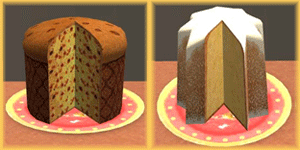
"Panettone" and "Pandoro" - Italian traditional Christmassy cakes *UPD 27DEC2007*
by MaryLou & Numenor 12th Dec 2006 at 4:19pm
"PANETTONE" and "PANDORO" Italian traditional Christmassy cakes *** UPDATED 27 DEC 2007 *** Fully animated food - more...
92
188.7k
186
-
No Visual Effects for Stereo/Karaoke/DJ Booth - *UPD 19MAR08*
by Numenor 11th Dec 2006 at 12:31am
NOTICE - This is a GLOBAL HACK, which means that: it might be unknowingly included in your uploaded lots more...
35
58.2k
79
-
The Grand Kursaal - Commercial & Business lot
by Numenor 20th Apr 2006 at 2:34am
The GRAND KURSAAL (OFB version) Commercial & Business lot UNI+NL+OFB REQUIRED! more...
+3 packs
33 57.5k 28 University
 Nightlife
Open for Business
Nightlife
Open for Business
-
Recolourable Full-Wall Mirror *Upd 08sept07*
by Numenor 29th Jul 2007 at 3:08am
RECOLOURABLE FULL-WALL MIRROR (a.k.a. "Reflection Wall") with FULL/HALF/NO reflection modes! more...
83
115.8k
114
-
Swamp Lodge - A SimStone starter home
by Numenor 27th Jul 2006 at 12:38am
SWAMP LODGE - A SimStones starter home (UNI)+NL+OFB REQUIRED! more...
+3 packs
20 25.7k 14 University
Nightlife
Open for Business
-


Turn off the TV when stop watching (from bed, too)
by Numenor 15th Apr 2005 at 10:12pm
NOTICE - This is a GLOBAL HACK, which means that it may be included in your uploaded lots (so, use more...
180
110.4k
144
-
"Learned Behaviour" cheat object - *UPD 01 NOV 06*
by Numenor 21st Oct 2006 at 3:48pm
"LEARNED BEHAVIOUR" CHEAT OBJECT *** Pets EP required*** ------------------------------------------------------------- :new: 26 OCT 2006 - UPDATE & FIX :new: more...
+1 packs
83 142.9k 195 Pets
Pets
-
-
Maxis "Lost & Found" #15: CAS Micro Spot
by Numenor 20th Jan 2006 at 2:14am
These spot lights weren't actually "hidden": they are used in the CAS screen (both in the screen where the sims more...
54
74.5k
79
-
"Trompe-l'oeil" Painting-TV *UPD 06oct2008*
by Numenor updated 6th Oct 2008 at 8:53am
"TROMPE-L'OEIL" HIDDEN FLAT-PANEL TV by Numenor :new: 06 OCT 2008 - BUGFIX: Price is no longer zero; now it more...
85
85.1k
122


About Me
You may contact me via personal messages here at MTS, and I will reply, but I don't grant I can help you, as a long time has gone by since I created my mods.
This following policy applies to ALL my creations, unless otherwise stated on the download thread.
It's FORBIDDEN: to repost my stuff anywhere.
It's FORBIDDEN: to clone my creations.
It's ALLOWED: to create recolours for my objects (and post them on any site, including paysites), BUT you can't include the mesh in your recolour: you must give credits to me for the mesh, and provide a link to the mesh download thread.
It's ALLOWED: to include my creations in your lots, BUT the lots must be uploaded on free sites (except the Exchange), and you must provide credits and a link to the download thread.