
 Sign in to Mod The Sims
 Buy published books, earn royalties & bestsellers
 Buy published books, earn royalties & bestsellers


Capture d’écran 2026-09-30 à 22.21.35.png - width=356 height=165
Capture d’écran 2026-09-30 à 21.51.31.png - width=305 height=229
Capture d’écran 2026-09-30 à 22.26.06.png - width=506 height=593
Your Sims' books, on every bookcase in town.
Ever wished you could get back a book your Sim published? In the base game, publishing a book (self-publishing or selling it to a publisher) destroys it forever: all you keep are the royalties. Published Books Library changes that: every book published in your save is added to a shared catalogue, and ANY Sim can buy a copy of it at ANY bookcase. And every copy sold pays royalties to its author: will your Sim write the next bestseller?
━━━━━━━━━━━━━━━━━━━━
✨ FEATURES
━━━━━━━━━━━━━━━━━━━━
• Every book published by any Sim of your save is recorded automatically: self-published books AND books sold to a publisher, from a regular mailbox or a City Living wall mailbox.
• A new "Published Books…" interaction on every bookcase: at home, in public libraries, on community lots, from every pack.
• The catalogue shows each book's cover, title, the description your Sim wrote, "Written by <First Name> <Last Name>" and its price.
• The copy you buy is identical to the original: same title, description, author, genre and quality.
• Fair price: half of the book's value when it was published (minimum §10), so better books cost more.
• If the household can't afford a book, it is greyed out with a "Not enough simoleons." note and can't be bought.
• Royalties: every time another household buys a copy, the author's household earns half of the price, with a notification if the author is in your household.
• Sales counter: each book shows how many copies it sold, and the catalogue lists the best sellers first.
• Bestsellers: after 5 copies sold, a book gets a "Bestseller!" badge and its author a notification.
• Each save has its own catalogue, saved alongside your game (Save As and travelling are supported).
• Translated in English, French, Spanish, German and Italian. Other game languages display English.
• No dependency: you do NOT need Sims 4 Community Library (S4CL) or any other mod.
━━━━━━━━━━━━━━━━━━━━
📋 REQUIREMENTS
━━━━━━━━━━━━━━━━━━━━
• Base game only (no pack required).
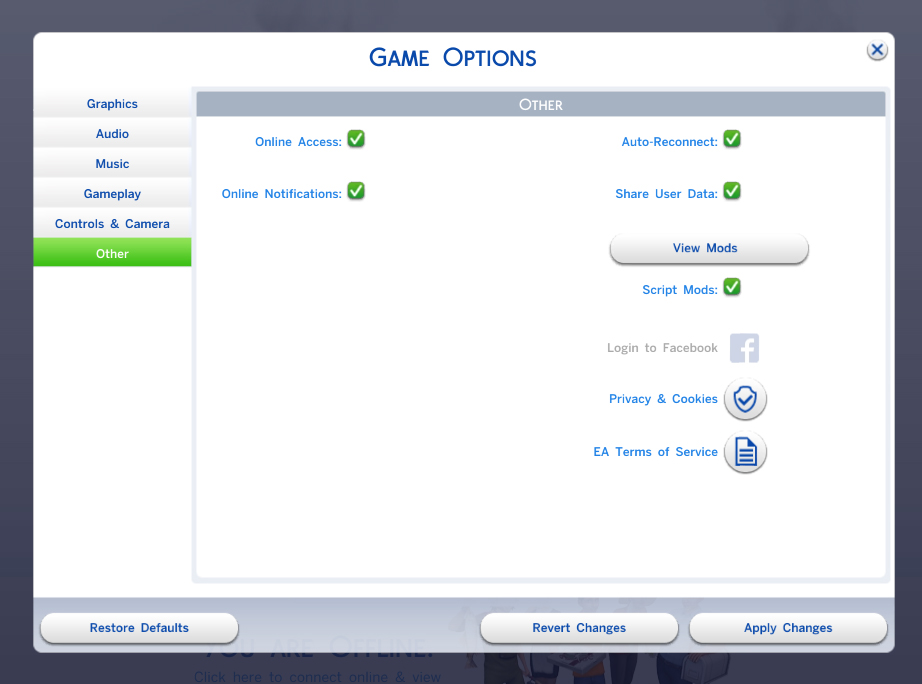
• Script mods must be enabled: Game Options > Other > "Script Mods Allowed", then restart the game.
• Tested on game version 1.128.90.1230.
━━━━━━━━━━━━━━━━━━━━
💾 INSTALLATION
━━━━━━━━━━━━━━━━━━━━
1. Download and unzip the file.
2. Move the "PublishedBooksLibrary" folder (with its 2 files) into your Mods folder:
Documents > Electronic Arts > The Sims 4 > Mods
3. Make sure both files are there:
• PublishedBooksLibrary.ts4script
• PublishedBooksLibrary.package
⚠️ The .ts4script file must not be more than ONE folder deep inside Mods.
4. Start the game and make sure script mods are enabled.
━━━━━━━━━━━━━━━━━━━━
🎮 HOW TO USE
━━━━━━━━━━━━━━━━━━━━
1. Have a Sim write a book on a computer.
2. Publish it at a mailbox (self-publish or sell to a publisher).
3. Click any bookcase > "Published Books…".
4. Pick a book: the price is taken from your household funds and the copy goes straight to your Sim's inventory.
━━━━━━━━━━━━━━━━━━━━
❓ FAQ & KNOWN LIMITATIONS
━━━━━━━━━━━━━━━━━━━━
• Books published BEFORE installing the mod can't be recovered: the game had already deleted them. Only books published after installation appear.
• The option is greyed out until at least one book has been published in your save.
• Where is the catalogue saved? In Documents > Electronic Arts > The Sims 4 > saves > PublishedBooks. Keep this folder with your saves if you back them up or move them to another computer.
• Buying your own books (same household) doesn't pay royalties and doesn't count as a sale.
• If you publish a book and quit WITHOUT saving, then reload the same save without restarting the game, that book may still show up in the catalogue.
• Want to see the whole catalogue? Open the cheat console (Ctrl + Shift + C) and type: publishedbooks.list
• Compatibility with other mods that change book publishing hasn't been tested. Please tell me if you run into a conflict!
━━━━━━━━━━━━━━━━━━━━
🐞 FOUND A BUG?
━━━━━━━━━━━━━━━━━━━━
Please leave a comment with:
• what you were doing when it happened,
• the file Documents > Electronic Arts > The Sims 4 > Mods > PublishedBooks.log,
• your last exception file (lastException.txt, or mc_lastexception.html if you use MC Command Center).
━━━━━━━━━━━━━━━━━━━━
🗑️ UNINSTALL
━━━━━━━━━━━━━━━━━━━━
Delete the "PublishedBooksLibrary" folder from your Mods folder. Your saves stay safe. You can also delete the "saves > PublishedBooks" folder if you don't plan to reinstall the mod.
━━━━━━━━━━━━━━━━━━━━
🌍 TRANSLATIONS
━━━━━━━━━━━━━━━━━━━━
English, French, Spanish, German, Italian.
Spotted a mistake or want to translate the mod into your language? Leave a comment, there are only a few short sentences to translate!
━━━━━━━━━━━━━━━━━━━━
📝 CHANGELOG
━━━━━━━━━━━━━━━━━━━━
v1.1.0: royalties for authors, sales counter, bestsellers.
v1.0.0: first release.
━━━━━━━━━━━━━━━━━━━━
💜 CREDITS & TERMS
━━━━━━━━━━━━━━━━━━━━
Made by Little Unicorn.
Free for everyone. Please don't re-upload this mod anywhere else or claim it as your own: share the link to this post instead: [LINK TO THIS POST]
Happy writing, and happy reading! 📖
| Filename | Type | Size |
|---|---|---|
| PublishedBooksLibrary.zip | zip | |
| PublishedBooksLibrary.ts4script | ts4script | 28707 |
| PublishedBooksLibrary.package | package | 9957 |
|
PublishedBooksLibrary.zip
Download
Uploaded: 11th Oct 2026, 15.7 KB.
126 downloads.
|
||||||||
| For a detailed look at individual files, see the Information tab. | ||||||||
Install Instructions
1. Download: Click the File tab to see the download link. Click the link to save the .rar or .zip file(s) to your computer.
Read the upload description for installation instructions. If nothing else is specified, do the following:
2. Extract: Use WinRAR (Windows) to extract the .package file(s) (if included, ts4script as well) from the .rar or .zip file(s).
3. Cut and paste the .package file(s) (if included, ts4script as well) into your Mods folder
- Windows XP: Documents and Settings\(Current User Account)\My Documents\Electronic Arts\The Sims 4\Mods\
- Windows Vista/7/8/8.1: Users\(Current User Account)\Documents\Electronic Arts\The Sims 4\Mods\
Need more information?
- Anyone can use both .rar and .zip files easily! On Windows, use WinRAR.
- If you don't have a Mods folder, just make one.
- Mod still not working? Make sure you have script mods enabled
Loading comments, please wait...
Uploaded: 11th Oct 2026 at 10:12 PM
-
by temptest 1st Oct 2014 at 3:46am
 59
212.2k
267
59
212.2k
267
-
by plasticbox updated 22nd Dec 2014 at 4:21pm
192
296.3k
801
-
-

by nickyclem1 updated 9th Nov 2024 at 11:42pm
10
41.8k
42
-

by nickyclem1 updated 9th Nov 2024 at 11:40pm
6
16.7k
30
-
by o19 30th Jan 2024 at 11:34am
14
10.7k
7
-
by nickyclem1 updated 9th Nov 2024 at 11:39pm
2
5.2k
11
-
by Gersonjoseantonio 5th Nov 2024 at 11:03am
4
33.2k
30
-

by baciaangi updated 23rd Sep 2026 at 3:47pm
16
4k
13
-

by baciaangi updated 14th Sep 2026 at 4:56pm
4
2k
4


