
 Sign in to Mod The Sims
 Recolors of my Teen Baggy T's
 Recolors of my Teen Baggy T's
SCREENSHOTS


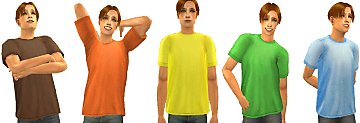
ALL Recolors.jpg - width=989 height=591
LightBrownT.jpg - width=402 height=587
OrangeT.jpg - width=519 height=591
YellowT.jpg - width=383 height=600
LightGreenT.jpg - width=463 height=600
LightBlueT.jpg - width=459 height=600
Downloaded 1,557 times
126 Thanks
10 Favourited
14,139 Views
Say Thanks!
Thanked!
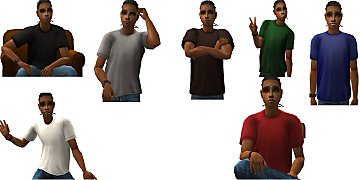
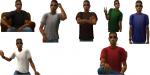
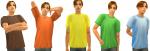
Hey Guys, here's 5 recolors of my Teen Baggy T Mesh. I hope you like them!
Additional Credits:
Model by me
Skintone: Summersong86 Dark FX
Eyes: Dark Bronze by Enayla
Hair: Cornrows by Maxis
Brows: Realistic Brows by Exnem's Sims
Blush: Matte Powder for the Late Fall Skin by Alkaloid & Matte Blush (Anti-Shine) by Kyriaw
Lashes: Eyelashes 101 #12 Opium by Bruno
Lips: 2-B-Real: Natural Lips for Men (And Women)! by Simenroute
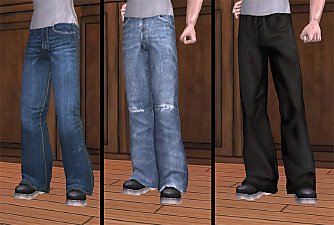
Pants: Kalynn06's Untuckable Baggy Teen Male Bottoms with Bigger Boots by ExportDry (Light Brown, Yellow & Light Blue) & Set of 10 H&M Pants for the Teen Male by Migamoo(Orange & Light Green Shirt)
Watch: Maxis
Earing: Maxis
Additional Credits:
Model by me
Skintone: Summersong86 Dark FX
Eyes: Dark Bronze by Enayla
Hair: Cornrows by Maxis
Brows: Realistic Brows by Exnem's Sims
Blush: Matte Powder for the Late Fall Skin by Alkaloid & Matte Blush (Anti-Shine) by Kyriaw
Lashes: Eyelashes 101 #12 Opium by Bruno
Lips: 2-B-Real: Natural Lips for Men (And Women)! by Simenroute
Pants: Kalynn06's Untuckable Baggy Teen Male Bottoms with Bigger Boots by ExportDry (Light Brown, Yellow & Light Blue) & Set of 10 H&M Pants for the Teen Male by Migamoo(Orange & Light Green Shirt)
Watch: Maxis
Earing: Maxis
Advertisement:
This is a new mesh recolour, and means that you will need to download the particular mesh itself in order for this to show up in your game. See the Meshes Needed section or read the text for more information.
|
Ang41187_5f049451_TeenLightBlueT.rar
Download
Uploaded: 27th May 2008, 247.7 KB.
261 downloads.
|
||||||||
|
Ang41187_5fab2da2_TeenLightGreenT.rar
Download
Uploaded: 27th May 2008, 251.5 KB.
238 downloads.
|
||||||||
|
Ang41187_5ff98240_TeenYellowT.rar
Download
Uploaded: 27th May 2008, 246.0 KB.
230 downloads.
|
||||||||
|
Ang41187_5fc591f9_TeenOrangeT.rar
Download
Uploaded: 27th May 2008, 254.9 KB.
230 downloads.
|
||||||||
|
Ang41187_5fbdc259_TeenLightBrownT.rar
Download
Uploaded: 27th May 2008, 244.2 KB.
210 downloads.
|
||||||||
|
ALL Teen Baggy T Recolors.rar
Download
Uploaded: 27th May 2008, 1.22 MB.
1,776 downloads.
|
||||||||
| For a detailed look at individual files, see the Information tab. | ||||||||
Install Instructions
Basic Download and Install Instructions:
1. Download: Click the download link to save the .rar or .zip file(s) to your computer.
2. Extract the zip, rar, or 7z file.
3. Place in Downloads Folder: Cut and paste the .package file(s) into your Downloads folder:
1. Download: Click the download link to save the .rar or .zip file(s) to your computer.
2. Extract the zip, rar, or 7z file.
3. Place in Downloads Folder: Cut and paste the .package file(s) into your Downloads folder:
- Origin (Ultimate Collection): Users\(Current User Account)\Documents\EA Games\The Sims™ 2 Ultimate Collection\Downloads\
- Non-Origin, Windows Vista/7/8/10: Users\(Current User Account)\Documents\EA Games\The Sims 2\Downloads\
- Non-Origin, Windows XP: Documents and Settings\(Current User Account)\My Documents\EA Games\The Sims 2\Downloads\
- Mac: Users\(Current User Account)\Documents\EA Games\The Sims 2\Downloads
- Mac x64: /Library/Containers/com.aspyr.sims2.appstore/Data/Library/Application Support/Aspyr/The Sims 2/Downloads
- For a full, complete guide to downloading complete with pictures and more information, see: Game Help: Downloading for Fracking Idiots.
- Custom content not showing up in the game? See: Game Help: Getting Custom Content to Show Up.
- If you don't have a Downloads folder, just make one. See instructions at: Game Help: No Downloads Folder.
Meshes needed
This download requires one or more meshes to work properly. Please check the Description tab for information about the meshes needed, then download them below:| MTS cannot guarantee any off-site links will be available |
| Teen Baggy T (MESH + Recolors) by ang41187 |
Advertisement:
Loading comments, please wait...
Author
Download Details
Packs:
None, this is Sims 2 base game compatible!
Uploaded: 27th May 2008 at 5:41 AM
Updated: 13th Sep 2008 at 12:04 AM
Uploaded: 27th May 2008 at 5:41 AM
Updated: 13th Sep 2008 at 12:04 AM
Age:
– Teen
Gender:
– Male
Clothing Type:
– Everyday
Clothing Style:
– Modern
Other Type:
– Untuckables
Outfit Type:
– Top
Tags
#Baggy T, #Teen Baggy T, #Tshirt
Other Download Recommendations:
-
-
by SimplyStella 27th Jun 2005 at 10:20am
-
Teen Baggy Outfits by Pookkah.
by Pookkah 23rd Nov 2005 at 11:36pm
-
-
-
-
-
-
-

More downloads by ang41187:
See more
About Me
My Policy
Absolutely under NO circumstances are you allowed to upload or use my creations on paysites. Sites that are both free & pay are ok, but you MUST put the creation in the FREE area only. Also, no uploading to the exchange.
Meshes: Feel free to upload my meshes with your creations, just make sure you give me credit & put a link to my profile that way if other people want to use them, they know my policies.
Recolors/ textures: Feel free to use my textures & recolors in your creations (or make your own) just give me credit & link back to my profile.
Also, it'd be nice if you sent me a PM with a link to your creations that way I can see what you've done with my work, but it's not required.
If you have any questions just PM me & I'll answer them as soon as I can.
Absolutely under NO circumstances are you allowed to upload or use my creations on paysites. Sites that are both free & pay are ok, but you MUST put the creation in the FREE area only. Also, no uploading to the exchange.
Meshes: Feel free to upload my meshes with your creations, just make sure you give me credit & put a link to my profile that way if other people want to use them, they know my policies.
Recolors/ textures: Feel free to use my textures & recolors in your creations (or make your own) just give me credit & link back to my profile.
Also, it'd be nice if you sent me a PM with a link to your creations that way I can see what you've done with my work, but it's not required.
If you have any questions just PM me & I'll answer them as soon as I can.